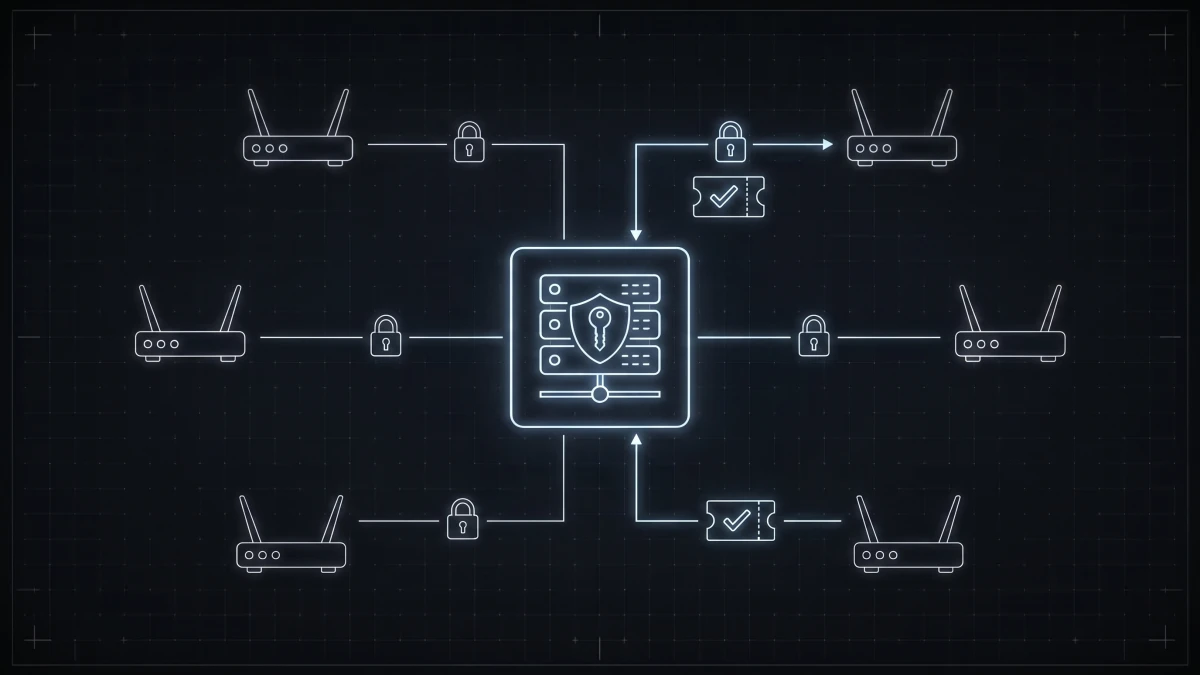
Every time one of your subscribers' routers dials in over PPPoE, connects to a hotspot, or requests an IP address on an authenticated network, something has to answer three questions: Who is this? What are they allowed to have? And how much did they use? In most ISP networks, the thing answering those questions is a RADIUS server.
This guide explains what RADIUS actually does in an ISP context - not the enterprise Wi-Fi version of the story - and why the way you manage it ends up mattering more than the protocol itself.
RADIUS in one paragraph
RADIUS (Remote Authentication Dial-In User Service) is a protocol from the dial-up era that refuses to die, because the problem it solves never went away. A network device - your MikroTik router, a BRAS, an OLT - receives a connection attempt and forwards the credentials to a central RADIUS server. The server checks them and replies with either a rejection or an acceptance, and critically, the acceptance carries attributes: the subscriber's speed limit, their static IP or pool assignment, their session timeout. The router enforces whatever the RADIUS server tells it. One database decides; every router obeys.
That is the whole trick, and it is why RADIUS is still the backbone of subscriber management in 2026.
The three A's, in ISP terms
RADIUS is usually described as an AAA server - authentication, authorization, accounting. Here is what each one means when you run an access network:
Authentication - who is this? A subscriber's CPE presents a username and password (PPPoE), a MAC address (IPoE/DHCP setups), or portal credentials (hotspot). The RADIUS server matches it against your subscriber database. Wrong password or terminated account: rejected, before they ever get an IP.
Authorization - what do they get? This is the part that makes RADIUS an ISP tool rather than just a login checker. The Access-Accept reply carries the service definition: a 100/20 Mbps rate limit for the Silver plan, a specific IPv4 address the customer pays extra for, an IPv6 prefix delegation, an address pool for CGNAT customers. Change the attributes, and the subscriber's service changes - no router login required.
Accounting - what did they use? The router streams session records back: start time, stop time, bytes in and out. That data feeds usage reporting, FUP/data-cap enforcement, and the answer to "was this customer actually online yesterday when they said the internet was down?"
There is a fourth capability worth knowing: CoA (Change of Authorization). With CoA, the RADIUS side can push a change into a live session - upgrade the speed, suspend the account, redirect to a payment page - without dropping the connection. It is the difference between "your upgrade applies after you reconnect" and "your upgrade applied while you watched."
Where RADIUS lives in a real ISP network
A typical setup: subscribers connect via PPPoE to a MikroTik or similar router (the NAS - Network Access Server, in RADIUS jargon). The router is pointed at a RADIUS server - very often FreeRADIUS, the open-source implementation that powers a huge share of the world's ISP authentication - with a shared secret. FreeRADIUS reads users and attributes from a SQL database: the famous radcheck, radreply, and radacct tables. PPPoE and RADIUS together form the classic stack, and if you are weighing that model against DHCP-based alternatives, we compared them in PPPoE vs DHCP vs IPoE.
So far, so good. Now comes the part nobody warns you about.
The real cost is not running RADIUS - it is managing it
FreeRADIUS itself is rock solid. The operational pain lives one layer up, and it compounds with every subscriber you add:
- Every change is a SQL statement. New customer? INSERT into
radcheckandradreply. Plan upgrade? UPDATE the rate-limit attribute - with vendor-specific syntax that differs between MikroTik, Cisco, and Ruijie. Typo in an attribute name? Silent failure that you debug at 9 PM. - Billing and access control live in different worlds. The invoice system knows the customer has not paid. The RADIUS database does not, until someone or something tells it. Every ISP that manages FreeRADIUS by hand eventually builds a pile of cron jobs and scripts bridging the two - a pile exactly one person in the company understands.
- No audit trail. When a subscriber's speed is wrong, was it a support tech's manual UPDATE last Tuesday? A script? Nobody knows, because raw SQL leaves no history of who changed what and why.
- Restarts and sync. Attribute changes, new NAS entries, dictionary updates for a new router vendor - depending on your setup, these need service reloads that someone has to remember, sequence, and verify.
None of these problems is dramatic on day one with 30 subscribers. All of them are serious at 300, and at 1,000 they are the reason your best technician spends afternoons in a MySQL console instead of on a tower.
What "managed RADIUS" looks like instead
The fix is not replacing RADIUS - it is putting a real management layer on top of it, so the protocol keeps doing its job while humans stop touching the plumbing. That is exactly what ISPbox's FreeRADIUS GUI does:
- Subscribers and plans are managed in a normal interface; ISPbox writes the
radcheck/radreplyentries, with per-vendor attribute profiles so a MikroTik and a Ruijie NAS each get the syntax they expect. - Billing drives access automatically. Invoice unpaid past the grace period: the service suspends itself. Payment arrives: it restores. No cron jobs, no scripts, no 9 PM SQL.
- Live changes via CoA - plan upgrades and suspensions apply to active sessions without dropping the connection.
- Every change is a logged action by a named user, so "why is this customer at 10 Mbps?" has an answer in the audit trail.
- IPv4 pools, static assignments, and IPv6 with prefix delegation are managed from the same place.
If you are currently running FreeRADIUS with a legacy web frontend bolted on, our comparison of daloRADIUS alternatives covers that specific migration path. And if you want the deeper explainer on the protocol on the access side, see What is PPPoE.
FAQ
What is a RADIUS server used for in an ISP? It centrally authenticates subscribers (PPPoE, hotspot, IPoE), authorizes their service parameters like speed limits and IP addresses, and collects usage accounting from routers. Every router enforces what the RADIUS server decides.
What is the difference between RADIUS and FreeRADIUS? RADIUS is the protocol; FreeRADIUS is the most widely deployed open-source server implementing it. Most ISP deployments run FreeRADIUS backed by a SQL database.
What ports does RADIUS use? UDP 1812 for authentication, UDP 1813 for accounting. Legacy deployments sometimes use 1645/1646, and CoA/Disconnect messages typically use UDP 3799.
Can RADIUS change a subscriber's speed without disconnecting them? Yes - via CoA (Change of Authorization), the server pushes new attributes into a live session. The router applies the new rate limit immediately without dropping the connection.