Run your whole ISP
from one panel.

Billing, RADIUS provisioning, network maps, monitoring and a customer portal. Works with MikroTik, Cisco, Huawei and any RADIUS router.

blueridge.ispbox.net/network/map
2600 Rd2600 Rd2400 Rd 3700 Rd3900 Rd Transit Upstream 6 North Tower 5 South Tower 3 Ridge Relay
Search sites, devices, clients ⌘K

Show

Down now

·

Diagnosis

South Tower lost power or went offline

What it checked

  • 7 hosts behind South Tower stopped answering - all in the same cycle, 14:12 UTC
  • No packet loss in the 6 cycles before - a failing link loses packets first
  • North Tower core still answers - the backhaul works up to the tower
  • North Tower and Ridge Relay are fine - only this site is out
Power or outage

Summary

South Tower and everything behind it went dark at the same moment, with no warning signs before. That is how a power cut or a lost uplink looks, not a failing radio. Check the power at the site first.

Hosts

Host Loss
South Tower
South Tower core 10.20.2.1
Median
Jitter
Loss, 24 h
Availability
ms 11:00 17:00 23:00 05:00 11:00
South Tower - Sector A 10.20.2.11
South Tower - Sector B 10.20.2.12
Sam Patel #1201 100.64.4.12
Eli Brooks #1203 100.64.4.19

Run #214 Beta

Site down: outage, ticket and visit

Running Waiting Finished Monitoring raises an alert · South Tower core

The path it took

Starts whenwaiting here

Monitoring raises an alert

Only when 2 conditions hold

Logicwaiting here

Back within 10 minutes?

The monitoring alert clears · up to 10 minutes

It happened
Logicwaiting here

End

recovered on its own

Time ran out
Networkwaiting here

Open an outage

{{ device.name }} is down

Ticketswaiting here

Open a ticket

{{ device.name }} is down

Visitswaiting here

Book a visit

Today 10:00

Logicwaiting here

Wait for the fix

The outage is resolved · up to 2 days

It happened
Networkwaiting here

Send the all-clear

The outage is over

Time ran out

Moving from Splynx, UISP, Sonar, SAS4, Powercode, VISP or something else? We move your customers, plans and balances into ISPBox for you, free.

Join 300+ ISPs already running on ISPbox

MikroTik-native / RADIUS / WireGuard / Billing & Customer Portal
01 Network Maps

Plan, document, and grow your network on live maps

Build your infrastructure map inside ISPbox: from OLT and cabinet layout to splitters, routes, and linked services. One view for planning and daily operations.

  • Map base stations, cabinets, splitters, sectors, and cable routes in one shared workspace.
  • See predicted optical path impact after splitters and keep topology data tied to real network objects.
  • Run all this in the same platform that starts at just $25/month for emerging ISPs.
blueridge.ispbox.net/network/map
2600 Rd2600 Rd2400 Rd 3700 Rd3900 Rd 7 North Tower 7 South Tower 4 Ridge Relay

South Sector A

Sector· live Unsaved

Azimuth

Beamwidth

Range

Frequency

Height

Tilt

If this goes down: 1 radios, 5 clients affected Show on map

Clients4 online1 offline

Daniel ReedInternet service · Home 100 Maria SantosInternet service · Business 200 Ana LimaInternet service · Home 50 Josh CarterInternet service · Rural 25 Emily StoneInternet service · Home 100

Topology

South TowerParent site AP South A (MikroTik mANTBox 52 15s)Access Point Backhaul to North TowerWireless link
Additional bands
P1

Primary:

On the map: drag the arrow to rotate, drag a corner of the wedge for range and beamwidth.
  1. Azimuth 250° to 255°

    Mike Torres · Nov 12

  2. Radio swapped to mANTBox 52 15s

    Jess Nguyen · Nov 3

  3. Sector created

    Blue Ridge Owner · Sep 28

Add device Move
02 AI assistant New

Your ISP panel now speaks AI

Every ISPbox workspace ships a built-in MCP server. Connect Claude, ChatGPT, Cursor or any MCP client with one URL and ask your panel questions - or let AI do the clicking.

  • "Why is this customer offline?" - one question runs the full diagnosis: billing suspension, RADIUS session, router health and a plain-language verdict.
  • Safe by design: each staff member signs in with their own account, AI only gets the permissions they grant, and every action lands in the audit log.
  • It does the clicking: look up customers, open and reply to tickets, record payments and pull billing summaries by asking in plain English.

// Works with Claude · ChatGPT · Cursor · any MCP client

ISPbox MCP · connected as support@your-isp
Why is John Smith offline?
search-clients("John Smith") diagnose-service(id: 4821)
Router Ridge Tower 3 is offline since 06:12 - John and 46 other customers are down, so it is not a problem at his house. His billing is fine. Want me to reply to his ticket and note the outage?
Yes - and record the $45 check he just mailed in.
reply-to-ticket(id: 913) record-payment($45.00)
Done. Ticket #913 answered with the outage ETA and a $45 payment is recorded against invoice INV-2041.
Warn the other 46 about the outage too.
preview-message-audience(46) send-client-message
Outage notice sent to all 46 customers behind Ridge Tower 3 with the repair ETA.
03 Workflows New · Beta

Routine work that does itself

Pick what starts a workflow, then add what should happen. ISPbox watches tickets, invoices, services and the network, and does the follow-up your team does by hand today.

  • 64 triggers made for ISPs: an invoice three days from due, prepaid time about to end, a failed card, a router offline, a visit marked done.
  • Steps that act: message the customer, change a plan, pause a service, assign a ticket, wait for a payment, ask AI to sort or draft.
  • Safe to try: 21 templates, a test run that sends nothing, and an approval step before anything risky.

// Included in every workspace · no code

Workflow · Remind before prepaid time runs out Live
Starts when Tue 09:00
A prepaid period is about to run out
2 days before it runs out
Messages Sent
Text the customer
Your internet is paid until Friday. Top up to stay online.
Logic Waiting
Topped up within 5 days?
Waits for the top-up, up to 5 days
It happened
Logic
End
Topped up
Time ran out
Messages
Message the reseller
Maria Santos did not top up. A call usually brings them back.
Run #482 · Maria Santos · Home 50 Waiting for a top-up · 3 days left
04 Customer Portal

Self-service portal your subscribers will use

Give subscribers a branded hub that shows their balance, invoices, services, and support activity.

  • Account overview with live balance, open invoices, and service status pulled straight from your back office.
  • Card payments and optional autopay via Stripe with secure invoice checkout built in.
  • Support workflows included: submit tickets, follow recent payments, and keep subscribers informed.
portal.blueridgewireless.com
B

Blue Ridge Wireless

Customer Portal

en

Welcome back, Daniel Reed

Everything about your services, invoices, and support in one place.

Account overview

Edit
Client name
Daniel Reed
Account number
1042
Email
daniel.reed@gmail.com
Phone
+1-540-555-0182
Address
418 Ridge Rd, Floyd, VA, 24091, US
Balance due

Your services

Home 100

Active since 2025-03-14

Active

Latest activity

Last invoice

69.00 USD

Issued on 2026-11-01

Last payment

Open support tickets

Services detail

Service
Home 100
Status
Active
Speed
100 / 20 Mbps
Price
69.00 USD / month
Connection
Wireless, Ridge Tower
Active since
2025-03-14

Outstanding balance

Total amount due across invoices.

Open invoices

Waiting for payment

Last invoice total

69.00 USD

Issued on 2026-11-01

Last payment

Automatic payments

Save a card on file to have future invoices charged automatically when they are issued.

Using VISA ending in 4242 (expires 08/29)

Recent invoices

View your latest billing activity and balances.

Recent payments

Most recent payments recorded on your account.

Recent tickets

Follow up on your latest support conversations.

Open a support ticket

Share the details so our specialists can assist you quickly.

Usage

How much you downloaded and uploaded, and how fast, measured every 5 minutes.

Home 100

Downloaded

Uploaded

Total

Peak speed

96.4 Mbps

Documents

Agreements and files your provider shared with you.

Service agreement - Home 100

Accepted on 2025-03-14

PDF

Acceptable use policy

Accepted on 2025-03-14

PDF
05 Billing & revenue

See the money side of your ISP at a glance

MRR, outstanding balances, churn and the day's payments in one view - no spreadsheets, no month-end guesswork.

  • Recurring invoices generated automatically, with one aged view of who owes what.
  • Take card payments and autopay, or record cash and bank transfers - it all lands in the same ledger.
  • Biggest debtors, recent payments and churn surfaced on the dashboard so nothing slips.
blueridge.ispbox.net/dashboard

Dashboard

Help

MRR

48 920.00USD

+2.4% vs last month

Outstanding

3 812.40USD

-6.1% vs last month

Active Clients

715

+1.8% vs last month

Open Tickets

9

+0.0% vs last month

Churn (30d)

0.8%

21 new · 6 lost

Recent payments

View all

Daniel Reed

2026-11-14

+69.00 USD

Grace Kim

2026-11-14

+119.00 USD

Tom Whitfield

2026-11-13

+39.00 USD

Olivia Park

2026-11-13

+69.00 USD

Sam Patel

2026-11-12

+49.00 USD

Ruth Allen

2026-11-12

+69.00 USD

Biggest debtors

Overdue
Maria Santos357.00 USD
Luis Ortega196.00 USD
Ben Hughes147.00 USD
Nora Quinn119.00 USD
Eli Brooks98.00 USD
Kai Morgan78.00 USD

Last activity

Clients

Josh Carter

2 hours ago

New client

Luis Ortega

3 hours ago

Blocked

Emily Stone

5 hours ago

Unblocked

Ana Lima

1 day ago

Status: Active

Owen Price

1 day ago

New client

Max Hale

2 days ago

Status: Inactive

Network incidents

View all

Ridge Relay

2026-11-13 22:30

Open

South Sector B

2026-11-11 04:12

Resolved

Fiber POP uplink

2026-11-08 17:45

Resolved

North Tower

2026-11-02 09:21

Resolved

Cedar Hill AP 2

2026-10-29 13:05

Resolved

South Tower

2026-10-24 21:40

Resolved

Key Metrics

Client Status Trend

Router Status

Online
6
Offline
1
Unknown
0

Based on ping every 1 minute.

Offline Routers

See all
Ridge Relay CCR
9 hours ago

Client Sessions

Connected
688
Offline / Initial
27

Based on PPPoE/DHCP session status from monitored routers (API) every 5 minutes.

Recent Offline Clients

See all
Max Hale
2 hours ago
Nora Quinn
5 hours ago
Kai Morgan
1 day ago
06 Field operations

Plan technician routes and hit your install windows

Schedule visits, assign technicians and let ISPbox build the driving order with live ETAs - so you know before the day starts who is running late.

  • Drag visits onto a day or week calendar per technician, with overlaps stacked so nothing is missed.
  • The route planner orders the stops and shows drive time, distance and ETA for each visit.
  • Spot delays early - a technician running late is flagged before the customer calls.
blueridge.ispbox.net/tickets/calendar

Team Calendar

Date

Route planner

Optimise the driving order and preview live ETAs for a technician.

stops driving On schedule
1 2 3 4 5 6
Stops in order
Pick a technician with at least two visits to build a route.

Enable the map to preview ETAs and reorder the route for the selected technician.

No scheduled visits this week.

Filters

Refine technicians, status and date

Date
Technicians
Status

Click on a card to open the ticket.

Overlaps are allowed; schedule wisely.

07 Mobile apps

Run your ISP from your pocket

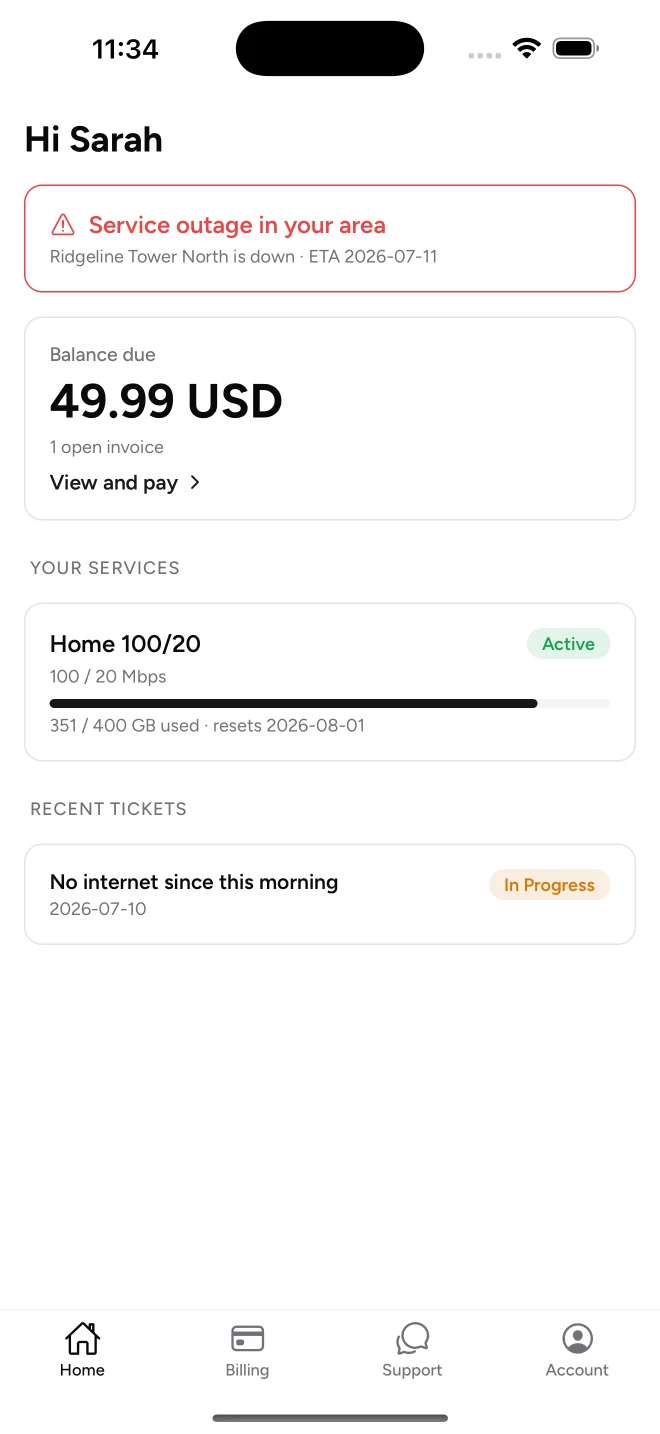
Two native mobile apps for iPhone and Android, included with every ISPbox plan and always in sync with your panel.

  • ISPbox Field for your crew: today's visits, full client context and a "why is this customer offline" diagnosis right at the ladder.
  • ISPbox for your subscribers: balance, invoice payments and support tickets in their pocket - fewer calls to your office.
  • One-scan sign-in: staff and subscribers log in with a QR code from the panel or portal - no typing domains or passwords.

// ISPbox Field for your team, ISPbox for subscribers - free with every plan

ISPbox Field app: a customer's record with access status, balance, services and notes
Field · technicians
ISPbox subscriber app: home screen with an outage notice, balance due, the service and its data use
ISPbox · subscribers
08 Inventory & assets

Track every ONT, router and SFP from stock to subscriber

Know what is in the warehouse, in a technician's van, installed or on the repair bench - and which serial went to which client.

  • Per-location stock across warehouse, field vans and repair bench, with counts at a glance.
  • Equipment templates and categories so adding a batch of devices takes seconds.
  • Assign a serial to a service on install; it stays on the client's record for its whole life.
blueridge.ispbox.net/inventory

Inventory

In Stock

With Technician

Installed

At premise, no service

With technicians

Total: / Groups:

Device Serial Number Location / Owner Status Notes Actions
No devices found
DeviceLocationStatusQuantity

Every time a device changed hands, place or state, and who did it.

WhenActionDeviceFromToBy
No movements match.

Move selected devices

09 Support desk

Every ticket comes with the context to close it

Open a ticket and see the client's connection status, balance and the exact service affected - plus a full activity timeline. No tab-hopping to diagnose.

  • Live client context on the ticket: connection state, balance due and the linked service.
  • Activity timeline with internal notes and client-visible updates in one thread.
  • Schedule a field visit straight from the ticket and track it on the calendar.
blueridge.ispbox.net/tickets/482

Ticket #482

Internet drops every evening

Created by Linda Hayes · Nov 12, 2026 19:42

No group Next visit: 19.11 10:00 Tag
Also on this ticket: nobody else Add person

Client

Linda Hayes

(540) 555-0177

linda.hayes@example.com

GPS: Verified

Description

My internet drops every evening around 20:00. Video calls freeze for a minute, then it comes back. The router lights look normal.

Activity Timeline

Add update
Attach files

Optional attachments: up to 5 files, max 10 MB each (jpg, png, webp, pdf, csv, txt).

Send this update to the client?

This comment will be visible in the client portal and ISPBox will attempt to send an email notification.

Email target: linda.hayes@example.com

10 Advanced Monitoring

Know Which Link Is Broken Before Customers Call

A small probe on your network measures latency and packet loss to every device on your map, around the clock. ISPbox compares the results across the whole network, names the link at fault and opens an incident for the customers behind it.

  • Latency and packet loss for every tower, link and customer radio.
  • A diagnosis with the evidence and the next step, not just a red graph.
  • Alerts, device logs and outage reports in the same place.
blueridge.ispbox.net/network/monitoring

Hosts

Host Loss
North Tower
North Tower core 10.20.1.1
0 %
Median
Jitter
0.35 ms
Loss, 24 h
0 %
Availability
100 %
North Tower - Sector A 10.20.1.11
0 %
Median
Jitter
0.58 ms
Loss, 24 h
0 %
Availability
100 %
North Tower - Sector B 10.20.1.12
4.1 %
Median
Jitter
5.49 ms
Loss, 24 h
4.1 %
Availability
99.6 %
Linda Hayes #1187 100.64.3.17
3.4 %
Median
Jitter
9.9 ms
Loss, 24 h
3.4 %
Availability
99.6 %
South Tower
South Tower core 10.20.2.1
0 %
Median
Jitter
0.53 ms
Loss, 24 h
0 %
Availability
100 %
South Tower - Sector A 10.20.2.11
0 %
Median
Jitter
0.8 ms
Loss, 24 h
0 %
Availability
100 %
South Tower - Sector B 10.20.2.12
100 %
Median
Jitter
-
Loss, 24 h
100 %
Availability
97.9 %
Ridge Relay
Ridge Relay 10.20.3.1
0 %
Median
Jitter
0.73 ms
Loss, 24 h
0 %
Availability
100 %
Ridge Relay - Sector A 10.20.3.11
0 %
Median
Jitter
1.1 ms
Loss, 24 h
0 %
Availability
100 %
Not on the map
Upstream - transit 198.51.100.1
0 %
Median
Jitter
0.25 ms
Loss, 24 h
0 %
Availability
100 %

Diagnoses

2 open · 1 needs someone on site · 30 customers affected

Open2 Resolved Marked wrong All

There is an outage on the radio that serves your area. A technician is on the way and we will text you as soon as you are back online.

South Tower - Sector B stopped answering at 21:04 together with every customer radio behind it, while South Tower core one hop earlier still answers. The fault is the sector radio or its power, not the backhaul.

Loss now
100 %
Since
21:04
South Tower core
answering, 2.1 ms
Hosts behind it
12 of 12 down
Cycles root
12
Measurement
direct
Open South Tower - Sector B →
North Tower - Sector B is full in the evening Saturationsince 3 days78 % 3 evenings in a row
11 Growth & Marketing

Marketing that shows what actually wins subscribers

Track every ad, flyer and referral to a paying customer. Campaign ROI, referral rewards, promo codes and a demand map - built into the same panel that runs your billing.

  • Real CAC, MRR added and payback per campaign - computed from actual conversions, not estimates.
  • Referral program with automatic account credits and tracked QR codes for offline media.
  • Out-of-coverage waitlist on a demand heatmap that tells you where to build next.
blueridge.ispbox.net/marketing

Marketing

Campaign performance

Campaign Leads Won Spend CAC MRR Payback

Where leads come from

All leads by source, with realized revenue per converted client (LTV to date).

Source Leads Conv. Rate MRR LTV to date

Demand map

Every lead with a location. Red points are outside your coverage - clusters of them show where to build next.

In coverage Out of coverage

Budget pacing

Funnel

New

Contacted

Qualified

Proposal

Won

Lost

Costs

Log what you actually spent; CAC and ROI use these entries.

No costs logged yet.

Tracked links & QR codes

One link per medium (flyer, truck, door hanger). Every scan or click is counted and carries the campaign attribution.

No tracked links yet.

Recent leads

No leads attributed to this campaign yet.

Campaigns

Campaign Leads

New Campaign

Campaign details

Where you are promoting, when, and how much you plan to spend.

Targeting & attribution

Pin the campaign to a coverage zone (e.g. a newly lit tower) and control the UTM tag that links leads back to it.

12 Compatibility

Works with the routers you already run

ISPbox provisions subscribers over standard RADIUS, so it works with broadband gateways from every major vendor. MikroTik gets the deepest integration, with an extra API mode that configures RouterOS directly.

  • Speed limits are pushed with the right attributes for each vendor automatically: MikroTik rate limits, Huawei and ZTE rate attributes, Cisco and Juniper QoS policies, or WISPr.
  • MikroTik API mode: PPPoE/DHCP first config, address pools, queues and leases managed straight from the panel.
  • PPPoE and DHCP/MAC authentication, static IP addresses, data-cap throttling and automatic suspension work the same on every vendor.
MikroTik Cisco Juniper Huawei ZTE Ubiquiti accel-ppp
Any RADIUS-capable router can authenticate against ISPbox.
13 Payments

Works with the payment gateways you already use

Collect subscriber payments through your own merchant accounts. ISPbox connects to the major processors, so money lands in your account, not ours. Turn on one or several and let clients pay from the portal.

  • Bring your own account: connect with your existing credentials and keep your negotiated processing rates.
  • One-off invoice payments and saved-card autopay handled the same way across every gateway.
  • Webhook reconciliation keeps invoices and payment statuses in sync automatically, no manual matching.
Stripe PayPal Authorize.net Square
More gateways are added over time. Any processor with card and webhook support can be integrated.

Ready to run your ISP from one panel?

Create your account in minutes. Or take the live demo for a spin first.

Simple monthly pricing that scales with your client count. Every plan starts with a 7-day free trial.

One plan, all features included. Your price simply follows your active subscriber count.

How many subscribers do you have?

$25 per month per subscriber

for 20 active subscribers

Per subscriber monthly: $1.00 (first 50), $0.40 (51-500), $0.30 (above 500). Count rounds up to the nearest 10. Minimum $25 per month.

Each bill uses the highest subscriber count you held for at least 3 days in the billing period, and never less than 50% of your highest count in the past 12 months.

The calculator covers up to 10,000 subscribers. Running more than that? Talk to us and we will price it with you.

Start free trial

7-day free trial - no charge today, cancel anytime.

Everything included

No modules, no add-ons, no hosting fee.

  • Client management & billing
  • Customer portal with payments
  • Monitoring & alerts
  • Maps for your network
  • IP address management (IPAM)
  • Inventory management
  • Client messaging
  • REST API & webhooks
  • Support ticketing
  • Priority email support
Active subscribers Monthly price Per subscriber
50 $50 $1.00
200 $110 $0.55
500 $230 $0.46
1,000 $380 $0.38
5,000 $1,580 $0.32
10,000 $3,080 $0.31

Need More Info?

Visit our official ISPbox Wiki for detailed guides, best practices, and step-by-step tutorials.

Frequently Asked Questions

How much does ISPbox cost?
Plans start at $25/month with the Starter plan for up to 20 clients, including core features like billing, ticketing, and network management. Growth and Scale plans add monitoring, network maps, alerts, and more.
Does it work with Mikrotik?
Absolutely. ISPbox has deep integration with Mikrotik RouterOS for PPPoE, Hotspot, and address list management.
Can I accept credit cards?
Yes, we have native integration with Stripe, allowing you to accept credit cards and set up automatic recurring payments.
How do I migrate from Sonar or Splynx?
We offer migration guides and tools to help you import your customers and data. Our support team can also assist with the transition.

Bring your whole ISP into one panel

Set up billing, provisioning and your customer portal in an afternoon. Connect your first router, on any major vendor, and see it live.