Stay on SmartOLT
Nothing moves off SmartOLT. ISPbox works through its API, so your OLT setup and your SmartOLT habits stay.
Keep SmartOLT for your OLTs and let ISPbox drive it from billing. New ONUs are authorized from the customer's service, unpaid customers are switched off and back on, and SmartOLT outages become incidents with the customers behind them.
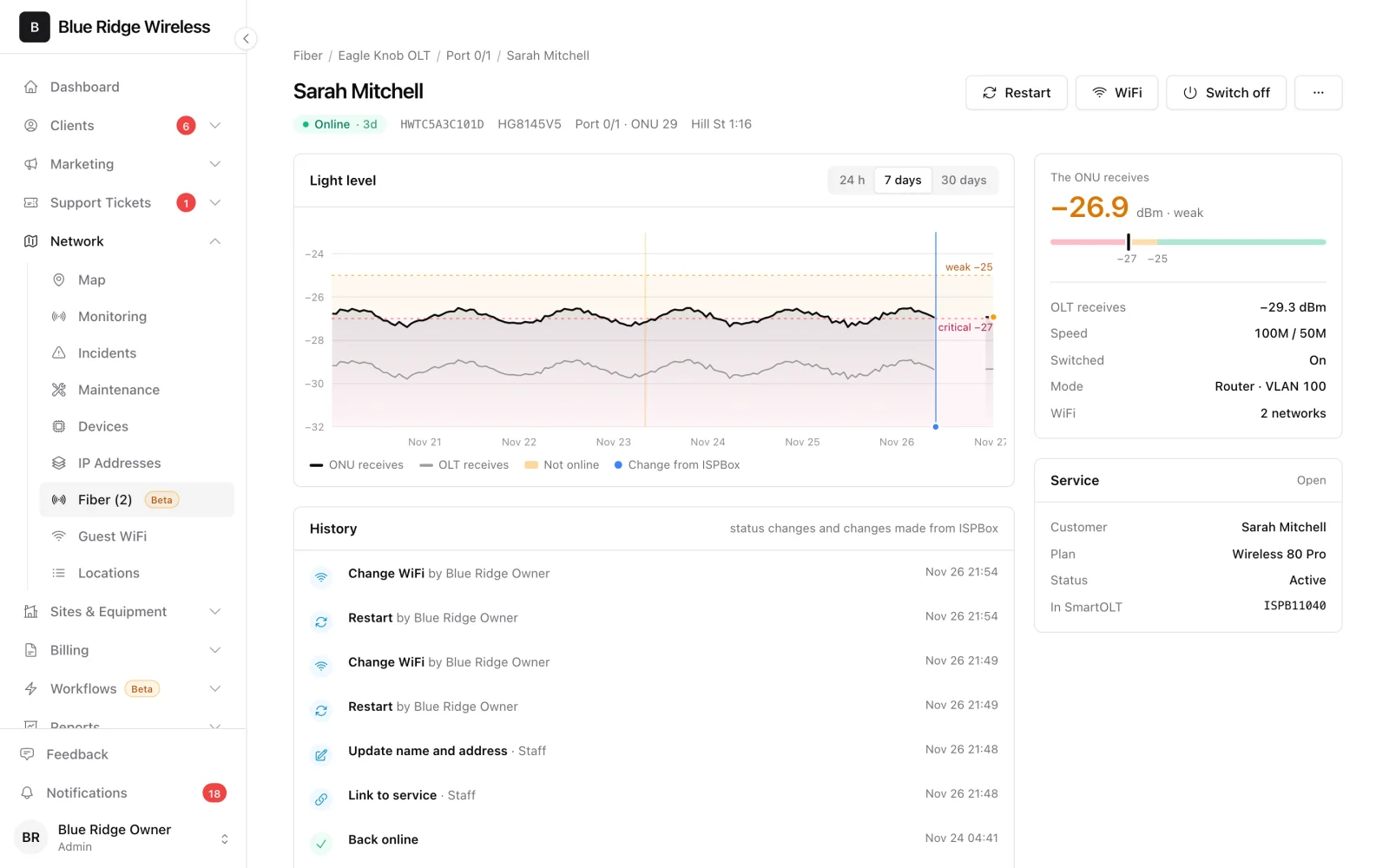
Real screens from ISPbox connected to SmartOLT, on a demo workspace.
Paste the SmartOLT address and an API key. ISPbox reads a sample first and saves the connection only if it works.

Each plan points at the SmartOLT speed profiles, zone, ONU mode and VLAN it should use. A plan change changes the ONU's profile.

The ONU the installer just plugged in shows up on the customer's service. One click authorizes it in SmartOLT with the plan's settings, the customer's name and address.

ISPbox suggests which customer each existing ONU belongs to, by SmartOLT id, account number or name. Linking keeps every ONU as it is.

SmartOLT is very good at talking to OLTs, but it does not know who paid. ISPbox connects to your SmartOLT account and puts every ONU on the customer's service, so billing decides what the ONU does and the ONU's status shows up where your staff already work.
Settings > Fiber (OLT) > Connect > SmartOLT: your SmartOLT address and an API key from General > API key. ISPbox reads the account time zone, your OLTs, speed profiles, zones and ONU types, then every ONU.
Add the ISPbox webhook address and signing secret in SmartOLT and status changes, new unconfigured ONUs and PON outages arrive within seconds. Without webhooks ISPbox polls, within the 1,000 calls an hour SmartOLT allows.
Authorize a waiting ONU with the plan's speed profiles, zone, mode and VLAN (or a SmartOLT authorization preset), restart, switch on and off, change speed profiles, set WiFi and PPPoE, move to another port, replace an ONU by serial and remove it. ONUs authorized from ISPbox get the id ISPB followed by the service number, and the customer's name and address go into SmartOLT.
For each connection you decide what happens when a service is blocked (switch off unless the router blocks the customer, always, or never), which speed profile a billing limit uses, and whether the end of a service switches the ONU off or removes it. If someone switches an unpaid customer back on in SmartOLT, ISPbox can switch them off again after 30 minutes.
Works with OLT & FTTH Management, MikroTik Integration, UISP Fiber (UFiber), Billing
Nothing moves off SmartOLT. ISPbox works through its API, so your OLT setup and your SmartOLT habits stay.
Blocks, speed limits, plan changes and the end of a service reach the ONU through SmartOLT without anyone touching it.
SmartOLT allows 1,000 API calls an hour. ISPbox uses webhooks first, spreads its reads and shows the calls left on the connection page.
SmartOLT PON and OLT outages open ISPbox incidents listing the affected customers, with your notification rules.
ISP mapping the way operators need it: build your network map on an interactive Mapbox view, place towers, OLTs, splitters, ONTs and fiber, coax and wireless links as real geographic features, trace PON optical budget, and import or export Google Earth KML.
Learn moreGive installers an antenna alignment tool that runs on their phone: rank the sectors that actually cover the address, check the terrain line of sight along the path, and aim the CPE by bearing and elevation on a live camera view.
Learn moreMonitor your ISP network in real time: ISPbox pings every router each minute, tracks PPPoE and DHCP client sessions, and fires alerts to Discord, Slack, email or webhooks with flap damping so you hear about real outages fast.
Learn moreHow-to guides: Fiber (OLT): Connect SmartOLT or UISP, ONUs on Services: Authorize, Link and Billing
Free tools for this: GPON Splitter Calculator
Create a workspace, paste your SmartOLT address and API key, and see every ONU next to its customer.