ONUs on Services: Authorize, Link and Billing
Authorize a new ONU from the customer's service with the plan's speed, link the ONUs you already run, and see what blocks, payments and plan changes do to the ONU.
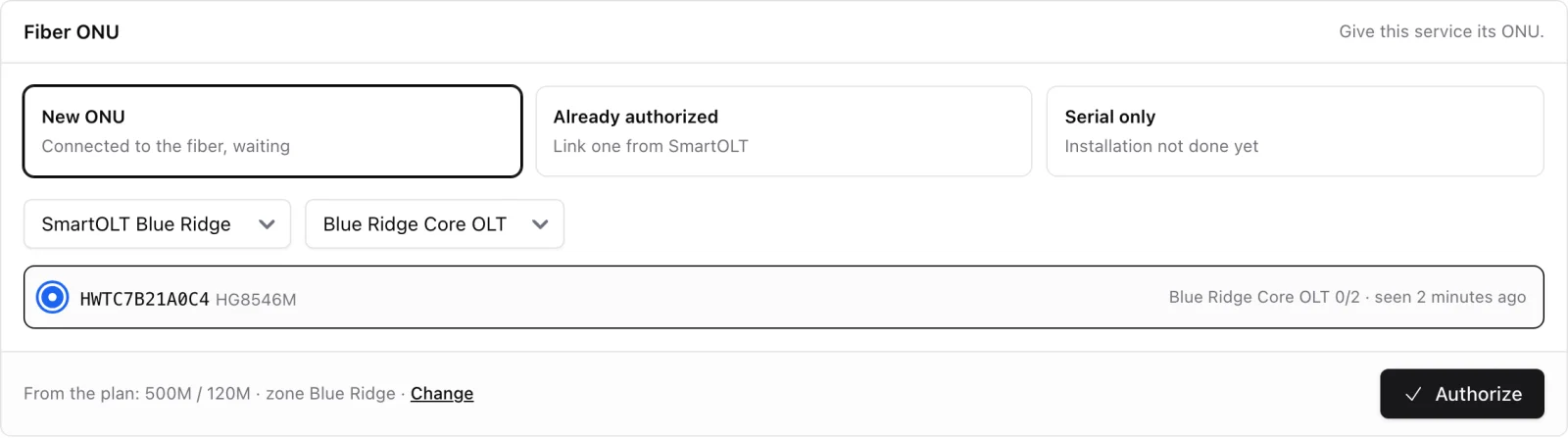
In ISPBox an ONU belongs to a service, the same way a router login does. Once the ONU is on the service, billing decides what it does: blocked services switch it off, payments switch it back on, plan changes change its speed. This article covers putting ONUs on services and what ISPBox then does with them. Connect SmartOLT or UISP first (see Fiber (OLT): Connect SmartOLT or UISP).
1. The Fiber ONU card
Open a service and go to Assigned Equipment. The Fiber ONU card gives the service its ONU in one of three ways:
- New ONU: the installer plugged a new ONU into the fiber. It shows up on the card within a minute or two, with the OLT and port it is on. Pick it and click Authorize.
- Already authorized: link an ONU that already works in the OLT system. Search by serial number, its name in the OLT system or the splitter.
- Serial only (SmartOLT): record the serial for an installation that is not done yet. The ONU is set up as soon as it is connected.
Authorizing uses what the plan says on the connection's Plans tab: speed, zone, mode and VLAN. The card shows it ("From the plan: 500M / 120M, zone Blue Ridge"); click Change to use something else for this customer. On SmartOLT the ONU also gets the customer's name and address and our id ISPB followed by the service number. After the authorize ISPBox sets the internet connection the connection asks for (PPPoE with the service login, DHCP or bridge) and, on UISP, the speed.
Once linked, the card shows the ONU with its status, position, light and speed, and the buttons staff use most:

2. ONUs you already run
When you connect an OLT system that already serves customers, its ONUs are not on any service yet. Fiber > Not on a service lists them with a suggested service and the reason for the suggestion: the same id as the customer's account number or imported id, the same customer name, or a similar name. Tick the right ones and click Link.
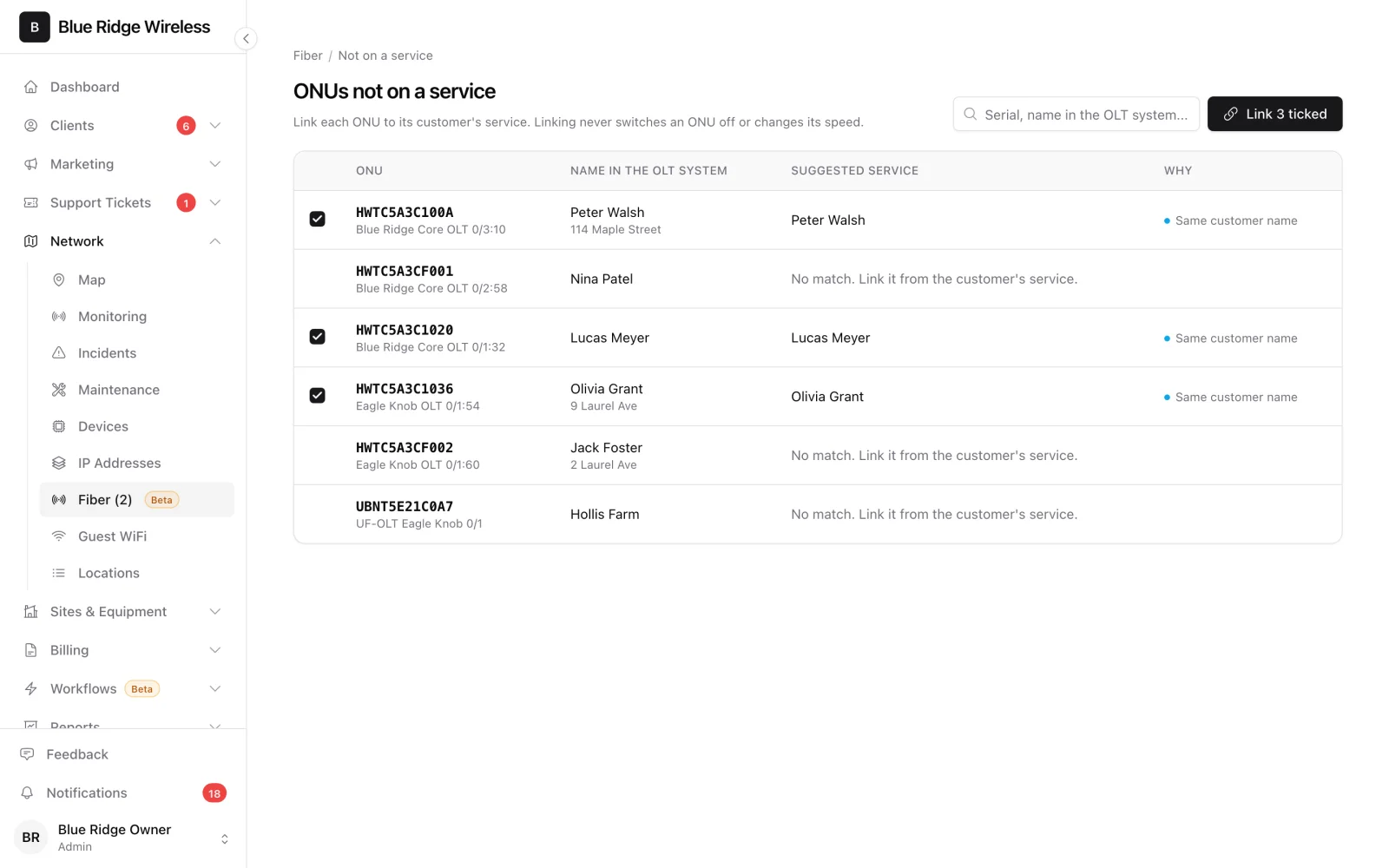
Linking never switches an ONU off or changes its speed. Linked ONUs keep the state they had until their service really changes (a block, a payment, a plan change) or until you press Apply ISPBox state on the connection page. Where name writing is on (SmartOLT), the customer's name and address are written to the ONU.
3. What billing does to the ONU
| In ISPBox | On the ONU |
|---|---|
| Service blocked for non-payment | Switched off, unless the customer's router already blocks them (setting When a service is blocked). UISP: the router blocks; staff are told when a customer would stay online. |
| Speed limit from billing | The limit speed profiles from the connection settings. |
| Customer pays | Switched back on; the speed it had before a limit comes back. |
| Plan change | The new plan's speed, when Set the ONU speed from the plan is on. |
| Service ends | Switched off, left as it is, or removed from the OLT (setting When a service ends). |
| Client blocked by hand | Same as a blocked service. |
A new install never switches a fresh ONU off: a service that has not run yet leaves its ONU alone.
The switch-off brake. When more ONUs than usual would be switched off within an hour (for example after a billing mistake), ISPBox holds them and tells staff. On the connection page you can run them or cancel them. Cancelled customers stay online until their service changes again.
Changes made outside ISPBox. If someone switches an ONU on or off or changes its speed in SmartOLT or UISP, ISPBox tells staff instead of fighting it. The one exception, if you allow it: an unpaid customer switched back on in SmartOLT is switched off again after 30 minutes.
4. Staff actions on an ONU
On the ONU card and on the ONU page:
- Restart: the customer is offline for about two minutes.
- Switch off / Switch on (SmartOLT).
- Change WiFi: name and password, on both bands where the ONU has two.
- Change speed.
- Resend configuration, Replace ONU (a new serial on the same customer) and Remove from the OLT (SmartOLT).
- Take off the service: nothing changes on the OLT.
A switch-off or a speed change made by hand stays: ISPBox does not undo it on its regular checks. It is dropped, and the ONU follows the service again, when the service itself changes (the customer pays, is blocked, or changes plan).
5. In the customer portal
Customers with a fiber ONU see its status on their service in the portal, a plain note when there is an outage in their area, and can restart the ONU (three times an hour) or change their WiFi name and password.
