Portal Request Inbox
Approve or reject customer self-service requests - plan changes and seasonal pauses - from one inbox. Covers the pending queue, the nav badge, guardrailed approval, and history.
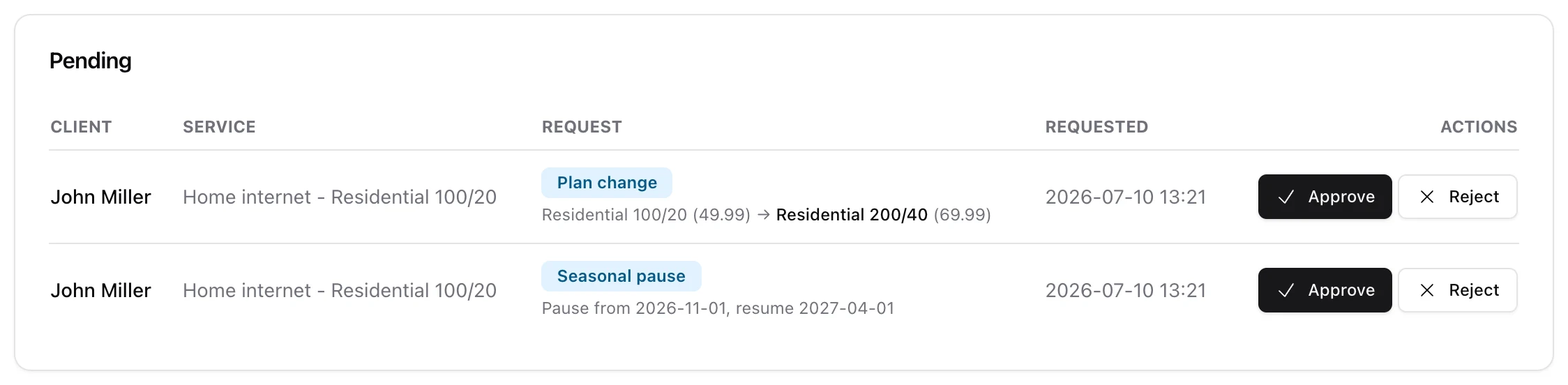
When customers do things from the portal that you have set to need sign-off - a plan change on approval, or a seasonal pause - they land in one place: the portal request inbox. From there your staff approve or reject each one, and approving applies the change for you.
1. Where it is
Open Portal Requests in the main navigation (it needs the clients.manage permission). The nav item carries a badge with the number of pending requests, so staff can see at a glance when something is waiting.
2. What lands here
Two kinds of request queue up:
- Plan change - a customer asked to switch package. The row shows the move, e.g. Residential 100/20 (49.99) → Residential 200/40 (69.99). These only appear when self-service plan changes are set to require approval; on auto-apply they take effect without a request.
- Seasonal pause - a customer asked to suspend and resume on set dates. The row shows the requested pause from / resume on. Seasonal pauses always require approval.
Each row lists the client, the service, the request detail and when it was submitted.
3. Approve or reject
Approve applies the change through the same engine that runs it everywhere else - so a plan change reprovisions the service, and a seasonal pause writes the suspend/resume dates onto it. Reject declines it, with an optional note.
Crucially, approval is not a blind apply: it runs the same guardrails, so a request approved after the customer's account went blocked, delinquent or suspended is refused rather than forced through. Decided requests drop into a Recently decided list for reference.
4. Turning the requests on
What can reach this inbox is controlled in Settings > Customer Portal: enable self-service plan changes (and set them to require approval) and/or allow seasonal pause requests. If you leave both off, nothing queues here.