DHCP Device Discovery
Stop typing MAC addresses. ISPBox watches the DHCP clients your routers see, lists the ones that belong to no service, and lets you or your reseller attach one to a customer in two clicks - on API routers from the lease table, on RADIUS routers from the rejected MAC auths.
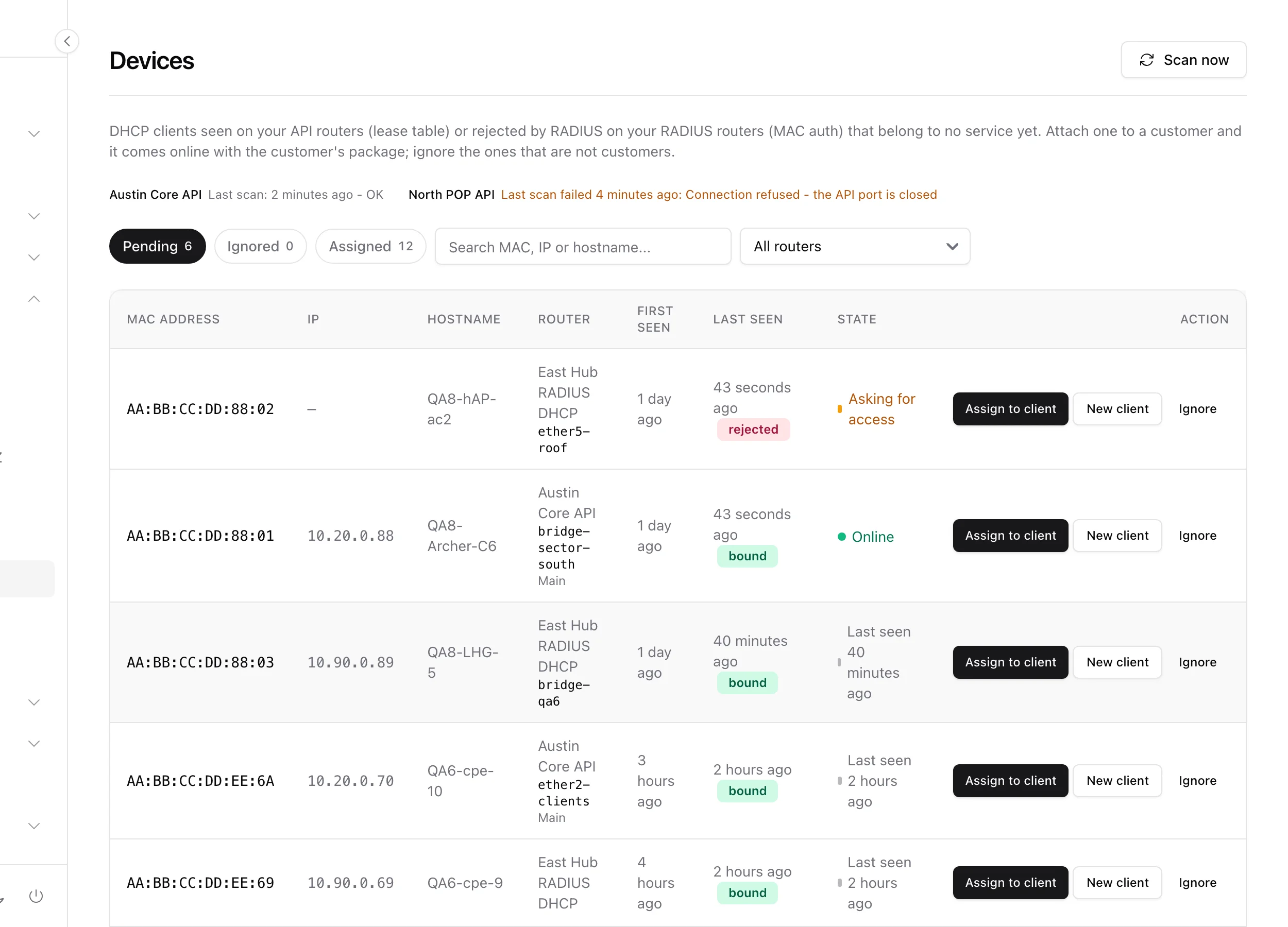
Signing up a DHCP customer used to mean reading a MAC address off a sticker on a roof and typing it into the panel without a typo. Device discovery removes that step: ISPBox watches the DHCP clients your routers see, lists the ones that belong to no service yet, and lets you (or your reseller) attach one to a customer with two clicks. The MAC is never typed.
It lives under Network > Devices, it is part of provisioning rather than monitoring, and it needs no external system.
1. Turning it on per router
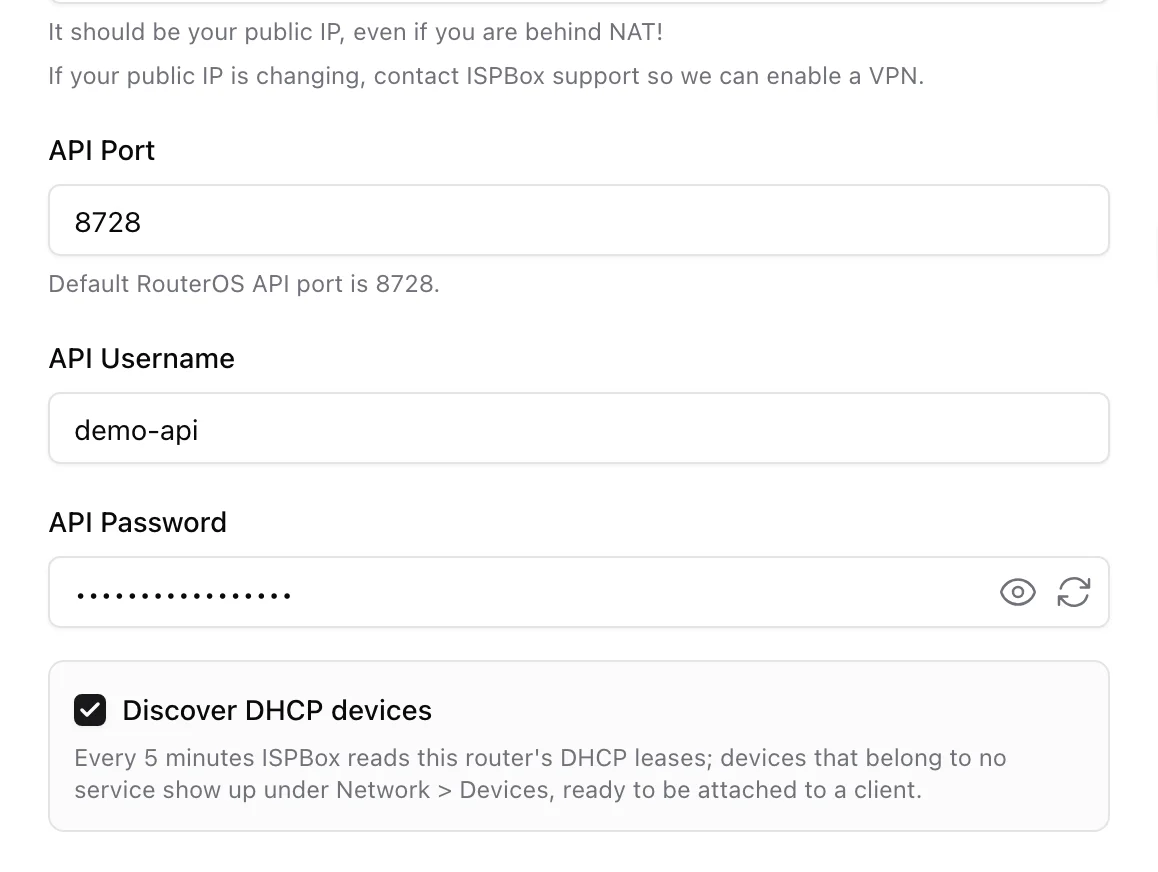
Discovery is opt-in per router. Open a DHCP-mode router under Settings > Routers and tick Discover DHCP devices. PPPoE routers do not have the option - a PPPoE customer is identified by a login, not a MAC.
What the checkbox does depends on how the router talks to ISPBox:
- API + DHCP router - ISPBox reads the router's DHCP lease table every 5 minutes over the RouterOS API.
- RADIUS + DHCP router - ISPBox reads the MAC addresses this router asked RADIUS about and got a no for. This needs the MikroTik DHCP server set to
use-radius=yesand the ISPBox post-auth columns on the RADIUS server.
A router that serves your guest wifi is deliberately excluded from the RADIUS sweep: rejecting unknown MACs is how guests reach the splash page, not a sign of an unassigned CPE.
2. How the sweep works
Both flavours run every five minutes and both end up in the same list.
The API sweep fans out one job per eligible router - discovery ticked, router active, API mode, DHCP mode, and not already known to be offline. It prints the lease table, then prints the DHCP servers once more to resolve each lease's server to the interface it is bound to, so the list can say which sector or bridge the device appeared on rather than just "somewhere on this router". Older or locked-down RouterOS may refuse that second print; the sweep carries on without it. The job retries three times with a growing backoff and then records the failure on the router.
The RADIUS sweep reads new rows out of the FreeRADIUS post-auth log past a cursor, keeps only Access-Reject rows that look like a MAC authentication (MikroTik MAC auth sends no password, so a genuine one has an empty password or the MAC itself), maps the NAS address back to one of your routers and hands those MACs to the same ingest. It never writes to FreeRADIUS and never changes how anyone authenticates: an unknown MAC stays rejected, and stays on whatever unauthorised addressing the router gives it, until somebody attaches it to a customer.
A lease becomes a candidate only when it is dynamic and was not created by ISPBox (provisioned leases carry an ISPBOX-ID: comment). A MAC that already belongs to any service in your tenant is skipped, and a pending row whose MAC meanwhile lands on a service - because somebody typed it by hand or imported it - is closed automatically and marked assigned by the system. Pending and ignored rows nobody has seen for 30 days are pruned, and the post-auth log is trimmed nightly, so neither table grows without bound.
3. Network > Devices
The page opens on Pending, with Gone, Ignored and Assigned beside it and a live count on each. Pending is only what is on the network right now - devices a sweep saw in the last 15 minutes, or that keep knocking on RADIUS. A device that went dark moves to Gone by itself, keeps the same three actions, and comes back to Pending the moment a sweep sees it again. The sidebar count follows the same rule, so it means "waiting for you", not "ever seen". There is a search over MAC, IP and hostname (a MAC term matches in any notation, separators stripped on both sides, and a term that is not MAC-shaped is treated as plain text) and a router filter.
Each row shows the MAC, the lease IP, the hostname the device announced, the router with the interface underneath it and the router's location, when it was first seen and when it was last seen. The DHCP lease status (DHCP lease: bound, RADIUS: rejected) sits under the IP as a detail of an unassigned device - it says what the router's lease table thinks, not whether the device is connected.
The router itself decides who is on the network. Every sweep reads three things and takes the strongest: the bridge host table (a device is listed while the bridge saw a frame from it in the last five minutes and disappears after - "on the wire"), ARP (the router exchanged packets with the address a moment ago), and the lease itself (a live client renews its lease at half the lease time, so a lease that is still "bound" but was not renewed when a live client would have renewed it has been abandoned). Last seen is the router's own number, not the time the panel last looked, and the State tooltip says which of the three decided. With a 10-minute lease a device you unplug shows Offline within about five to ten minutes; with a one-day lease the lease alone would take twelve hours, which is why the bridge table is read first. The bridge table is only trusted where it demonstrably sees the server's clients, so a DHCP relay or a router the panel may not fully read falls back to the lease rule instead of marking everyone offline. Customers on API DHCP routers get the same verdict on their Online / Offline link, from the same read, so the Devices page and a customer's page never disagree about one MAC.
Every sweep refreshes what the router reports about a device it already knows - the hostname it announces, its lease address, the lease state, the interface and when it was last seen - for assigned devices as much as pending ones. A CPE the customer renamed, or one that moved from the unauthorised pool to its client address, shows the new facts within five minutes; the name it had on the day it was attached is not kept. The other direction never happens: the router name and the location are yours, typed in the panel, and nothing read from a device overwrites them.
The State column is the honest answer to "is this thing there right now":
- amber Pending - on the network right now (a sweep saw it in the last 15 minutes) and waiting for you to assign it. Sweeps run every five, so two missed sweeps plus a little slack is the edge between "here now" and "gone".
- amber Asking for access - the router keeps asking RADIUS about this MAC and keeps getting a no. It is knocking, not connected.
- green Online / red Offline on the Assigned tab - the customer's live link, taken from the service's own connection record (the MikroTik session poll or RADIUS accounting), not from the discovery sweep: the sweep skips MACs it already knows, so its last-seen stamp freezes at the attach. Last seen on that tab follows the same record. An Online flag nobody confirmed for 20 minutes reads Offline.
- red Offline on the Gone and Ignored tabs - no sweep has seen it recently; hover for when.
- A dash - the device is assigned, but nothing measures that link yet (client monitoring is off for the router, or the first poll has not run).
Above the table, each API router with discovery on gets one line: Last scan: 2 minutes ago - OK, No scan has run yet, or Last scan failed 4 minutes ago: with the reason. That last one matters - a router the sweep cannot reach must not look like a router with nothing new on it. RADIUS routers get no line, because that flavour reads the post-auth log and never talks to the router at all.
Scan now queues a sweep on every discovery router immediately instead of waiting for the next tick.
4. Attaching a device to a customer
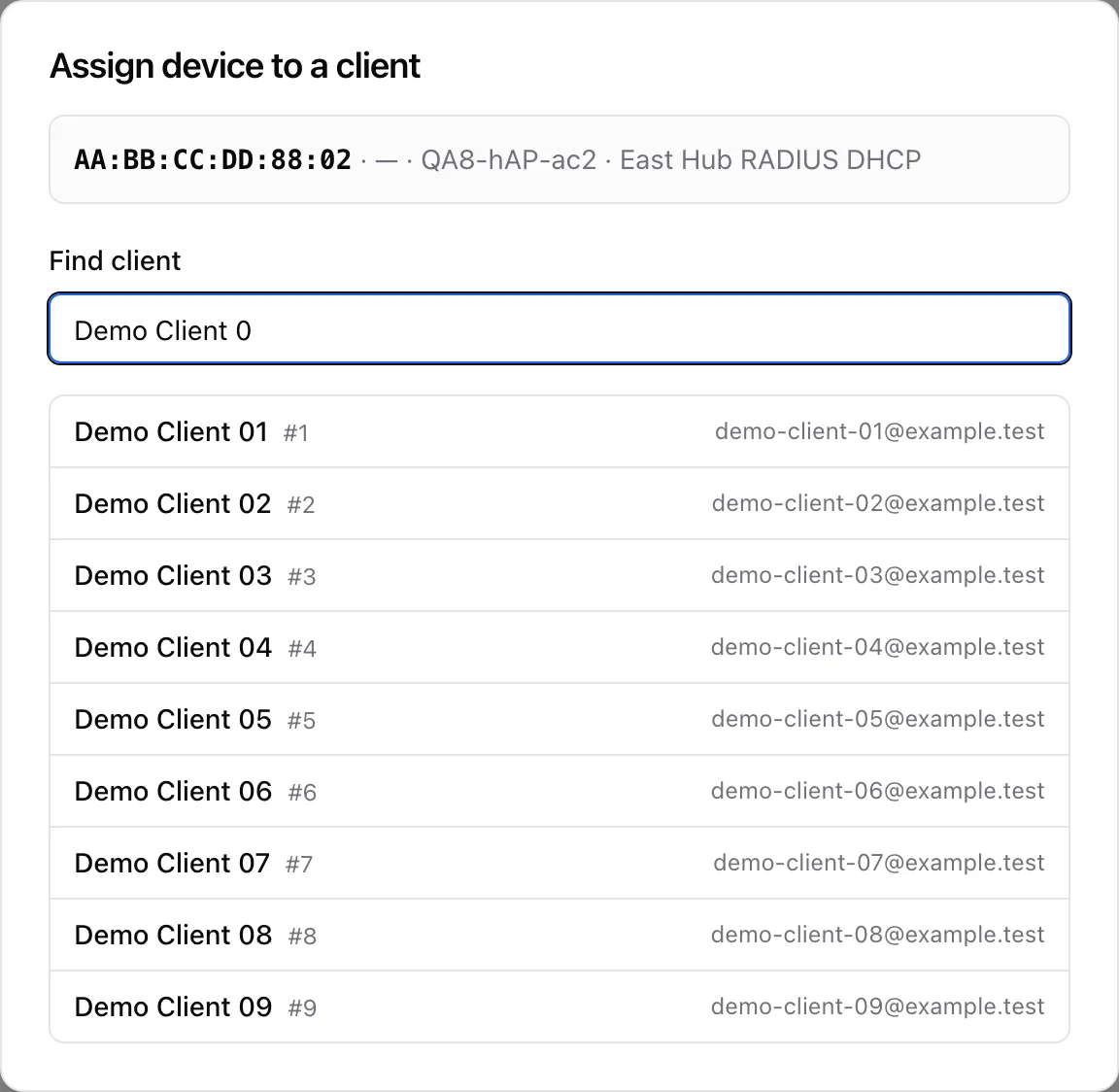
A pending row offers three actions:
- Assign to client - the modal repeats the device, then searches your clients by name, email, phone or client number. Pick one and it lists that client's services that are still waiting for network setup; pick the service and the device is attached. If the client has no such service, the modal links straight to Add service with the device carried along.
- New client - opens the Add client form with
?device=so the whole sign-up ends with this device already wired to the new service. - Ignore - parks it under the Ignored tab (your office laptop, a neighbour's phone, a printer). Restore puts it back on Pending.
Attaching writes the service's network credentials and nothing else: the MAC, and an address taken from the router's client pool - the lease IP it already had, when that address is free and inside the pool, otherwise the first free one. If the service has no router yet it gets the one the device was seen on. An API router (or any router with a client pool in ISPBox) with no free address left refuses the attach rather than half-doing it. The claim runs under a row lock and is one-shot, so two people racing for the same CPE cannot both win.
When the service goes away
Deleting the service, removing its network credentials or retyping the MAC frees the device: it returns to Pending (or Gone, until the next sweep sees it) with Assign / New client / Ignore offered again, instead of sitting under Assigned pointing at a service that no longer exists. The sweep's own reconcile pass does the same for any Assigned row whose MAC no service knows any more, so imports and bulk clean-ups heal within five minutes; php artisan devices:reconcile does it on demand.
5. What happens on the router
Writing the credentials is bookkeeping; whether the customer comes online depends on where their prepaid clock stands.
- The service is active and paid up - ISPBox pushes it immediately. On an API router the MikroTik provisioner applies the setup and the page says "The router has been updated" (or names the error if RouterOS refused). On a RADIUS router the MAC becomes a radcheck identity and FreeRADIUS is reloaded through the ops agent; the device authenticates on its next request. If the reload fails you are told so instead of being promised a customer who is still offline.
- The service is a draft or not activated - nothing is pushed. It is provisioned the moment the service is activated and paid for.
- At expiry - the prepaid sweep runs every quarter hour and blocks the service through the same enforcer that provisioned it, so the device stops passing traffic on its own. A renewal restores it. The device does not go back onto the pending list: its MAC is now a known identity.
6. The reseller side
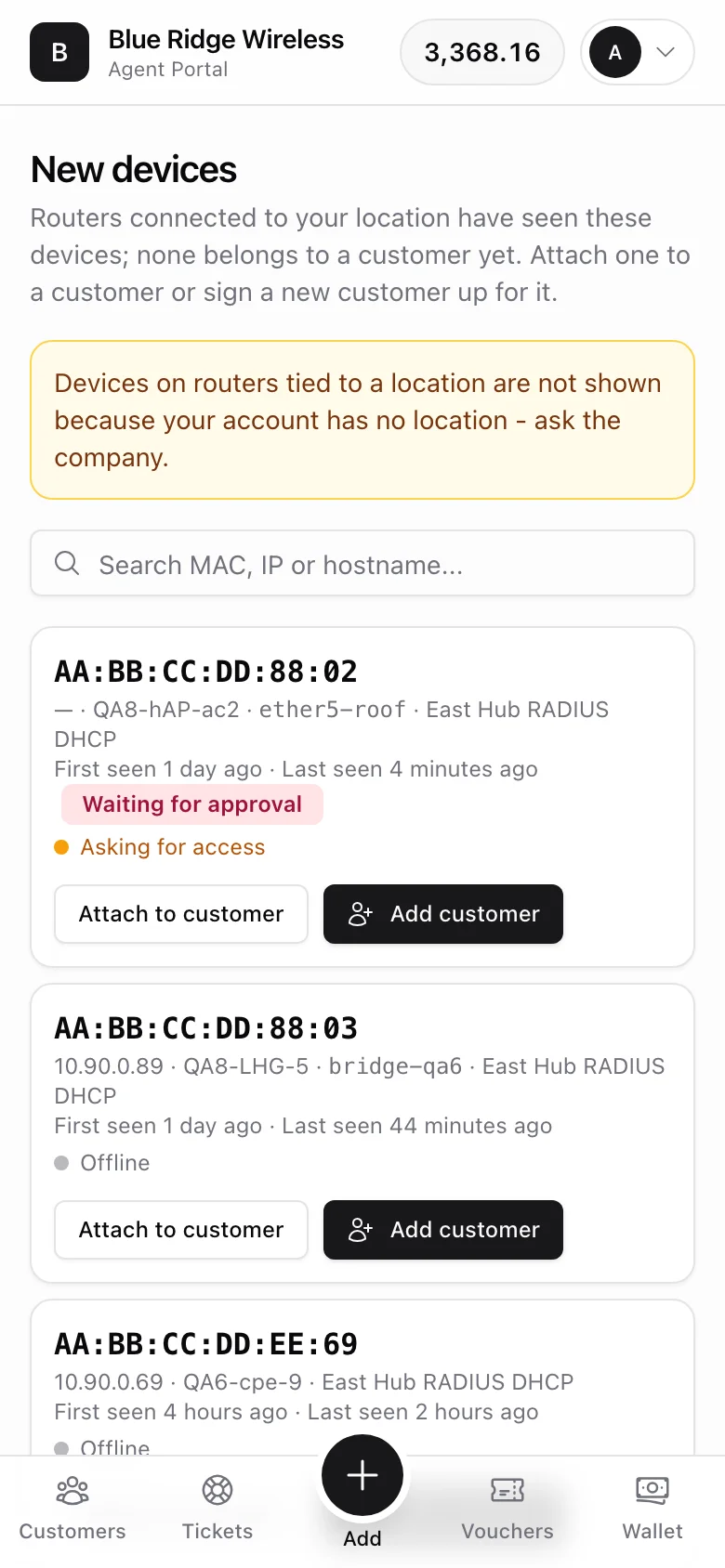
With the Claim discovered devices toggle in Settings > Agents, the same list reaches your resellers at /agent/devices. This is the flow where a street seller plugs in the customer's CPE, opens their phone and finishes the sign-up on the spot, without your staff ever seeing the MAC.
What an agent sees is narrower than what you see:
- The same four tabs with counters: Pending (on the network right now) and Gone (dark, still attachable - the customer's box may be off for the night) on the routers the agent reaches; Ignored, read-only - ignoring and restoring stay yours, because they hide a device from every agent; and Assigned, which lists only the devices of the agent's own customers with the customer's name and the live Online / Offline link. Two agents sharing a location never see each other's customers there. The reseller API mirrors it:
GET /devices?status=pending|gone|ignored|assigned, withcountsfor all four tabs in every answer. - Only devices on routers at the agent's own location, plus routers you gave no location at all (those count as global, the same rule the service form uses). An agent with no location therefore sees only the location-less routers, and if there are location-bound devices they are missing out on, the page says so out loud instead of sitting silently empty: "Devices on routers tied to a location are not shown because your account has no location - ask the company."
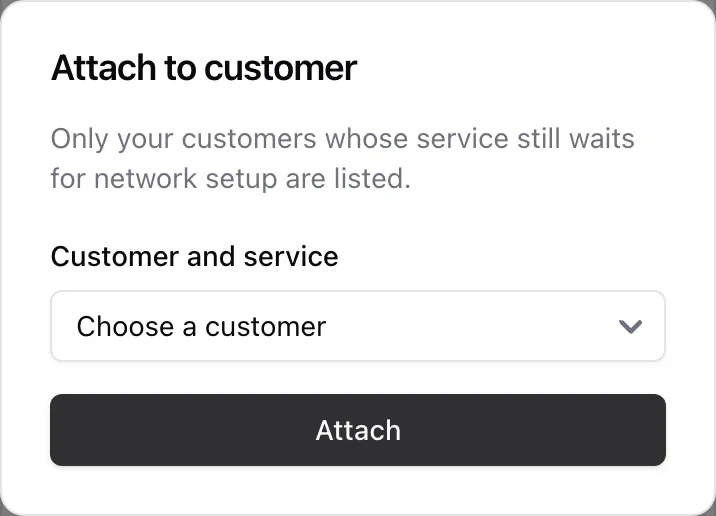
Two buttons per device:
- Attach to customer - the dropdown lists only the agent's own customers whose prepaid service is still waiting for network setup. If that customer's clock is already running, the network side is pushed straight away and the agent is told "Device attached - the customer is online"; if it is not, they get "Activate the service to bring the customer online"; if RADIUS did not reload, they are told that too and your office is notified.
- Add customer - opens the portal sign-up form with the device attached. The package becomes required (this device has to get one), the connection-point and login fields disappear because the device's own router is the answer, and the client, the prepaid service and the network credentials are created in one transaction.
Claims are one-shot for agents too: the second reseller to tap the same device is told it has already been assigned. The portal home carries a N new devices chip so nobody has to go looking.