Setting Up the Reseller Channel
What an agent is, how the wallet works, and every switch in Settings > Agents card by card - with what each one changes in the agent portal.
An agent is anyone who brings you customers without being on your payroll: a reseller with their own book of subscribers, a site manager who looks after every household at one RV park or apartment block, a field seller who knocks on doors with a phone in hand. They work in a separate portal at /agent on your domain, never in the admin panel, and they only ever see the customers you attributed to them.
Each agent carries a wallet. You top it up when they hand you money, and every sale they make debits that wallet at their own buy price while the customer's invoice is still booked at the customer price. A top-up is a deposit, not revenue - the revenue lands when the balance is actually spent on a customer.
Everything else an agent may do is off until you switch it on. With every toggle off you get the original behaviour: a flat list of agents selling your packages at your list prices. This guide walks Settings > Agents card by card and says what each switch changes in the agent's portal.
1. Reseller channel
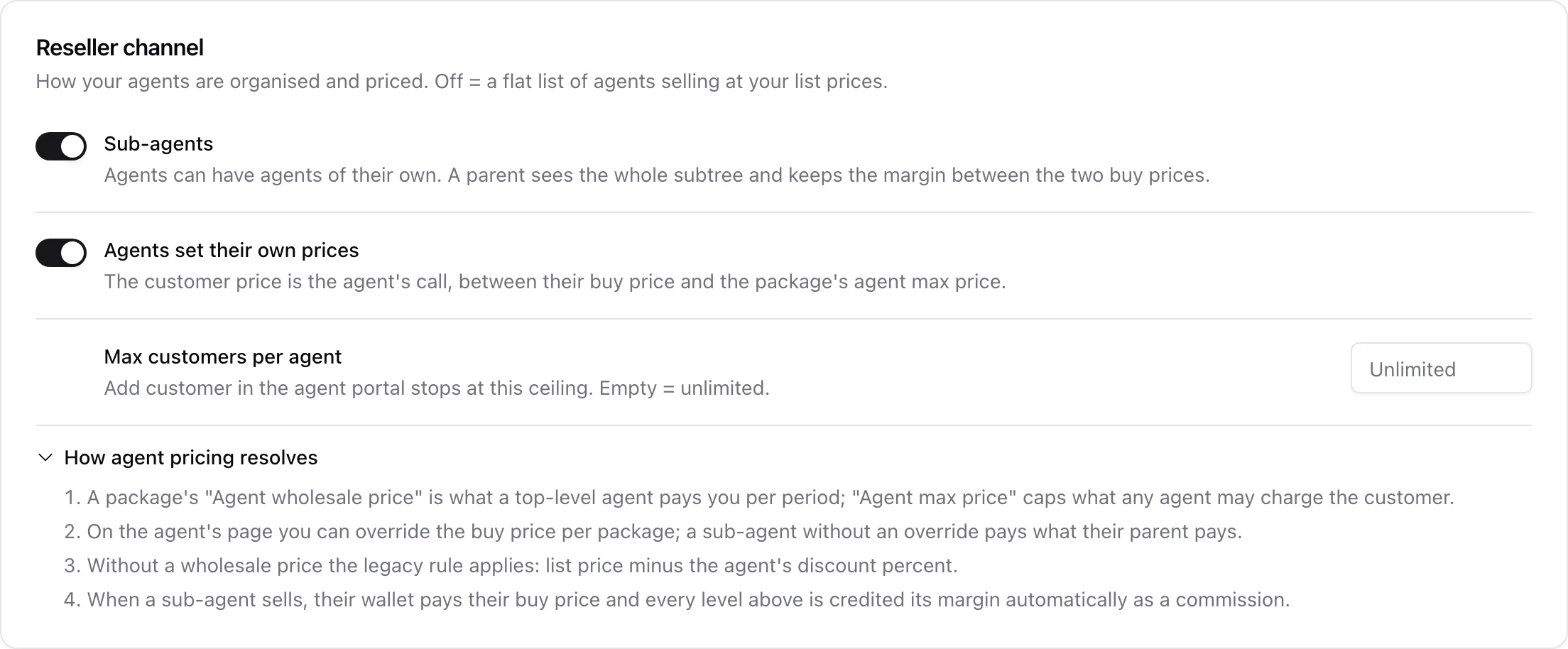
The first card decides how your agents are organised and who sets the price the customer pays.
- Sub-agents - agents may have agents of their own. Switching this on adds a Parent agent picker to the add/edit agent form; a parent then sees their whole subtree's customers and keeps the margin between their buy price and their child's. Switching it back off hides the picker but never reshapes an existing tree.
- Agents set their own prices - the customer price becomes the agent's call, between their own buy price and the package's agent max price. On, the portal's Prices page lets each agent edit their sell price per package; off, the same page turns read-only and says customer prices are set by the company, and every customer pays the package list price.
- Max customers per agent - a hard ceiling. Add customer in the portal stops there, counted on the agent's own attributed customers (not their sub-agents'). Empty means unlimited.
How a price resolves
The card carries a How agent pricing resolves disclosure with the whole rule. The buy price - what an agent pays upward per period - is the first of these that exists:
- the buy price you typed for that agent and package on the agent's page;
- their parent agent's buy price, so a sub-agent with no override pays exactly what their parent pays;
- the package's Agent wholesale price, which is what a top-level agent pays you;
- the legacy rule for packages with no wholesale price: list price minus the agent's discount percent.
The sell price is the package list price unless agents may set prices and this agent stored one, and it is always clamped into the range from their buy price up to the package's Agent max price. When a sub-agent sells, their wallet pays their buy price and every level above them is credited its own margin as a commission transaction automatically.

Selling on credit - agents may let a customer pay them later. The agent still pays you from their wallet at activation; what the customer owes goes into the agent's own book: an Owes you card on the customer page, a Debts page with partial payments, promised dates and history, and on your side a Customers owe column on the agents list and report plus a debtor table with a Correct action on each agent's page. Off by default. Switching it off later hides the credit box in the sale windows; anything still owed stays visible and collectable.
2. Selling and lifecycle
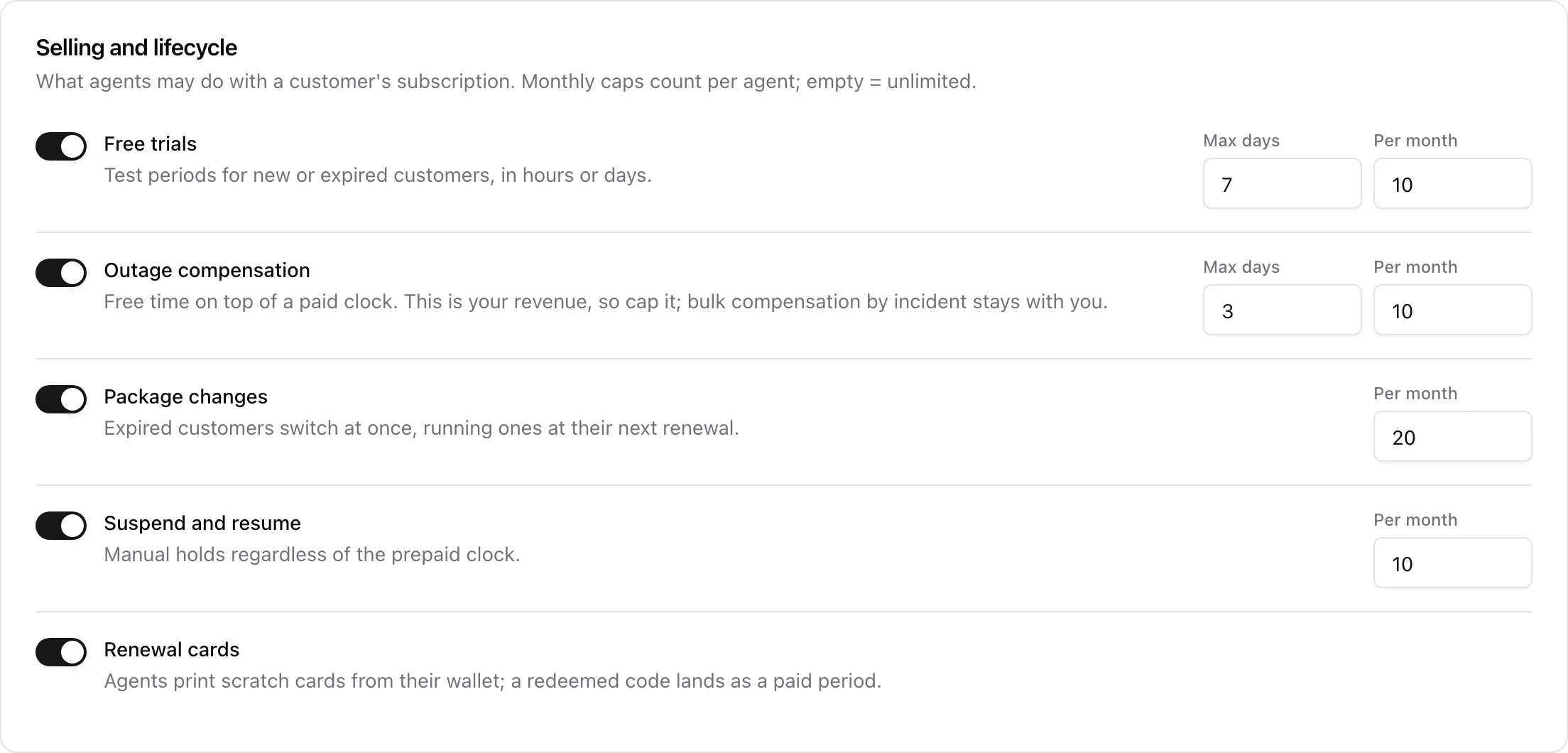
This card is about what an agent may do to a customer's running subscription. Each row has an optional Per month cap counted per agent over the calendar month; leave it empty for no limit. The counters show up on the agent's own page, so you can see who is close to their ceiling.
- Free trials - test periods for new or expired customers, granted in hours or days. Max days is the longest single trial (1 to 365). A service that is still paid up is refused: a trial is for someone who is not currently subscribed.
- Outage compensation - free time added on top of a clock that is already running, for a customer whose service was interrupted. This is your revenue being given away, so it is capped twice: a maximum per grant and a maximum per month. Bulk compensation by incident stays with you - an agent cannot see how far an outage reached.
- Package changes - an expired customer switches immediately, a running one at the start of their next paid period, and the renewal then prices on the new package.
- Suspend and resume - a manual hold and its release, regardless of what the prepaid clock says.
- Renewal cards - the agent prints prepaid scratch cards from their own wallet, each worth a number of periods of one package. A redeemed code lands as a paid period on the customer's service. Off, the cards section of the portal's Vouchers page is gone.
3. Network and support
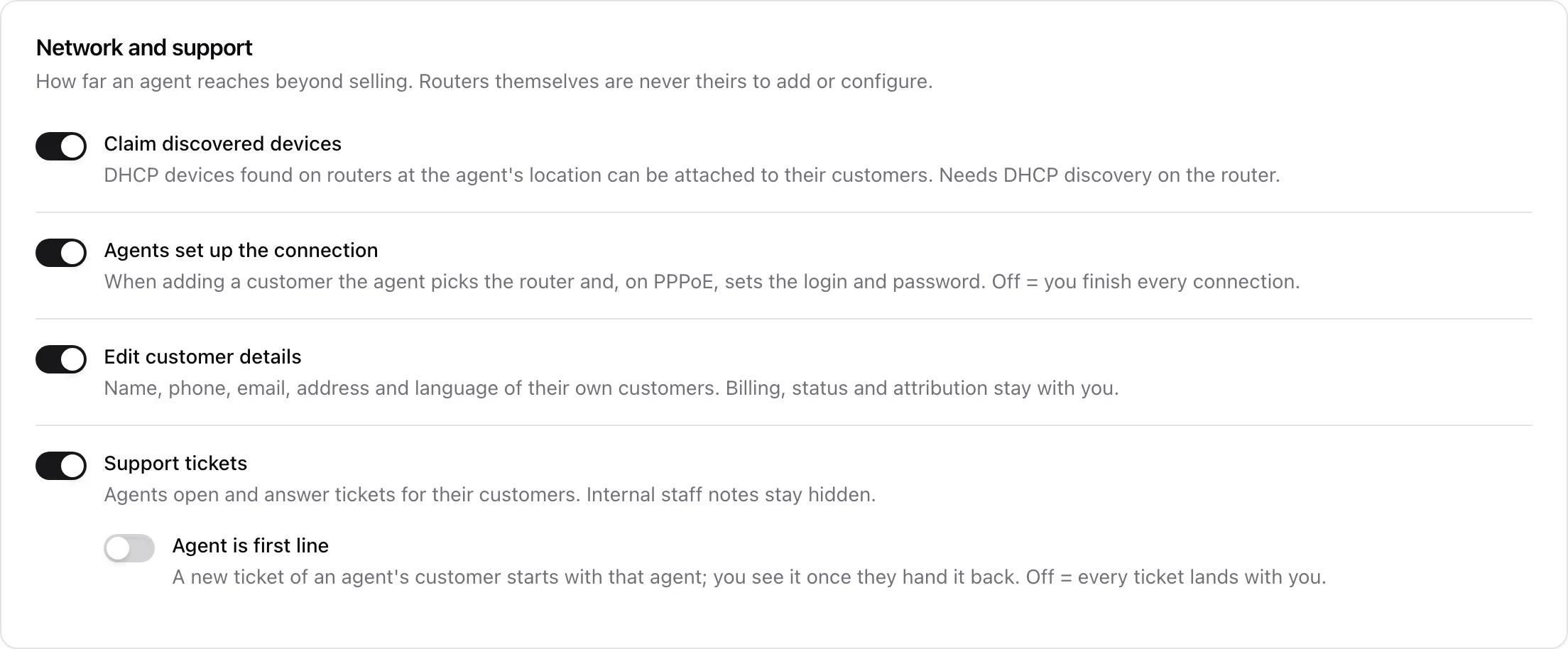
How far an agent reaches beyond selling. Routers themselves are never theirs to add or configure.
- Claim discovered devices - the portal gets a Devices page listing DHCP devices discovered on routers at the agent's location, so they can attach one to a customer whose service is still waiting for network setup, or open Add customer prefilled with it. Needs DHCP discovery switched on for the router. Off, the page is a 404.
- Agents set up the connection - when adding a customer the agent picks the connection point (a router at their location, or a router with no location) and, on a PPPoE router, types the login and password. Off, the router list is empty and you finish every connection yourself.
- Edit customer details - an Edit button on the portal customer page for name, phone, email, address and language. Billing, status, location and attribution are not reachable from the portal at all.
- Support tickets - the portal gets a Tickets page and a New ticket form for their own customers. The agent sees the customer-visible thread only; internal staff notes never leave the admin panel. Turning this switch back off releases every ticket currently held by an agent back to your queue with a note saying why.
- Agent is first line - a sub-option of Support tickets, off by default. A new ticket raised for an agent's customer starts with that agent, whoever opened it, and you see it once they hand it back. Off, every ticket lands with the office as before.
4. Agent notifications
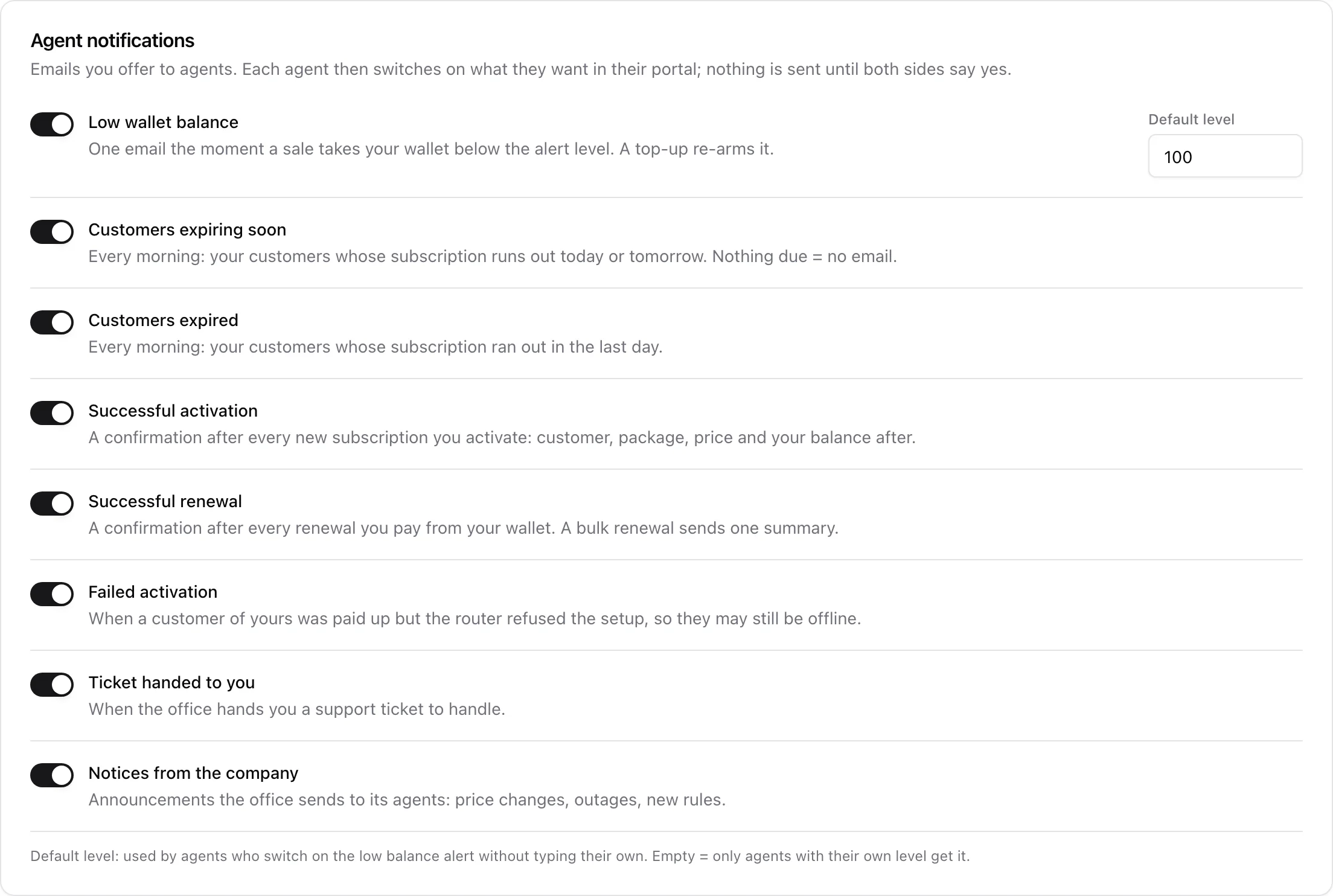
The last card lists the eight emails you are willing to send your agents: low wallet balance, customers expiring soon, customers expired, successful activation, successful renewal, failed activation, ticket handed to you, and notices from the company.
Each kind has two gates. Here you say what the company offers; every agent then ticks what they actually want under Notifications in their portal. Nothing goes out until both sides say yes, and nothing goes out to an agent with no email address. Everything is off on both sides to start with.
Default level beside the low balance row is the amount that fires the alert for agents who switch it on without typing a level of their own. Leave it empty and the alert only reaches agents who set their own number.
The details of each kind, including what the emails contain, are in Agent Notifications.
5. Saving

Nothing on this page applies while you are clicking. An amber Unsaved changes label appears beside the Save button as soon as you touch a switch or a number, and the same Save button sits at the top and the bottom of the page. Leaving the page without saving discards the lot.
Out-of-range numbers are refused with a plain message under the field - a trial cannot be longer than 365 days, a monthly cap cannot be negative, the customer ceiling cannot be below one customer.
Related guides
- Managing Agents and Their Wallets - adding agents, topping up, per-package prices and the agents report.
- Agent Notifications - the eight email kinds and when each one fires.
- The Agent Portal - what your resellers see and do in the field.
- DHCP Device Discovery - what the Claim discovered devices switch depends on.