Network Discovery
A probe can read LLDP, bridge tables and ARP, and sweep your subnets, to propose devices and links for your map. Everything it finds waits for a person to approve it.
Link attribution is only as good as the lines drawn on your network map, and nobody draws a whole ISP network by hand. So a probe can be asked to look around and report what it finds - which devices are there, and which of them are plugged into which.
Everything it finds is a proposal. It lands in an inbox and waits for a person. The map is never written by automation.
Switching it on
Discovery is off by default and is enabled per probe: Settings > Network monitoring > Probers, edit a prober, tick Discover neighbours and unknown hosts. If you want the ping sweep as well, list the subnets to sweep in the Discovery subnets field that appears, one CIDR per line. Only private IPv4 ranges (10.0.0.0/8, 172.16.0.0/12, 192.168.0.0/16 and 100.64.0.0/10) are accepted, each /16 or smaller. Your IPAM pools are included automatically when they belong to a location that has a map device in this probe's part of the network - a pool with no location is given to nobody, because two parks sharing 192.168.1.0/24 is exactly the case a sweep must not be pointed at blindly. A probe is sent at most 32 subnets in total, and what you typed always comes before the pools.
The first run happens five minutes after the probe starts, and then every six hours by default. Scan now on the Discovery page asks every probe with discovery on to run straight away; it starts within a couple of minutes.
What the probe looks for
Three sources, in order, each with a confidence that says how much the evidence is worth. The page shows them as Strong (LLDP), Possible (seen on a switch port) and Weak (only answered a ping).
LLDP - confidence 90
The strongest evidence there is: a device telling you its neighbour's name, the port it is on and its management address. RouterOS, Ubiquiti airOS and airMAX, Cambium and most managed switches all speak it over SNMP. A chassis identifier only counts as a device identity when it actually is a MAC address; when a device reports a name there, it is treated as a name.
Bridge table crossed with ARP - confidence 70
The "trust MACs, never names" method. The probe reads the bridge forwarding table (which MAC is on which port) and the ARP table (which IP has which MAC), and crosses both with the devices the panel already knows about. A known device's MAC seen on exactly one port is an edge: that device hangs off that port.
Three rules keep the inbox readable:
- A MAC seen on two ports says nothing about topology and is dropped.
- A port carrying more than 20 MACs is the way out of the switch, not a port a single device hangs off. Such a candidate drops to confidence 40 and is flagged as going via an uplink.
- A MAC nobody knows is not proposed at all. A bridge table is mostly customer laptops, and an inbox full of laptops is an inbox nobody reads.
Ping sweep - confidence 30
The weakest evidence: an address answered a ping and is not on the map. Every usable address of the configured subnets, at 50 packets a second, skipping everything the panel already knows about, capped at 8,192 addresses a run. When a device also answers SNMP, the candidate is enriched with its sysName and sysDescr, which usually turns "10.4.2.31 answered" into "10.4.2.31 answered and calls itself NorthSector-AP".
The sweep is the slow part - a /24 takes about five seconds of background pinging, a /22 about twenty - which is why the subnet count is capped at 32. It runs in its own loop, so a slow walk or a long sweep can never delay a measurement cycle.
One more source feeds the same inbox: a device that sends its log to a probe from an address the panel does not know is proposed at confidence 50, because it introduced itself by name. See Device Logs.
The inbox
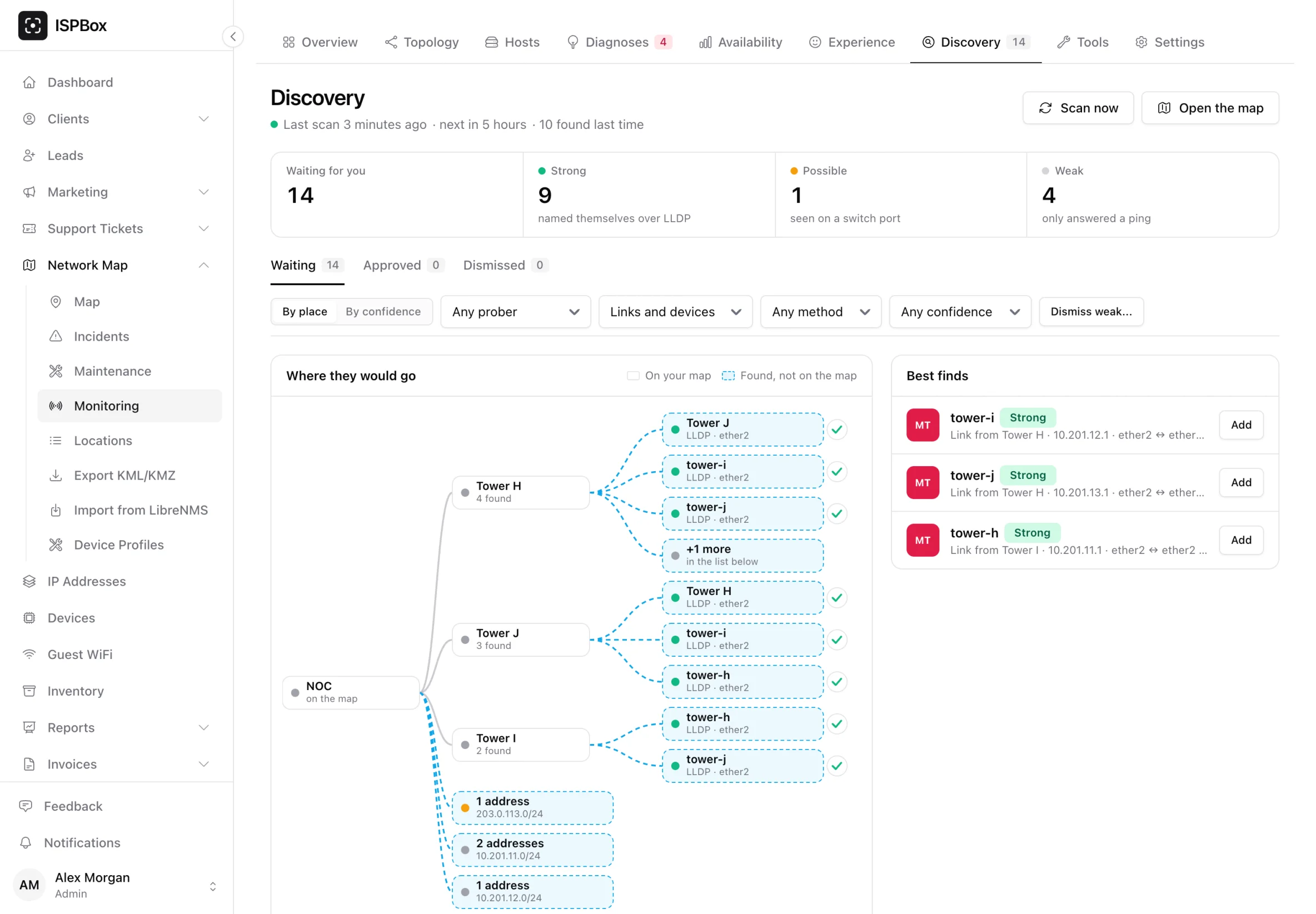
Network Map > Monitoring > Discovery opens with when the last scan ran and when the next one is due, then four counts: how many finds are waiting for you, and how many of them are strong, possible and weak. Below that are the Waiting, Approved and Dismissed tabs, filters by probe, by links or devices, by method and by confidence, and two ways to look at the list:
- By place - a tree of where they would go: the devices already on your map, with each find drawn next to the device it was found behind, plus the best finds with an Add button. Each place can be handled as a group: add all its links to the map, add its found addresses as hosts, or dismiss them all.
- By confidence - a plain list, strongest first, with a row per find.
Every row shows the evidence rather than only a score: the port it was seen on, the MAC, the IP, the sysName and sysDescr, how it was found, and when it was last seen (hover for the first time and how many times). Ends the panel could resolve are shown by their map names; an end it could not resolve says unknown device and shows the IP - which is precisely the thing you have to decide about. A find seen on a port with many other devices is tagged via uplink.
Approving
Approving a link draws a straight line on the map between the two point features, with the type you choose - wireless link by default, fibre route offered - and status live. The line records which method found it, at what confidence, which probe saw it and which candidate it came from, so in six months there is an answer to "who drew this". If a line already joins that pair in either direction, nothing is drawn twice: the candidate is simply pointed at the line that is already there, which is what "yes, that is real" means to the person clicking.
Approving a device drops a pin 20 m north-east of its parent site so it is not hidden underneath it, with the discovered IP on the feature, the MAC and sysName in its properties, and the parent's site inherited. You choose the device type, the name and the site or device it belongs to. The dialog also offers to draw a link from it to that device in the same step; a device is only measured once a line joins it to the map.
Add as hosts (on a place in the By place view) is the third option: the found addresses are measured as hosts on the probe that found them, without putting anything on the map. That suits a sweep of a management subnet where you want to know when an address stops answering before you know where it belongs.
Approving anything is enough on its own - the target sync and the path rebuild are queued automatically, and the probes pick up the new configuration on their next pull. Bulk approve exists for links only, and applies one link type to all of them; a device needs a name and a parent, so it stays one dialog at a time rather than producing a pile of pins all called "Discovered device".
Dismissing
Dismissing records the count of how many times the candidate had been seen, so it is not proposed again until it has been seen twice as often - a neighbour you have already said no to stays gone, but something that suddenly starts appearing far more often comes back. The reason you type goes to the audit log, because a dismissal nobody can explain three months later is what makes people stop trusting discovery. A dismissed find can be put back with Restore on the Dismissed tab, and Dismiss weak... clears everything below a confidence you choose in one go.
Why nothing is written automatically
It would be easy to let the probe draw the lines itself, and it would be wrong. Three reasons:
- The quality of a diagnosis equals the quality of the graph. Attribution reasons over the lines on your map; a wrong line produces a confidently wrong answer about which hop is broken. A human is the check on that.
- SNMP tables describe wiring, not intent. A bridge table knows a MAC is on a port. It does not know whether that is your backhaul, a temporary patch, or a neighbour's gear plugged into your switch.
- The map is a human artefact. It carries the names your staff use, the sites they organise work by, and the coverage and PON structure other parts of the panel read. Discovery adds to it, it does not own it.
If the inbox stays empty
- Nothing answers SNMP. LLDP and the bridge tables are read over SNMP, so the devices need a profile that works (SNMP v1, v2c or v3). Check Settings > Network monitoring > SNMP profiles, and remember that a device can carry its own profile override if it does not use the workspace default.
- No subnets to sweep. The sweep only looks at the subnets listed on the probe plus the IPAM pools it can attribute, and it skips everything the panel already knows - so on a fully mapped network it correctly finds nothing.
- It has not run yet. The first run is five minutes after the probe starts, then every six hours.
Discovery candidates are not stored on the probe. They are proposals about right now, not measurements, so a batch the panel could not accept is simply found again on the next run.