Seasonal Suspension
Schedule a service or client to switch off and back on for the season, with billing paused for the gap. Covers the suspend/resume dates, the daily processor, prorate vs full-cycle resume billing, and portal pause requests.
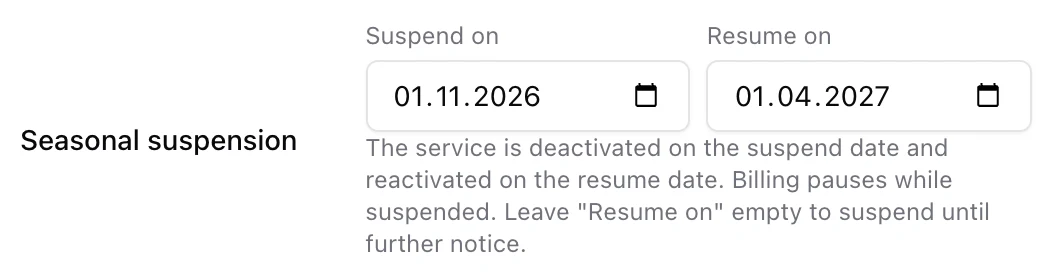
Seasonal suspension turns a service (or a whole client) off on a scheduled date and back on later, with billing paused for the gap in between. It is built for snowbird parks and any customer who leaves and returns on known dates - you set the two dates once and ISPBox handles the deactivation, the reactivation and the billing.
1. Schedule it on a service
On the service's Service Setup tab, set the Seasonal suspension dates:
- Suspend on - the day the service is deactivated and deprovisioned (RADIUS/router access removed).
- Resume on - the day it is reactivated and reprovisioned. Leave this empty to suspend until further notice and resume it by hand later.
You can also suspend an entire client the same way from the client's edit page - every one of their services follows.
2. What happens, and when
A daily job (services:process-seasonal-suspensions, 01:30 in your timezone) does the work:
- On the suspend date it deactivates the service and removes its network access.
- On the resume date it reactivates and reprovisions it.
Because it is date-driven, the change lands on the scheduled day without anyone touching the panel.
3. Billing pauses - and never back-bills
Billing follows the status automatically. While a service is suspended it is not billed, and the suspended stretch is never back-billed when the customer returns. What the first invoice after resume looks like depends on one tenant setting, Settings > Invoices > "First invoice after seasonal resume":
- Prorate - charge only the days from the resume date until the next bill day.
- Full cycle - charge the whole billing month the client returns in.
For example, on a plan resuming June 18 with bill day 1: prorate bills only June 18-30; full cycle bills the full June 1-30 month.
4. Guards worth knowing
- A manually blocked client stays off even when its resume date arrives - the block wins.
- If a whole client is seasonally suspended, its services will not resume individually until the client does.
- Dates entered retroactively (a resume date already in the past) are skipped rather than flapping the service on and off.
5. Letting customers request it from the portal
You can let clients request a seasonal pause themselves. Enable seasonal pause requests under Settings > Customer Portal; the client then submits a suggested suspend-from / resume-on from their portal. These requests are always staff-approved - they land in the portal request inbox as a Seasonal pause item for you to approve or reject, and approval sets the same dates described above.