Invoices Overview & Bulk Generator
The whole-business billing screen: every invoice with totals, filters, PDF ZIP downloads and per-row actions, plus the bulk invoice run with its dry-run preview, locked billing date and run options.
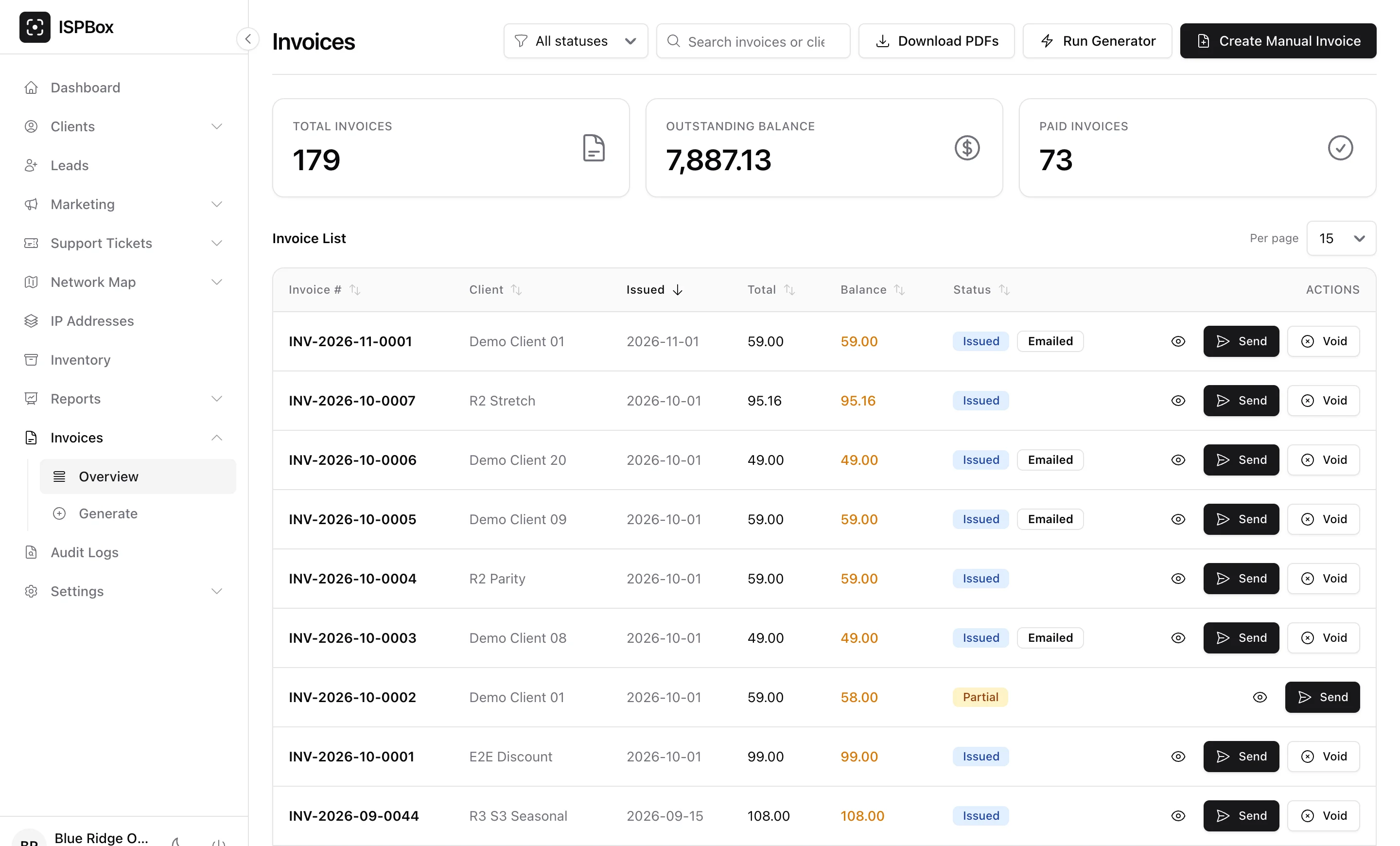
The Invoices overview is your whole-business billing screen - every invoice across every customer, with totals, filters and bulk actions. Open it from Invoices > Overview (needs billing view; issuing, sending and voiding need billing edit). For one customer's billing, use the client billing tab instead.
1. The overview
Headline KPIs show total invoices, outstanding balance and paid invoices. The list below shows each invoice with its number, client, issue date, total, balance and status (Issued, Paid, Partial, Overdue, Void), plus an Emailed badge on the invoices that have already been mailed to the customer. Click any column header to sort by it, filter by status, search by invoice number or client name, and set 15, 30 or 50 rows per page.
Per row you can preview the PDF (the eye icon opens it in a new tab), Send it to the customer (disabled when the client has no email address) and Void it.
Two more actions sit in the page header:
- Download PDFs - one ZIP with the PDFs of every invoice matching your current search and status filter, up to 500 invoices, void ones excluded. This is the print-and-mail workflow for customers without email.
- Create Manual Invoice - the off-cycle composer: pick a client, write your own lines, pull in fees or waiting one-time charges, and choose whether to email it. The client billing tab covers it in detail.
2. The bulk generator, and when you may run it
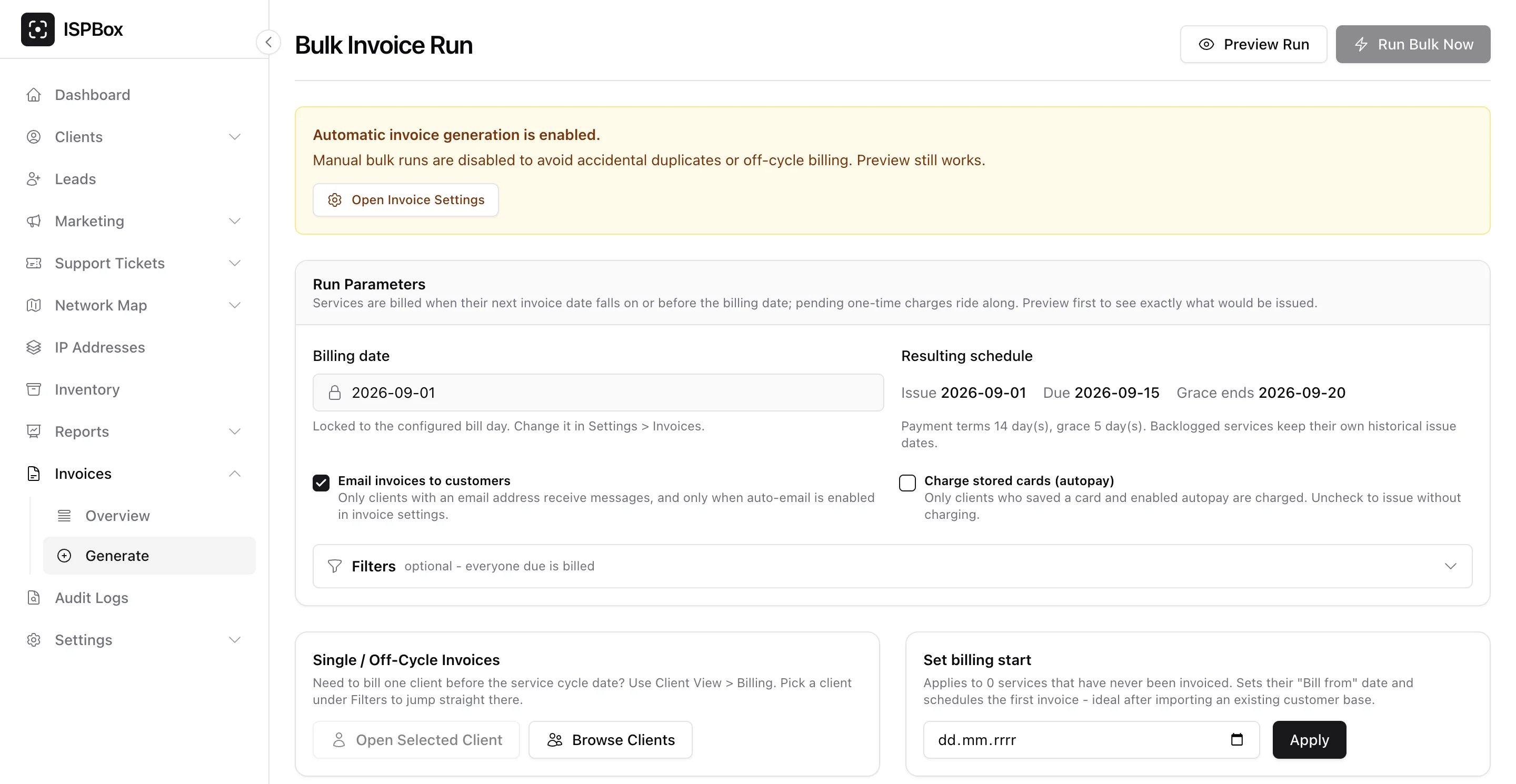
Run Generator (or Invoices > Generate) opens the Bulk Invoice Run. Normally you never need it: with Automatically generate invoices switched on in Settings > Invoices, ISPBox bills everyone due every night at 02:00.
While that automation is on, the page tells you so and Run Bulk Now is disabled - manual bulk runs would risk duplicate or off-cycle invoices. Preview Run still works, because it writes nothing. So you get two honest situations:
- Automation on - use the page to preview what tonight's run will do, and bill single customers from Client View > Billing (pick a client under Filters and press Open Selected Client to jump straight there).
- Automation off - you drive billing yourself: preview, then Run Bulk Now.
The billing date is not a free date field either. As soon as a bill day is configured in Settings > Invoices, the field shows a padlock and is locked to the next occurrence of that bill day, so a run cannot drift off your billing calendar. Beside it, Resulting schedule spells out the issue, due and grace-end dates from your payment terms and grace period, and mentions your advance-billing window when you use one. Services are picked up when their next invoice date falls on or before that billing date, and any waiting one-time charges ride along.
Two options control what the run does beyond issuing:
- Email invoices to customers - on by default. Only clients with an email address are mailed, and only while auto-email is enabled in invoice settings.
- Charge stored cards (autopay) - starts from your autopay setting and can be overridden for this one run. Only customers who saved a card and enabled autopay are charged; uncheck it to issue without taking money.
3. Always preview first
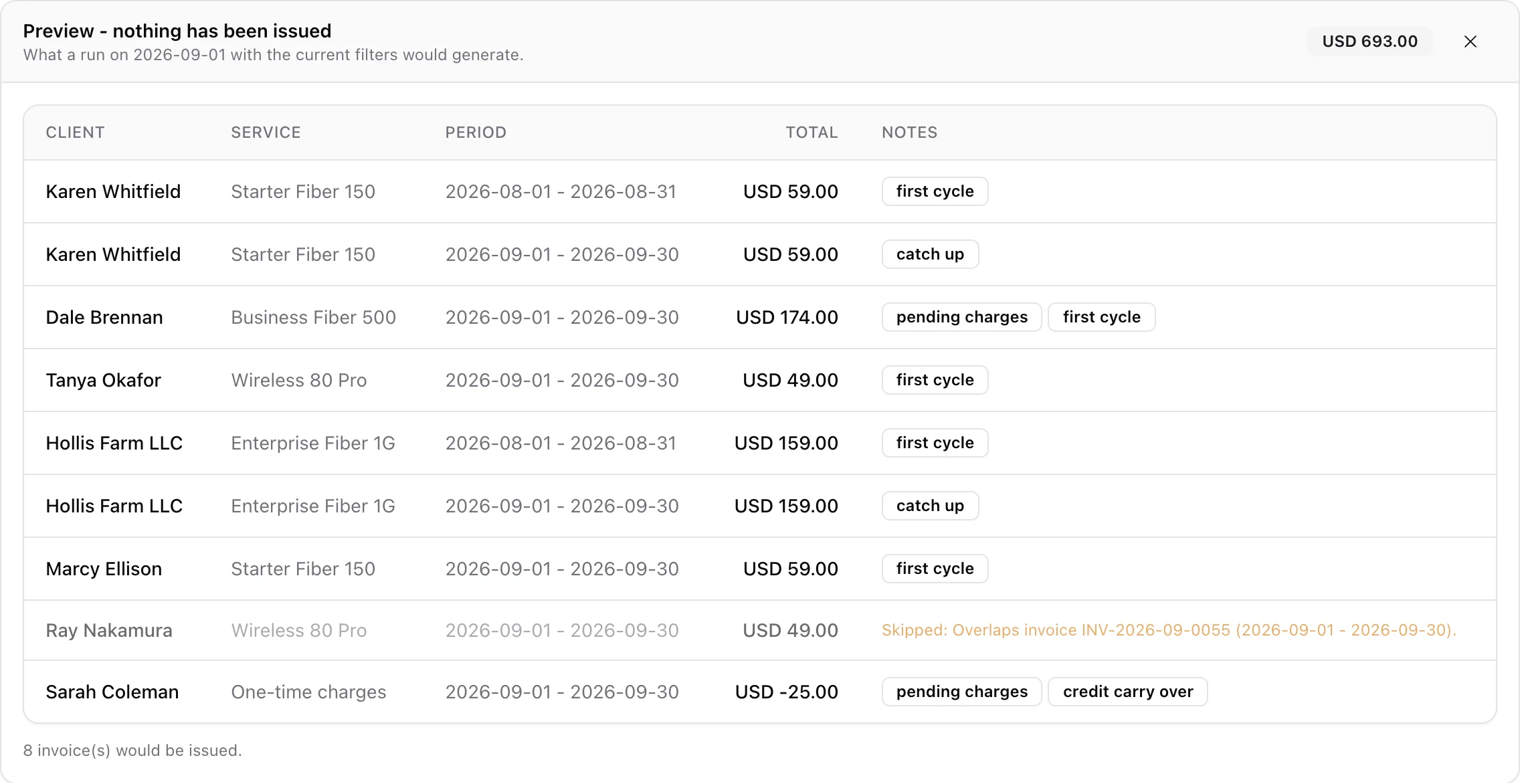
Preview Run is a dry run: it walks exactly the same selection as a real run and issues nothing. You get one row per invoice it would create, with the client, service, billed period and total, a total per currency in the header, and a count of the invoices that would be issued.
The Notes column is where the value is. Badges explain why a row looks the way it does - first cycle, prorated, prorated stub, catch up (a backlogged period), advance (a renewal pulled forward into your advance window), consolidated (rows that merge into one invoice per client), pending charges, add ons, discount, late fee and credit carry over (a negative total that becomes account credit).
Rows that would not be billed are greyed out with the reason spelled out, for example "Nothing to bill for this date.", "Billing has not started - no Bill from date." or "Overlaps invoice INV-2026-09-0055 (2026-09-01 - 2026-09-30)." If something blocks the whole run instead - missing company name, email or address in Settings > Invoices - the preview shows that as a red pre-flight list and no rows at all.
4. Narrowing the run with filters
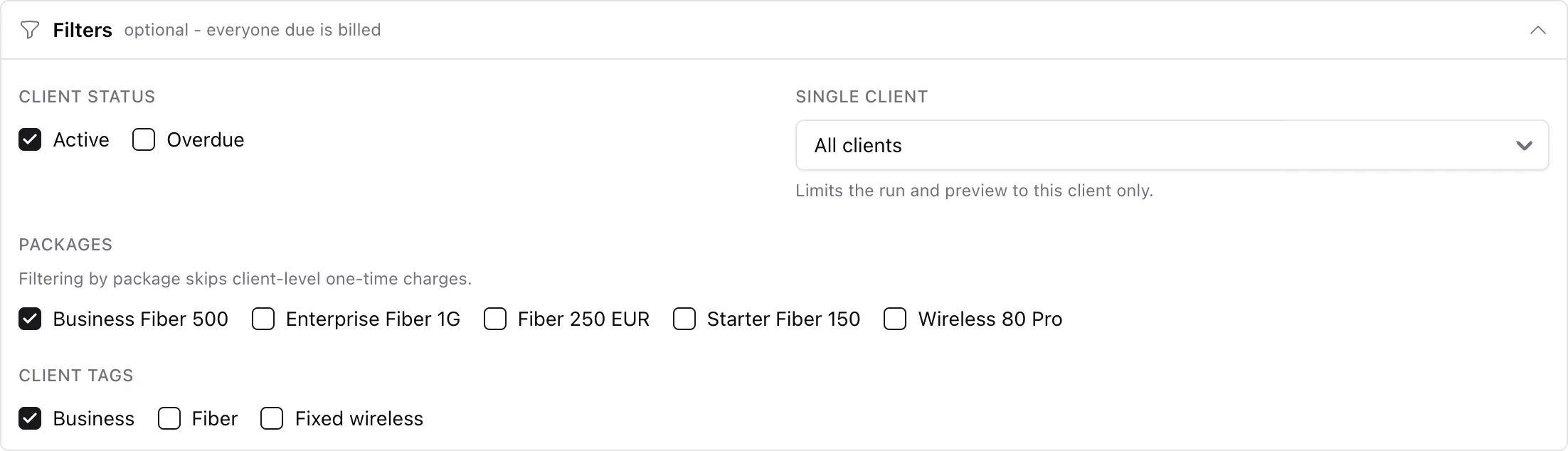
Filters apply to both the preview and the run; leave them empty and everyone due is billed. You can limit by client status (Active, Overdue), to a single client, to specific packages, or to clients carrying certain tags. One caveat worth knowing: filtering by package skips client-level one-time charges, because those are not attached to a package.
5. After the run
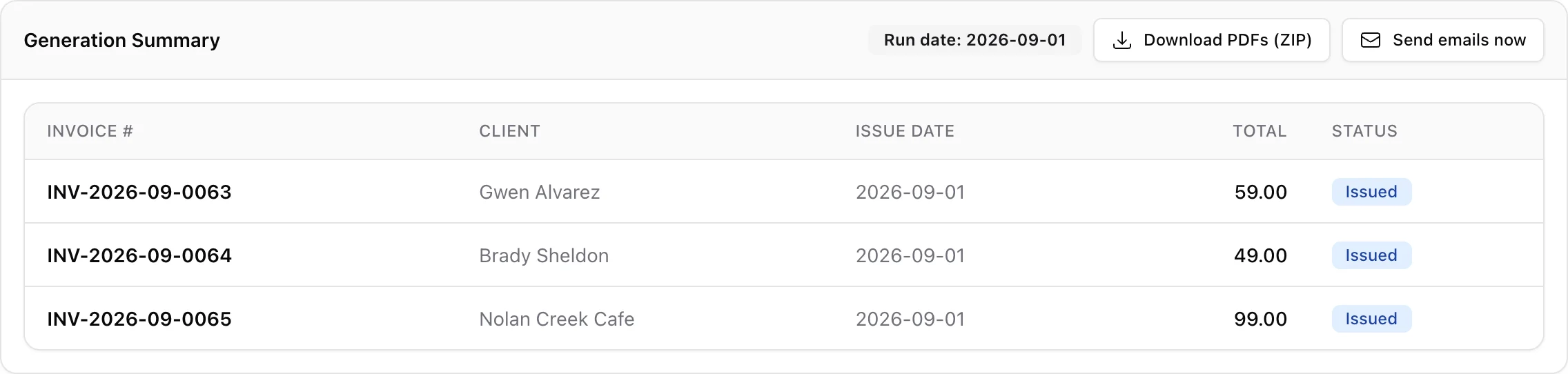
The Generation Summary lists every invoice created with its number, client, issue date, total and status, and any errors underneath. From its header you can Download PDFs (ZIP) for the whole run, and if you ran with emailing off, Send emails now mails the batch in one click (invoices already emailed are skipped).
6. Voiding an invoice
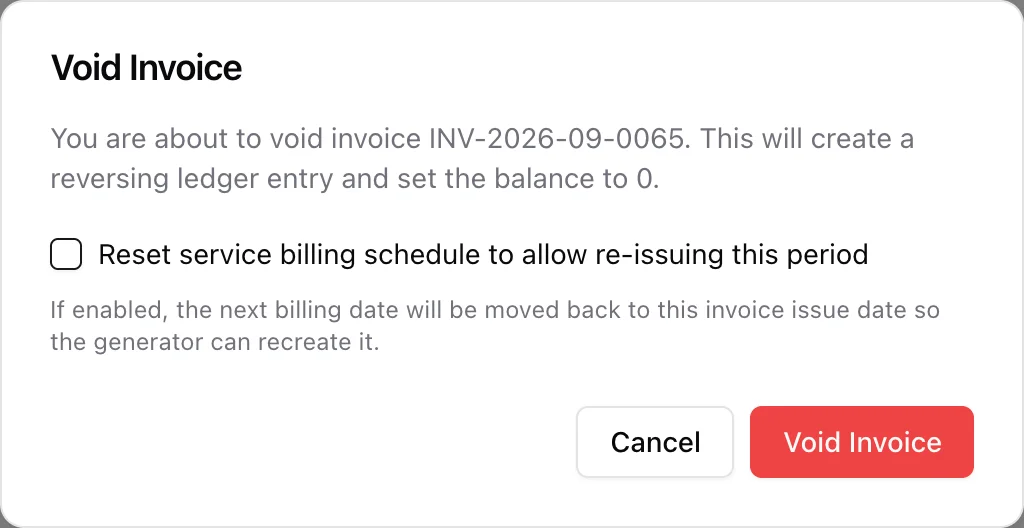
Void only appears while an invoice can still be voided: nothing paid against it and no allocated payment. Voiding writes a reversing ledger entry, sets the balance to 0, and returns any one-time charges that rode on the invoice to pending so they land on the next one.
For a service invoice the dialog offers Reset service billing schedule to allow re-issuing this period. Tick it when you plan to bill that period again - the service's next billing date moves back to the invoice issue date so the generator can recreate it. Leave it unticked when you simply want the charge gone.
Every invoice also has its own page (the audit log links to it) with the PDF inline, Send Email, Void, Void & Reissue and Download PDF. Use Void & Reissue when the invoice was right in principle but wrong in detail: it voids the old document and immediately issues a replacement for the same period and the same released charges.
7. Set billing start (after an import)
The Set billing start tool applies to services that have never been invoiced - it sets their "Bill from" date and schedules the first invoice, and the card tells you how many services qualify. This is exactly what you need after importing an existing customer base, so a migrated customer does not get back-billed for months they were on your old system. Services with billing deliberately switched off, or with a future start date, are left alone.