Document Templates
Write contracts and forms once with placeholders, then generate a filled PDF for any customer in seconds - and let clients e-accept them in the portal with an audit trail.
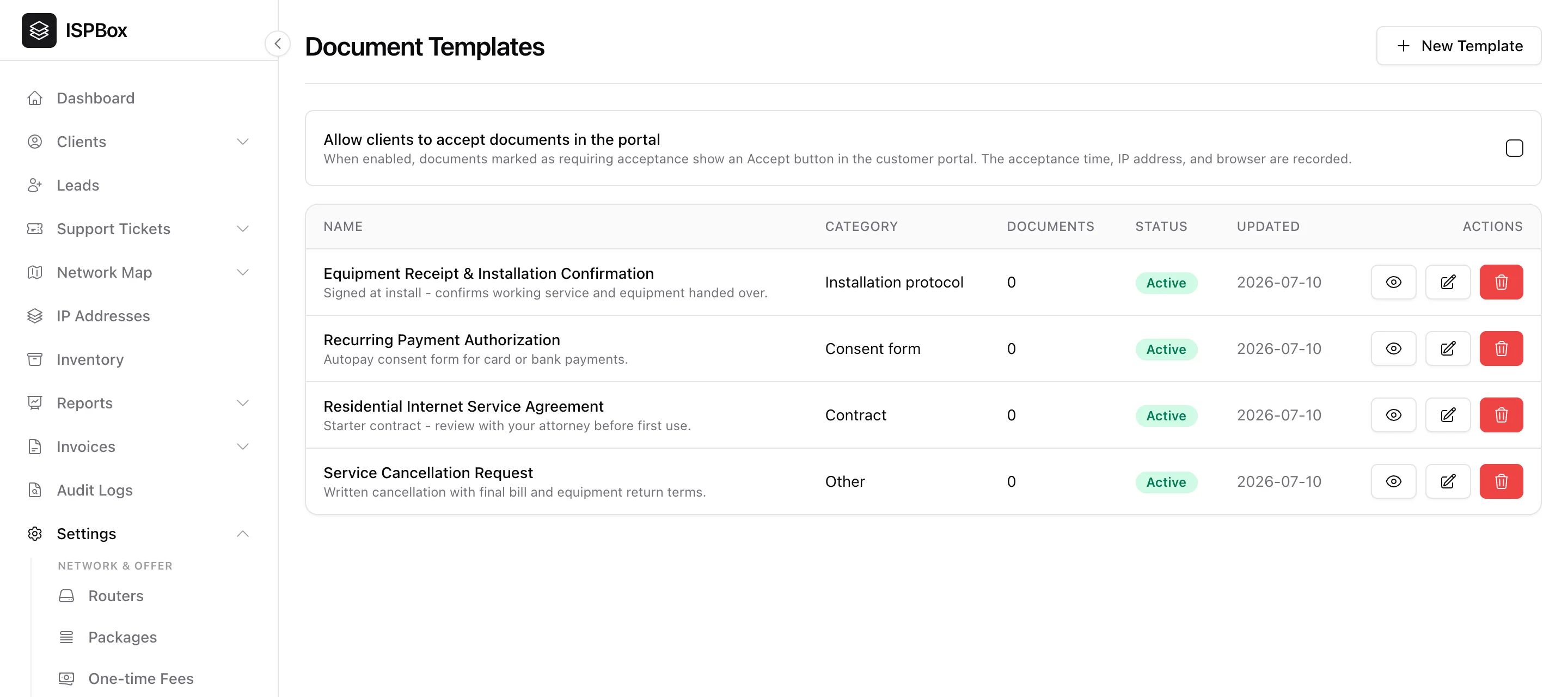
Document templates let you write a contract or form once - service agreement, install confirmation, autopay authorization - with placeholders for client and service data, then generate a filled-in PDF for any customer in seconds. Manage them under Settings > Documents (needs the documents manage permission).
1. The templates list
Each template shows its name, category (Contract, Consent form, Installation protocol, Other), status and how many documents have been generated from it. ISPBox ships with useful starters - a Residential Internet Service Agreement, an Equipment Receipt & Installation Confirmation, a Recurring Payment Authorization and a Service Cancellation Request - that you can adapt to your business.
2. Writing a template
Click New Template (or edit an existing one). Give it a name, category, description and paper size (Letter or A4), then write the body. Drop in placeholders for client and service details so each generated PDF is personalised automatically. Use Preview to see it rendered with sample data before you save.
3. Generating and e-signing
Once a template is active, generate a filled PDF straight from any client's page - no copy-paste. Turn on "Allow clients to accept documents in the portal" to show an Accept button in the customer portal for documents that require acceptance; ISPBox records the acceptance time, IP address and browser as a lightweight audit trail.