Revenue Share with Property Owners
Work out what a park, HOA or building owner is owed each month or quarter: a percent of what was invoiced or paid, or a fixed amount per active service, by active days, with tiers and a minimum.
When a park, a homeowners association or a building owner gets a part of what you earn on their property, somebody has to work out that part every month. Revenue share does it from the data already in ISPBox: the services at the partner's locations, the days each was active, what was invoiced and what was paid. You get a statement per period that you can check, approve and send. ISPBox works out the amount; it does not move money.
1. Where to find it
Open Reports > Revenue Share. By default only Admins see it (permissions revenue_share.view and revenue_share.manage).
2. Create an agreement
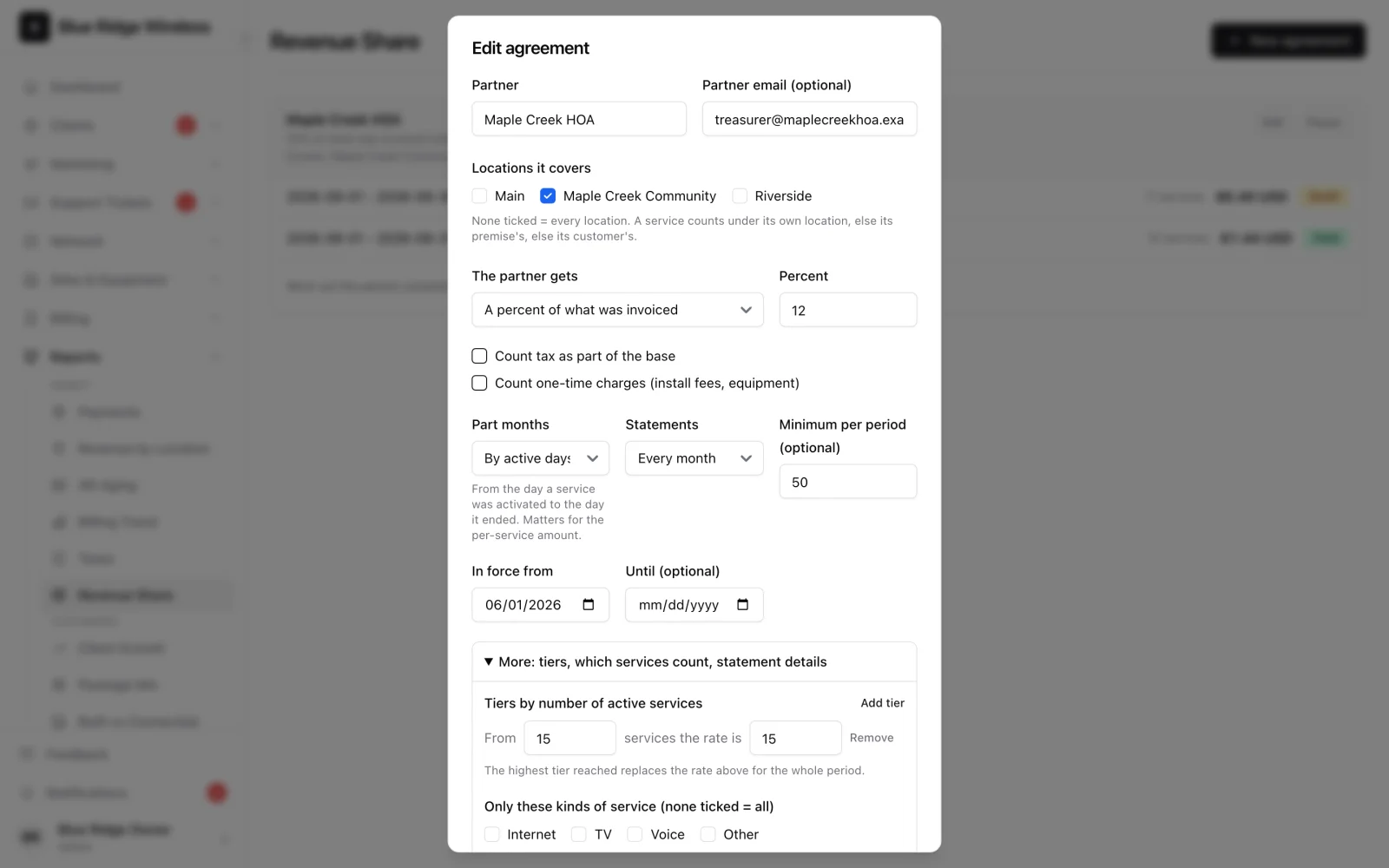
Click New agreement and fill in:
- Partner and, if you like, their email.
- Locations it covers. Leave all unticked to cover every location. A service counts under its own location; if it has none, under its premise's location, then the customer's.
- The partner gets, one of three:
- A percent of what was invoiced - the invoice lines of the covered services issued in the period, less credit notes issued in the period.
- A percent of what was paid - money received in the period towards those invoices. A refund is taken back in the period in which it is booked.
- A fixed amount per active service per month.
- For the percent options: whether tax and one-time charges (install fees, equipment) are part of the base. Both are left out unless you tick them.
- Part months: by active days, or in full. "By active days" counts from the day a service was activated to the day it ended.
- Statements: every month or every quarter.
- Minimum per period: if the share comes out lower, the statement gets a top-up line. When the agreement is in force for only part of a period, the minimum is reduced in proportion.
- In force from and, optionally, until. Only days inside these dates count.
Under More:
- Tiers by number of active services - "from 15 services the rate is 15%". The highest tier reached replaces the rate for the whole period.
- Only these kinds of service (Internet, TV, Voice, Other) and only these packages.
- Show customer names on the statement - off by default; lines then show the premise and the plan only.
If two active agreements cover the same services in the same days, the list says so under both, because those services would be shared twice.
3. How active days are counted
ISPBox keeps a record of the days each service was switched on. A service activated on the 16th of a 30-day month has 15 active days. A service paused from the 11th to the 20th has 20. The count never reaches before the service's start date or past its end date, and it uses your workspace's calendar days, so the result does not depend on the time of day or the time zone of whoever opens the statement.
For services that existed before this feature, the record starts from their start date.
4. Statements
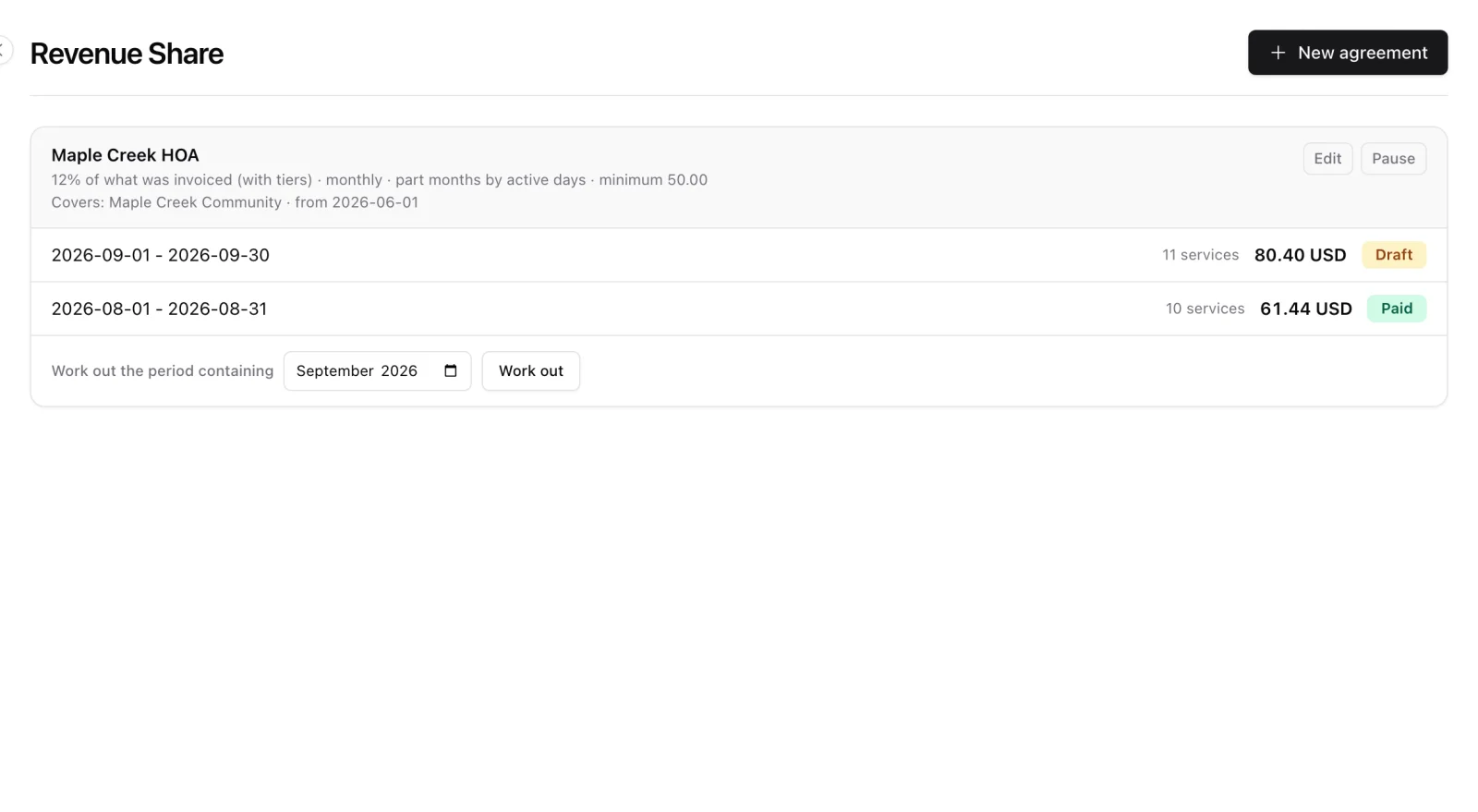
A statement is drafted by itself after each period ends (the first night after the month or quarter). If a night is missed, the next run catches up. You can also pick a month and click Work out at any time, including for the current month to see where it stands. A month that has not started yet, or one in which the agreement is not in force, is refused.
On the statement page:
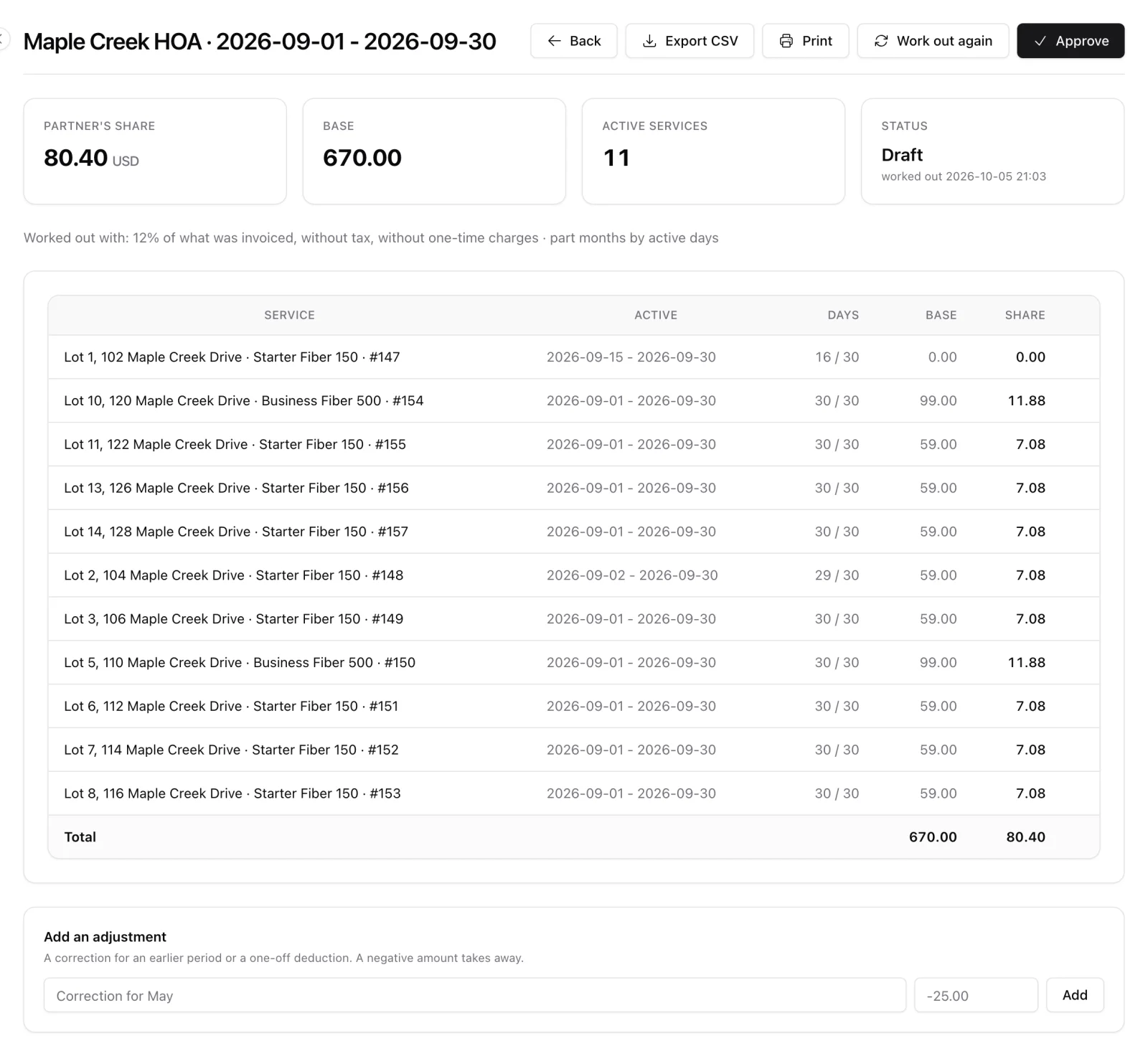
- One line per service: where it is, the active days, the base and the share.
- Work out again recalculates a draft from the current data.
- Delete draft throws away a draft worked out for the wrong month.
- Add an adjustment puts in a line by hand: a correction for an earlier period, a one-off deduction. A negative amount takes away. Adjustments survive "Work out again".
- Approve freezes the statement. It is offered only after the period has ended, so the whole period is in it. A draft made while the period was still running is worked out again by itself once the period is over.
- Back to draft undoes an approval made by mistake.
- Mark as paid records that you paid the partner, with a note (transfer reference, check number).
- Export CSV and Print give the partner their copy.
5. What happens after approval
An approved statement does not change, and it keeps the terms it was worked out with even if you edit the agreement later. If money moves afterwards, it lands in the period in which it moves: a payment from June refunded in July lowers July's statement, not June's. For anything else, add an adjustment to the next statement.
6. Good to know
- An invoice line counts for the service it names. A line on an older invoice that names no service counts for the invoice's service only when that invoice bills nothing else.
- An invoice voided in the month it was issued is left out. An invoice voided in a later period is taken back in the period of the void, like a refund. Bounced payments were never counted.
- When a service is deleted, what it earned the partner in periods not approved yet is kept on those statements as a line marked "service removed", counted up to the day before it was deleted. It still counts towards the tiers and the minimum. A draft that holds such a line cannot be deleted.
- A payment that is reversed (a bounced cheque) is treated like a refund: taken back in the period of the reversal. Nothing is taken back for invoices or payments from before the agreement started.
- A service that is still active after its end date keeps counting: the end date only matters in workspaces that stop services on it.
- A long statement shows the first 50 service lines with Show all; printing and the CSV always carry every line.
- Pausing an agreement stops new statements; the existing ones stay.
- Seasonal suspension lowers the active days of a service, so a partner paid per active service is not paid for the months a lot is closed.