Self-Service Plan Changes
Let customers switch their internet plan from the portal on your terms: upgrade-only or any direction, auto or staff-approved, next-period or prorated billing - plus the guardrails and FUP handling.
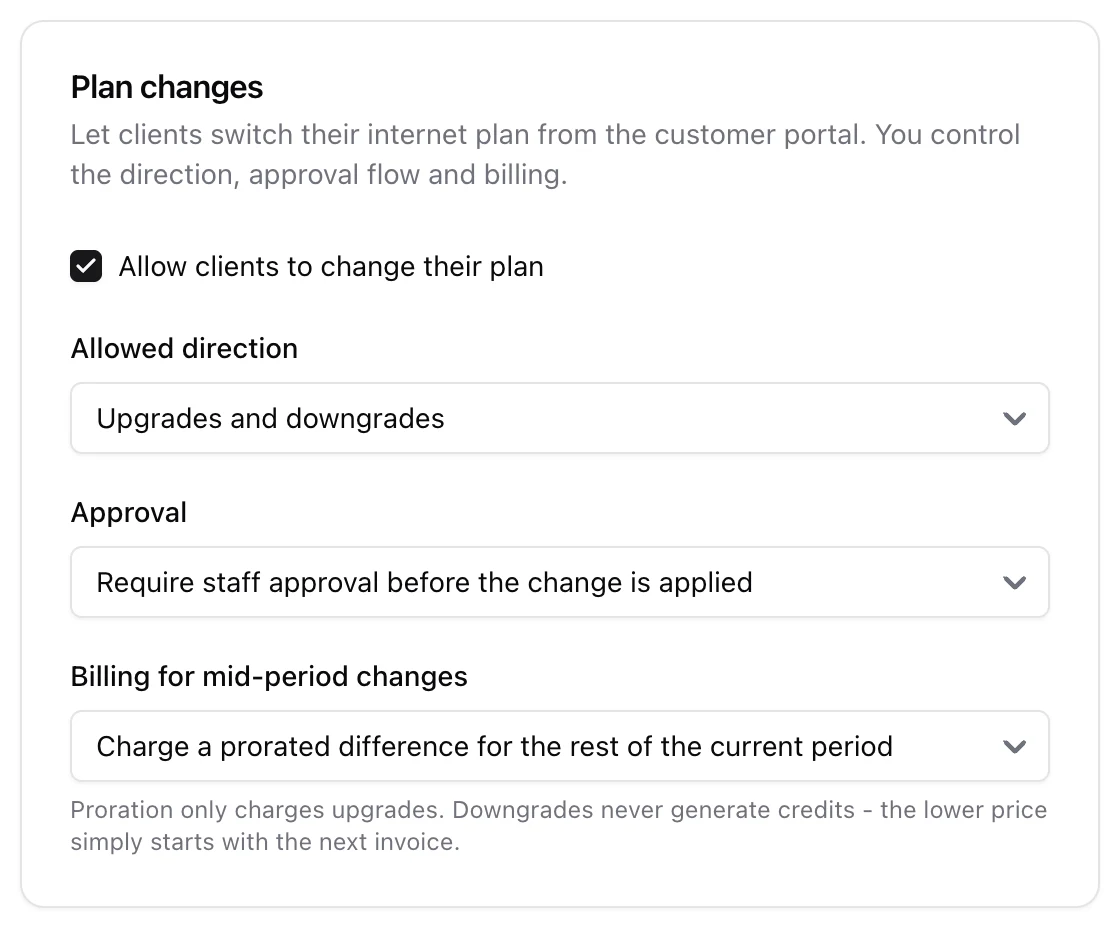
You can let customers switch their internet plan themselves from the portal, entirely on your terms - you decide whether they can only upgrade, whether a human approves the change, and how a mid-period switch is billed. This guide covers the settings and exactly what happens when a customer changes plan.
1. Enable and shape it
Go to Settings > Customer Portal > Plan changes and tick Allow clients to change their plan. Three controls shape it:
- Allowed direction - Upgrades only (faster / more expensive plans), or Upgrades and downgrades.
- Approval - Require staff approval before the change is applied, or Apply automatically, no approval needed.
- Billing for mid-period changes - the new price starts with the next billing period, or the change is settled fairly mid-period: the customer is credited for the unused time of the old plan and charged prorated for the new one, with both lines landing on their next regular invoice. Downgrades produce a real credit when your direction setting allows them.
2. What the customer sees
On a service in their portal, the customer is offered the plans they are allowed to move to - packages available in their location, on the same billing period as their current plan (a monthly price is never compared against a yearly one), excluding their current plan, and filtered to faster plans only if you chose upgrades-only. They pick one, see the exact proration amounts up front, and confirm.
3. What happens when a change is applied
- The service is reprovisioned to the new speed on RADIUS / MikroTik straight away.
- If you use proration, the settlement - credit for the unused old-plan time plus the prorated new-plan charge - lands on the next regular invoice, not as a separate immediate payment. An invoice never goes negative: a credit larger than the next invoice simply carries over to the following one. Staff-side changes have more options (immediate settlement invoices, scheduling, backdating) - see Changing a Client's Plan.
- An active fair-use throttle is handled sensibly: if the customer was throttled by FUP and moves to a plan with no data cap, the throttle is lifted; if the new plan also has a cap, the throttle is preserved.
4. Guardrails
A plan change is refused - whether self-applied or approved later - if the service is in a state where it should not move: blocked for non-payment, seasonally suspended, or the client is blocked. This holds even in approval mode, so a request approved after the account went delinquent still will not apply.
5. Approval mode and the request inbox
With approval selected, a customer's choice does not take effect immediately - it becomes a request in your portal request inbox for staff to approve or reject. With auto selected, the change applies the moment the customer confirms. Either way you keep full control of what customers can and cannot do to their own plan.