QuickBooks Sync
Two-way QuickBooks Online sync: ISPBox pushes customers, invoices, credit notes and payments, and pulls payments booked in QuickBooks back onto the right invoices, with mapping and a review queue.
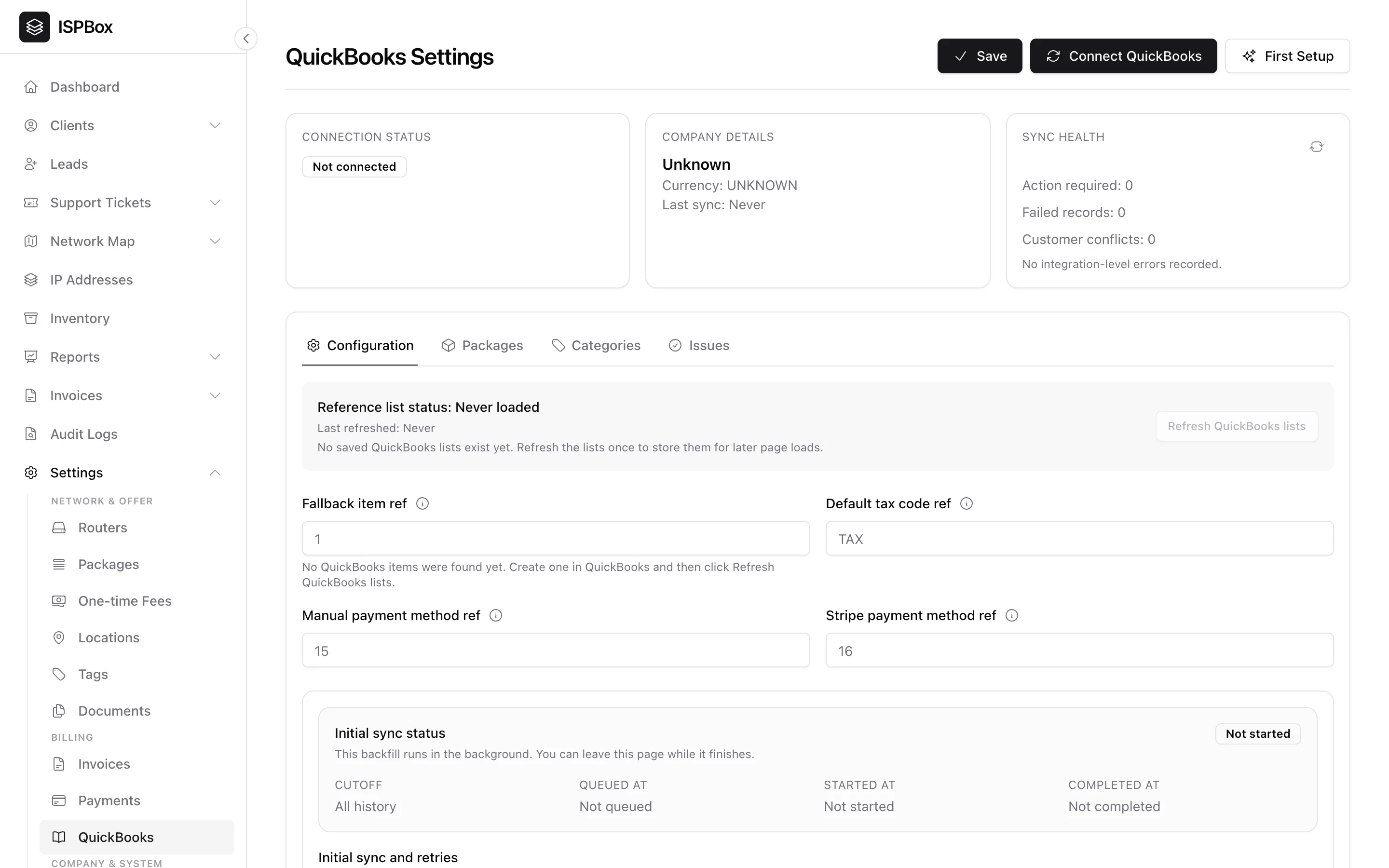
The QuickBooks integration keeps your accounting in sync in both directions: ISPBox pushes customers, invoices, credit notes and payments to QuickBooks Online, and payments you book in QuickBooks (a bank feed match, a cheque, a deposit) are pulled back and applied to the customer's invoices. Set it up under Settings > QuickBooks (needs settings manage).
1. Connecting your company
Click Connect QuickBooks and sign in with your Intuit account to link your QuickBooks Online company over OAuth, or use First Setup to walk connection, mapping and the initial sync in one guided pass. If the page says QuickBooks Online is not configured yet, the workspace is missing its Intuit app credentials - your ISPBox administrator sets those in the environment.
Once connected, the top of the page always shows three cards: connection status (with the realm ID and when you connected), company details (name, currency, last sync) and sync health - how many records need action, failed, or hit a customer conflict, plus the last integration-level error. The refresh icon re-checks the connection.
2. What ISPBox pushes to QuickBooks
- Customers - your clients become QuickBooks customers.
- Invoices - issued invoices are pushed with their line items, and voiding an invoice in ISPBox voids the QuickBooks copy too.
- Credit notes - issued as QuickBooks credit memos.
- Payments - recorded payments are applied against the matching invoice.
An initial sync backfills your existing history in the background. You can leave the page while it runs; the Configuration tab shows its status (queued, running, completed, failed) with the cutoff, timestamps and a summary of how many customers, invoices, credit memos and payments were attempted and what happened to them. Set From this date first if you only want history from a certain day forward, and use Retry issues to re-queue everything that is waiting on a fix.
3. Mapping your chart of accounts
Press Refresh QuickBooks lists once after connecting. ISPBox stores a snapshot of your items, tax codes and payment methods so the dropdowns work on every later page load (it also refreshes itself daily). On the Configuration tab you then set:
- Fallback item ref - the QuickBooks Item used when a line cannot be resolved to a mapped one.
- Default tax code ref - the tax code applied to synced documents.
- Payment method refs - one per payment source: Manual, Stripe, PayPal, Square and Authorize.net. Leave a gateway empty and its payments fall back to the manual method, so a card payment never lands in QuickBooks as untyped cash.
The Packages tab maps every package to a QuickBooks Item. Mapped packages carry a green Mapped badge; an unmapped one is flagged Blocking sync, because an invoice containing it cannot be pushed until you choose the Item. Recurring service lines and per-service price overrides inherit the Item from their package, so mapping the package is enough.
4. Charge categories
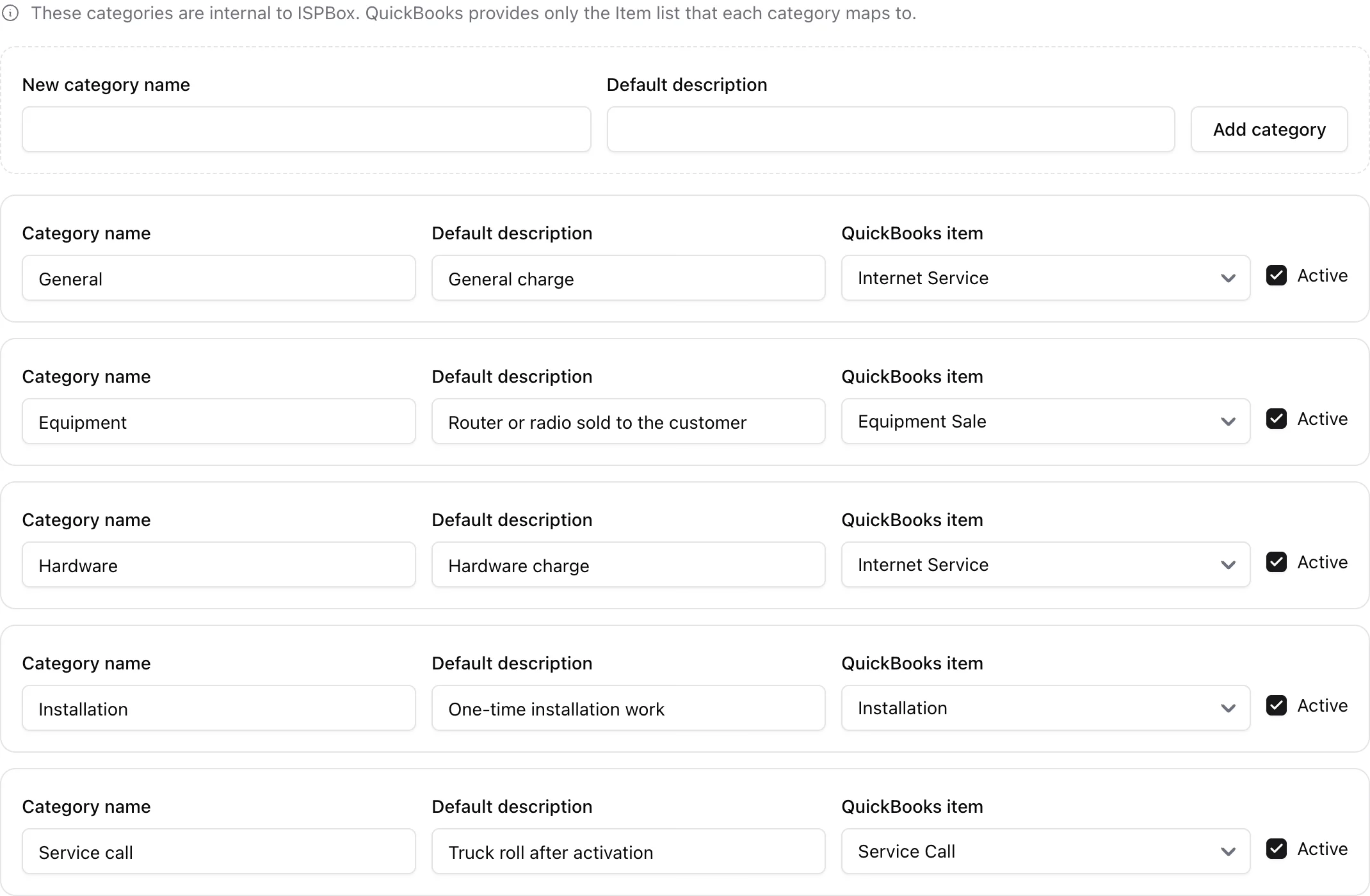
One-time charges are grouped into charge categories that live inside ISPBox - QuickBooks only supplies the Item each category maps to. On the Categories tab you can rename a category, give it a default description, map it to an Item, deactivate it, or add a new one. Those categories are what you pick when you add a one-time fee to a customer, so mapping them is what puts installation revenue and hardware sales on the right accounts.
5. Importing payments from QuickBooks
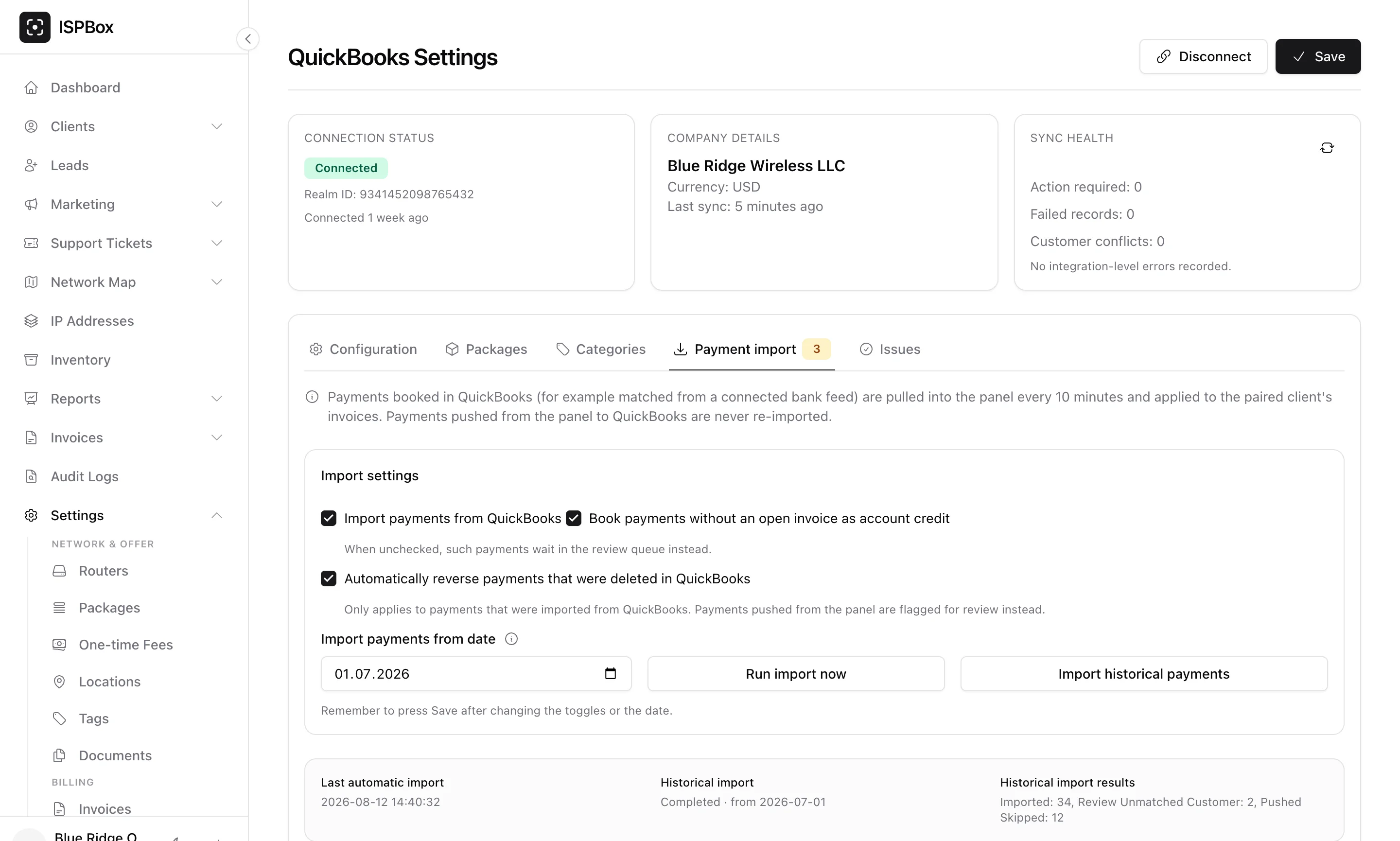
If your bookkeeper matches payments in QuickBooks - from a bank feed, a cheque or a cash deposit - the Payment import tab brings them back into ISPBox so the customer's balance is right without double entry. ISPBox polls QuickBooks every 10 minutes and books each new payment against that customer's invoices: first the invoices QuickBooks itself applied it to, then the oldest open ones, and any leftover stays as account credit. Payments that ISPBox pushed to QuickBooks are never re-imported.
The import settings decide how careful it is:
- Import payments from QuickBooks - the master switch. Nothing is pulled while it is off.
- Book payments without an open invoice as account credit - on by default. Uncheck it and such payments wait in the review queue instead.
- Automatically reverse payments that were deleted in QuickBooks - on by default, and only for payments that came from QuickBooks. A deleted payment that ISPBox pushed is flagged for review rather than reversed behind your back.
- Import payments from date - payments dated before this day are skipped. It is also the start date for the historical import.
Remember to press Save after changing the toggles or the date. Then Run import now queues an immediate poll, and Import historical payments queues a one-off backfill from your chosen date (the 10-minute polling itself only reaches back about a month, so older history needs this). The status row underneath shows the last automatic import, the state of the historical import and its results.
6. Payments waiting for review
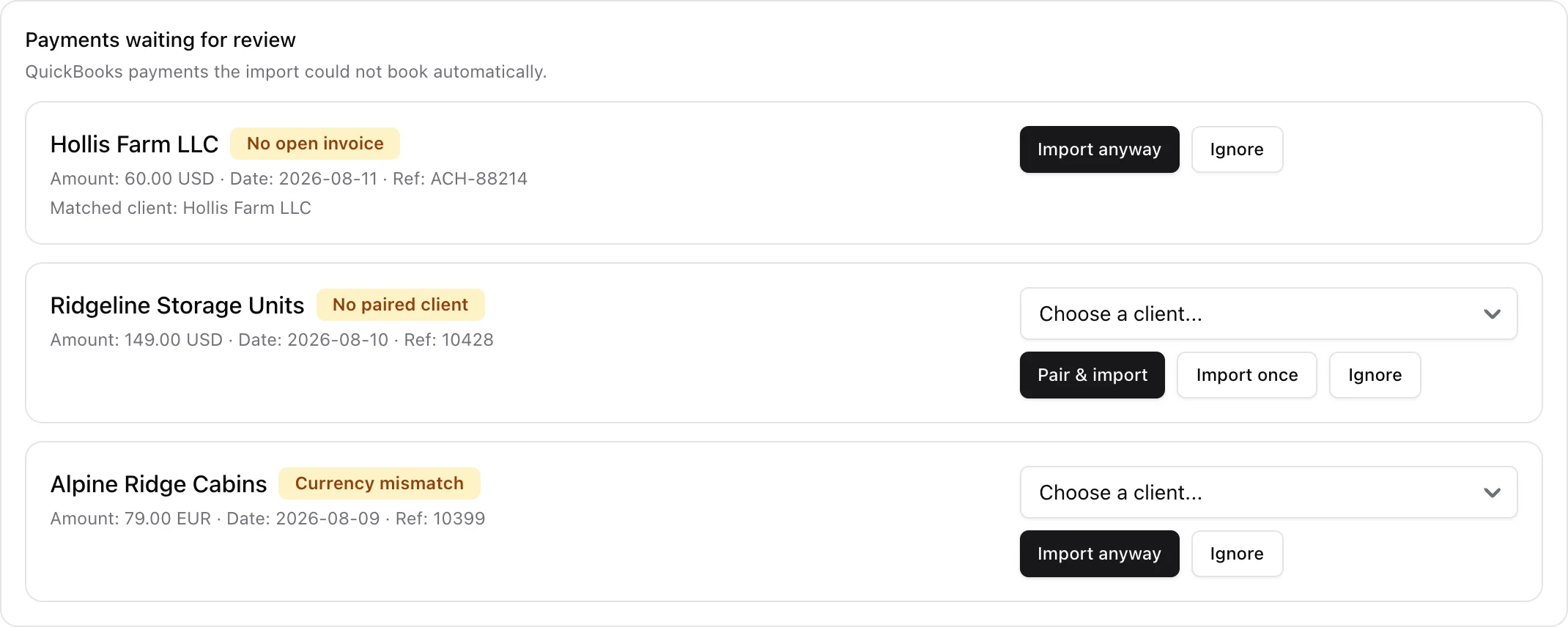
Anything the import cannot book on its own lands in Payments waiting for review with the QuickBooks customer, amount, date, reference and a reason chip:
- No paired client - pick the client from the dropdown and press Pair & import to remember the pairing for next time, or Import once for a one-off.
- No open invoice - Import anyway books it as account credit.
- Currency mismatch - the payment is not in your workspace currency; Import anyway if that is expected.
- Amount changed in QuickBooks - somebody edited a payment you already imported. Adjust it in ISPBox, then Dismiss the entry.
- Deleted in QuickBooks - Reverse payment to mirror the deletion, or Keep as is.
Ignore drops a row you never want booked. Once a blocker is gone (you paired the customer, for example) the next poll retries the payment on its own.
Below the queue, Manual customer pairing loads the QuickBooks customers that are not paired with any client yet, so you can match them by hand before their payments ever arrive. Filter the loaded list by name or email, choose the client and press Pair.
7. The Issues tab
The Issues tab is where sync stops and asks for a decision. It has three parts: unresolved mappings (legacy or imported invoice lines with no Item - choose one and Save and retry, or Skip invoices that contain them), customer conflicts (QuickBooks matched more than one customer for a client - Link this customer or Create new QuickBooks customer instead), and recent sync issues, a per-document log of what failed or was skipped, including the raw message QuickBooks returned. The tab shows a count badge whenever something is waiting.
8. Disconnecting
You can Disconnect at any time - your ISPBox data is untouched, and syncing simply stops until you reconnect. Nothing already in QuickBooks is deleted.