Customer Equipment: Wi-Fi & CPE Credentials
Store a service's Wi-Fi and CPE login details, management URL and notes on the Assigned Equipment tab. The Wi-Fi name and password are also what the customer sees in their portal; the CPE login and your notes stay internal, and the passwords are encrypted at rest.
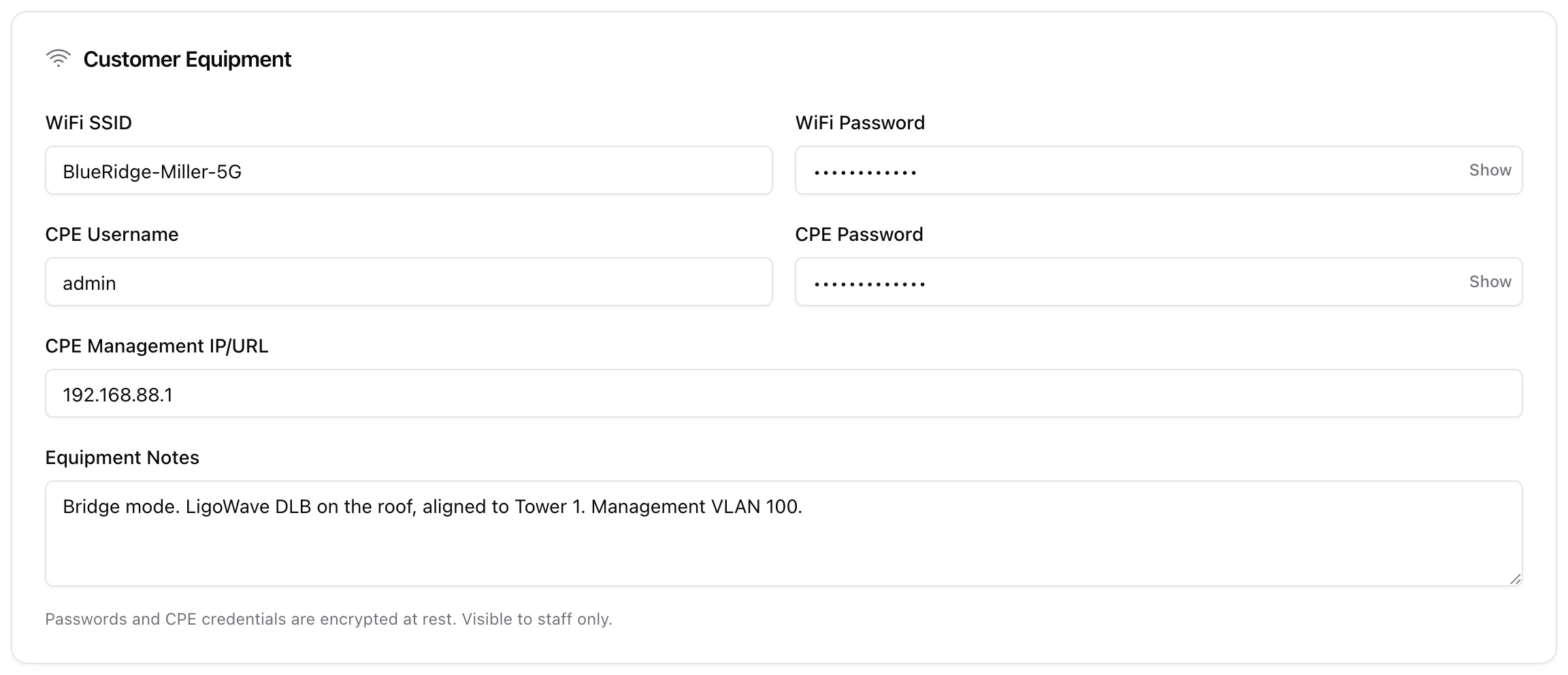
Every service can store the customer's on-site gear details - the Wi-Fi network, the CPE (customer premises equipment) login, its management address and free-form notes. Keeping these on the service record means whoever takes the next call or truck-roll has the credentials in front of them instead of hunting through a spreadsheet. The two Wi-Fi fields do double duty: they are also what the customer sees in their portal, so they stop the "what is my Wi-Fi password again?" call before it happens.
1. Where it lives
Open the customer's service and click Edit service (from the client's Services tab), then switch to the Assigned Equipment tab. The Customer Equipment card is at the top, above the section where you attach serialized inventory units to the service.
These fields are only on the edit form. The Add service wizard does not ask for them, so the usual order is: create the service, then come back and fill the equipment details in once the install is done.
2. The fields
- WiFi SSID - the network name configured on the customer's router/AP. Shown to the customer in their portal.
- WiFi Password - the wireless key. Encrypted at rest; hidden behind a Show toggle here. Shown to the customer in their portal.
- CPE Username and CPE Password - the login for the customer premises device (radio, ONT, router). Both stored so a technician can get into the device remotely. Staff only.
- CPE Management IP/URL - where that device is reached, for example
192.168.88.1. Staff only. - Equipment Notes - anything worth remembering: bridge mode, VLAN, antenna alignment, model, mounting. Staff only.
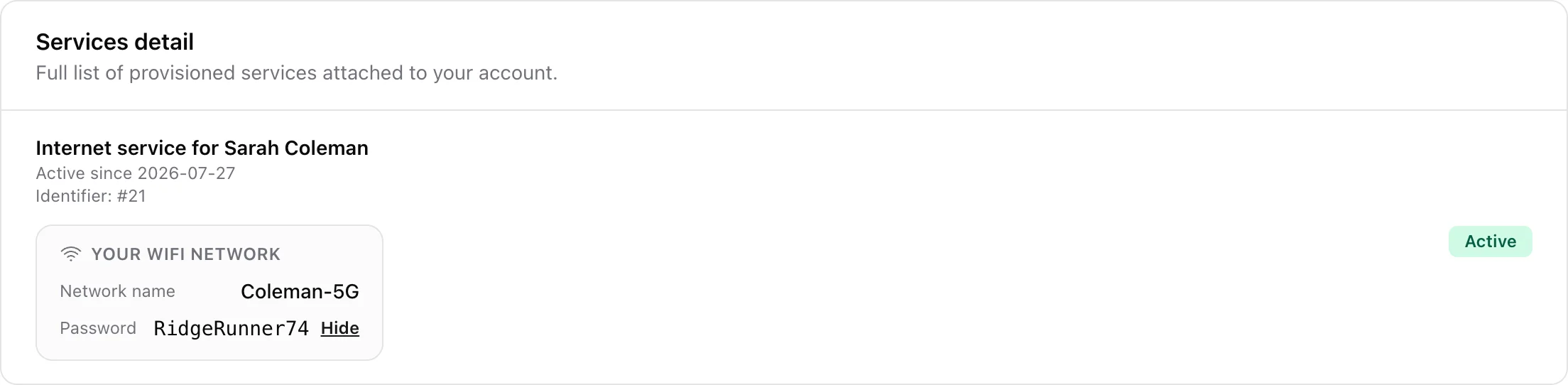
3. What the customer sees
On the Services tab of the customer portal, each service shows a Your WiFi network card with the network name and the password behind a Show / Hide link. Nothing else from the Customer Equipment card is exposed: the CPE login, the management address and your notes stay internal.
Two consequences worth remembering:
- Whatever you type is what the customer reads. Keep the SSID and password exact, and update them when a technician changes them on site. A stale password here is worse than an empty one, because the customer will trust it and then call you.
- Leave both blank and the card disappears. The portal only renders the card when the SSID or the password is filled in, so there is no half-empty box on the customer's screen. If you do not want customers self-serving their Wi-Fi details, simply do not store them.
4. What is encrypted
The Wi-Fi password, the CPE username and the CPE password are encrypted at rest. The SSID, the management address and the notes are stored as plain text. Access to the service edit form itself is controlled by your staff roles, so only users who may manage services can read or change any of it.
5. IPTV credentials
Services that carry IPTV also get an IPTV Credentials card (IPTV login and password, both encrypted) on the service's Service Setup tab. Those credentials are shared only with IPTV integrations and never appear in the portal.
6. Saving
Fill in what you have and click Update Service. You do not need every field - store whatever is useful; the record can be completed on the next visit.