REST API & Webhooks
Integrate ISPBox with your own tools: scoped machine API keys against your tenant URL, a full endpoint reference, and HMAC-signed webhooks for real-time events.
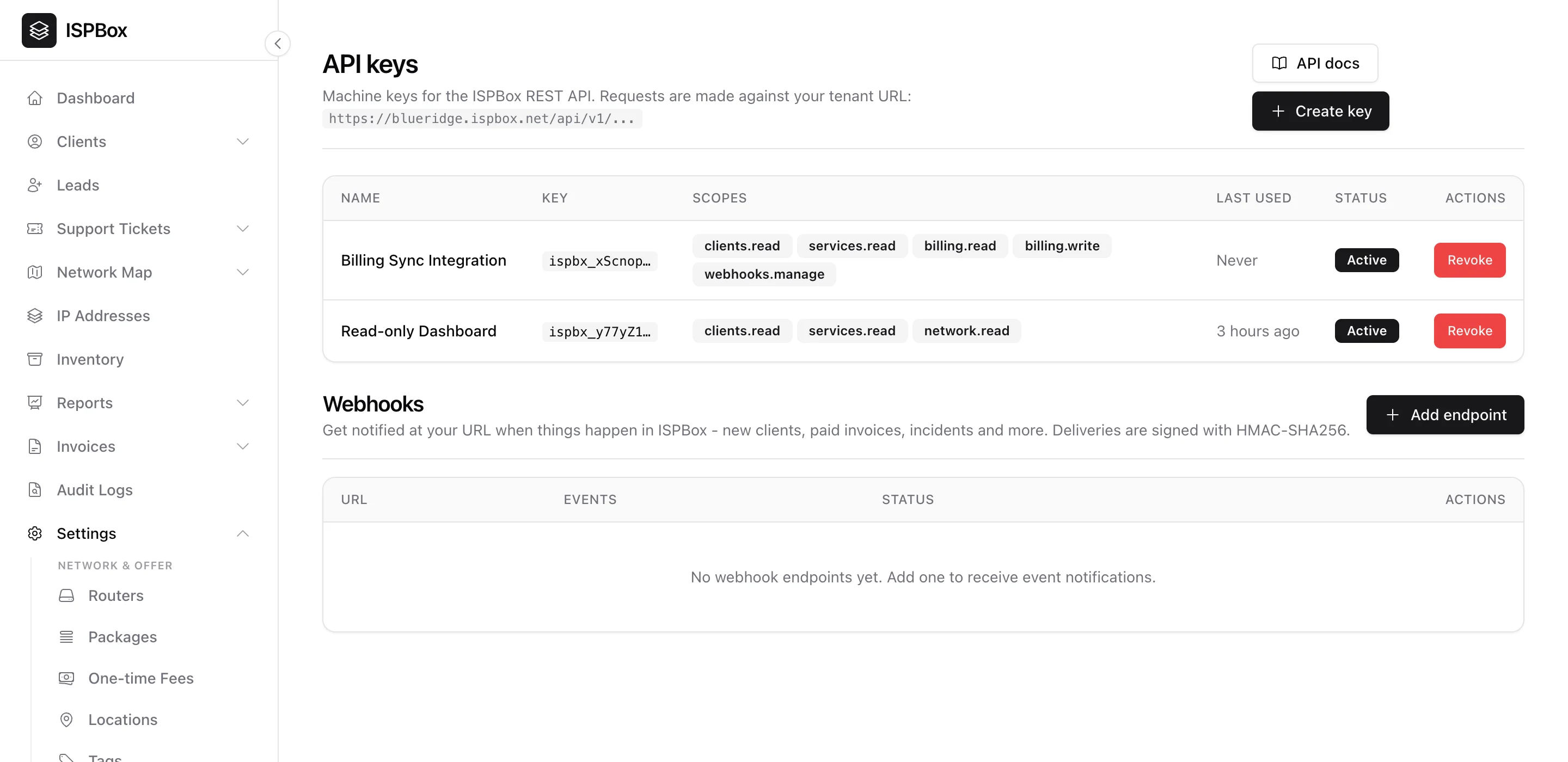
The REST API lets you integrate ISPBox with your own tools and automations - pull client and billing data, push updates, or drive a custom portal. You authenticate with machine API keys, restrict each key to just the scopes it needs, and can receive webhooks when things happen. Manage it under Settings > API (part of the API feature; needs settings manage).
1. Your API base URL
Requests are made against your own tenant URL - https://yourcompany.ispbox.net/api/v1/... - so every key is scoped to your data. The API docs button opens the full reference for the available endpoints.
2. Creating a key
Click Create key, give it a name (e.g. "Billing Sync Integration") and pick its scopes - fine-grained permissions like clients.read, billing.write or webhooks.manage. ISPBox shows the secret once; copy it into your integration then - it is stored only as a hash and can never be shown again. Each key lists its scopes, last-used time and status, and can be revoked instantly if it leaks.
Give every integration its own key with the narrowest scopes it needs - a read-only dashboard should not hold write keys.
3. TV subscriptions for a TV platform
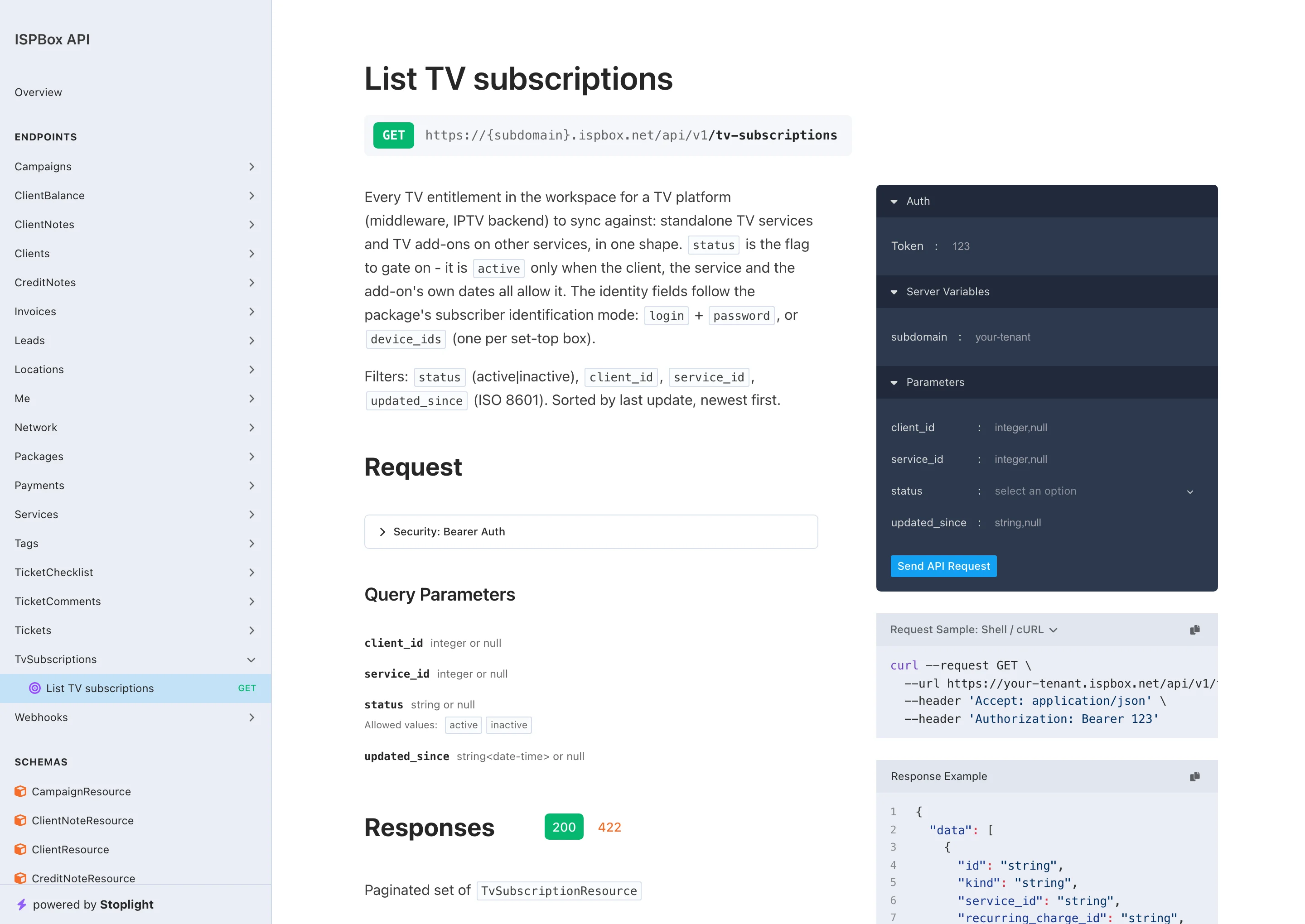
If you resell television, your middleware needs one question answered: who is entitled to watch right now? GET /api/v1/tv-subscriptions (scope services.read) answers it in a single shape, whether the customer bought TV as a service of its own or as an add-on on their internet service:
kind-servicefor a standalone TV service,addonfor a TV package sold on top of another service.status- the flag to gate on. It isactiveonly when the client, the service and (for an add-on) the add-on's own start and end dates all allow it. Do not try to reassemble that from the other fields.clientandpackage- id, number and name, plus the package's external id if it came from an import, so you can map it to your platform's own catalog.quantity- how many units, for example two set-top boxes on one add-on.auth_modeand the identity -loginandpasswordwhen the package identifies subscribers by credentials,device_idswhen it identifies them by device, nothing when the mode is none.identity_completetells you whether the operator has filled it in yet.updated_at, with aupdated_sincefilter, so a sync can ask only for what changed.status,client_idandservice_idfilter too, and the list is paginated newest first.
The regular services endpoints carry the same information for one service: GET returns a tv block, and POST / PATCH accept iptv_login, iptv_password and tv_device_ids according to the package's mode. How the modes and add-ons work in the panel is covered in TV and Add-on Services.
4. The Reseller API
Your resellers (agents) get their own API at https://yourcompany.ispbox.net/api/agent/v1/..., made for a reseller mobile app. An agent logs in with the same email and password as the web agent portal and gets a bearer token; every call then sees exactly what that agent sees in the portal - their own customers and their sub-agents customers, never another resellers book - and features you switched off in Settings > Agents answer 403 feature_disabled. The reference lives behind the Reseller API docs button in Settings > API; the guide is Reseller API.
5. Webhooks
Instead of polling, register a webhook endpoint and ISPBox will POST to your URL when events happen - a new client, a paid invoice, an opened incident and more. Deliveries are signed with HMAC-SHA256 so you can verify they really came from ISPBox. Add an endpoint, choose the events you care about, and you have a real-time feed of what is happening in your ISP.