TV and Add-on Services
TV, voice and other packages have no network side: no router, no credentials, nothing pushed to RADIUS. Sell them as a service of their own or as a catalog add-on on a customer's internet service, with the subscriber identity your TV platform needs.
Not everything you sell runs over a router. A TV pack, a voice line or an insurance plan is billed like any other subscription, but it has no speed to enforce, no PPPoE login and nothing to push to your network. ISPBox handles those as packages without a network side, and lets you sell them two ways: as a service of their own, or as an add-on on top of a customer's internet service.
This guide covers both, plus the subscriber identity a TV platform needs and how that platform reads who is entitled to what.
1. A package with no network side
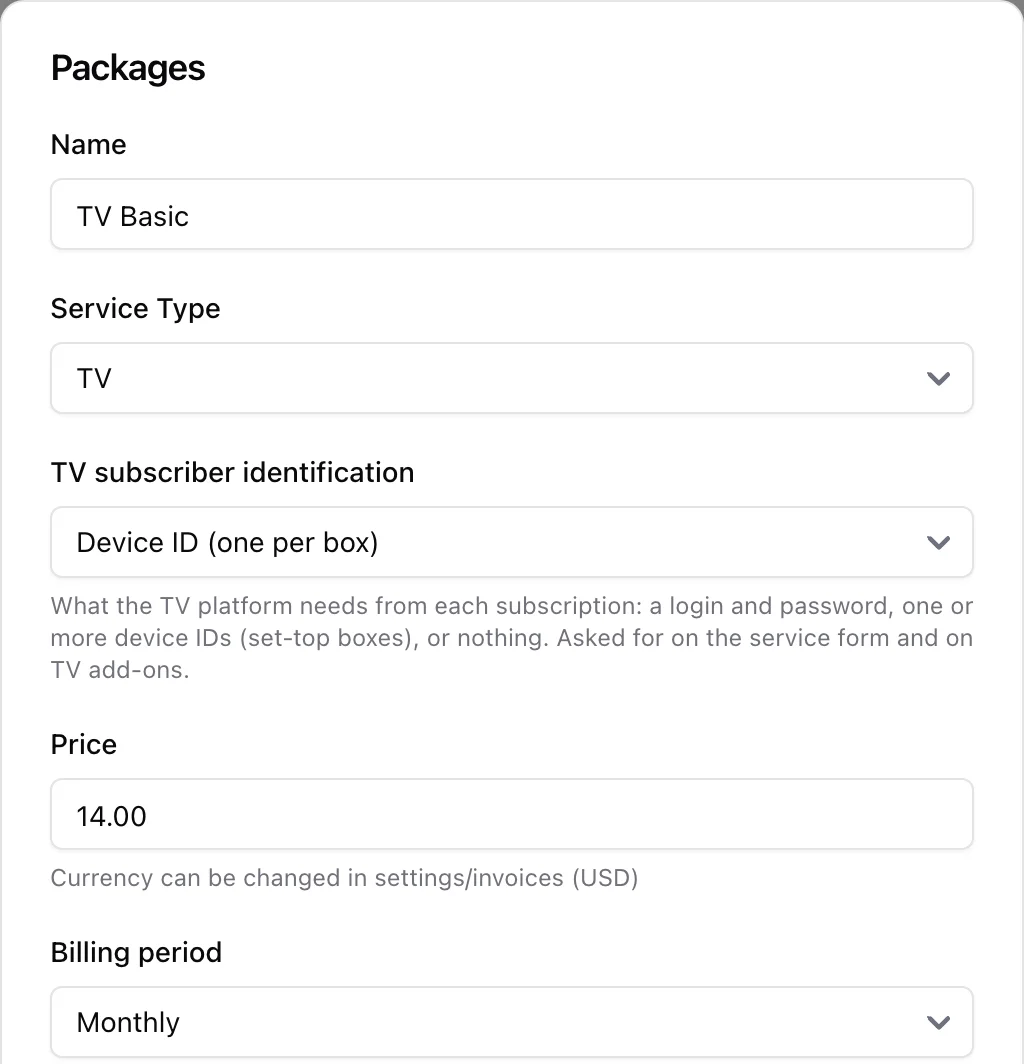
Every package has a Service Type: Internet, TV, Voice or Other. Internet is the only one with a network side. Pick TV, Voice or Other and the plan becomes a pure billing product:
- Speeds are irrelevant - leave download and upload at zero.
- A service on that package needs no router, even in a workspace that has routers.
- Nothing is written to RADIUS or pushed to MikroTik, and FreeRADIUS is not reloaded when you save.
Price, billing period, tax rate and locations work exactly as they do for an internet plan, so a yearly TV pack or a quarterly voice line is just a matter of picking the period.
2. How the TV platform identifies a subscriber
A TV package carries one more setting, TV subscriber identification, which appears as soon as you set Service Type to TV. It says what your TV platform (middleware, IPTV backend) needs in order to recognise a subscriber:
- Login and password - the classic IPTV account. This is the default, and it is what every existing TV package already had.
- Device ID (one per box) - the platform authenticates the set-top box itself. One customer can own several boxes, so you enter one ID per line.
- None - the platform gets its subscribers some other way and ISPBox only bills the pack.
The mode is a property of the package, not of the customer, so every subscription to that package is asked for the same thing. Change the mode later and new subscriptions follow it; moving a service to a package with a different mode drops the identity that no longer applies rather than keeping a stale login around.
3. Selling TV as its own service
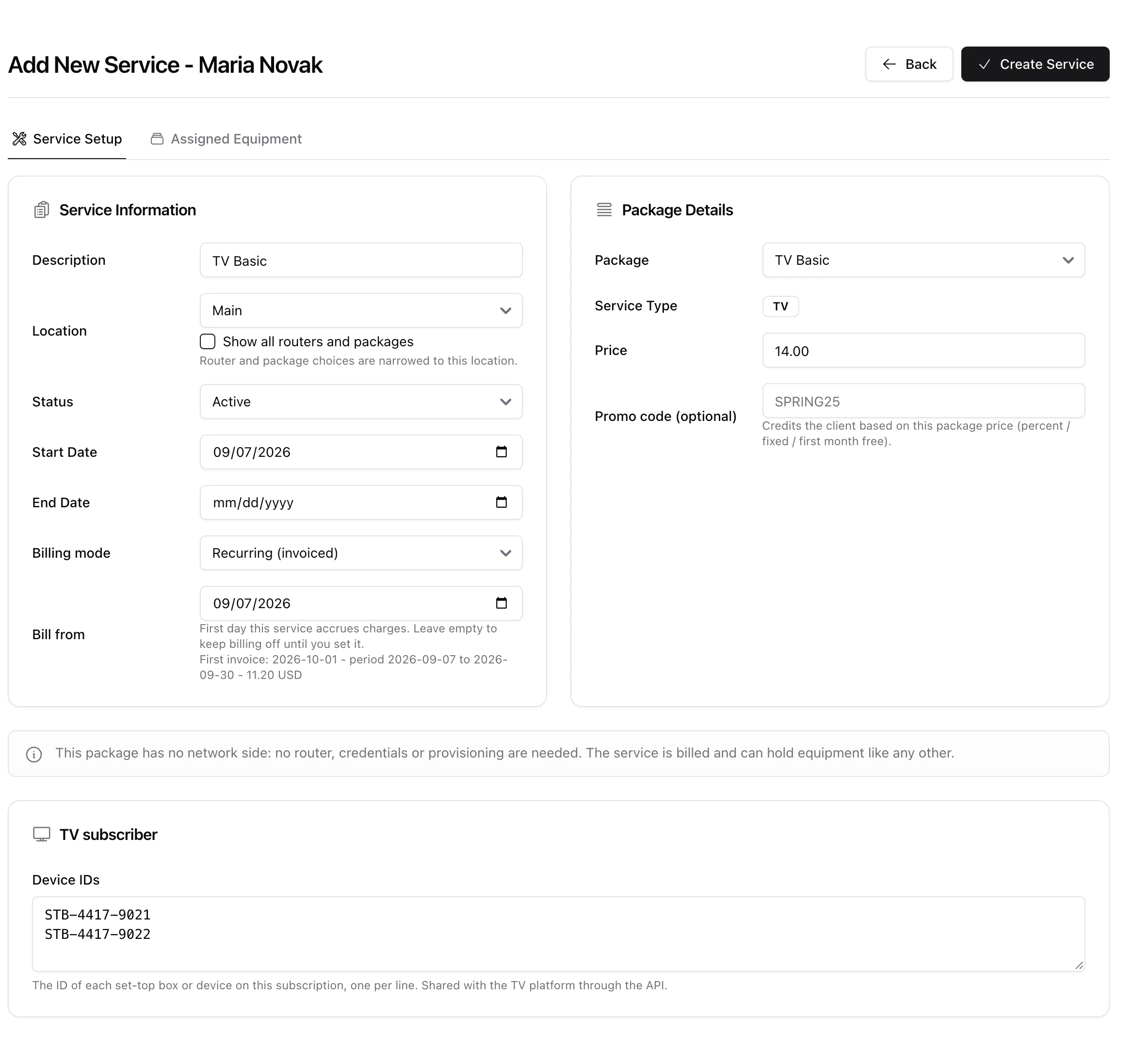
A customer who buys only television gets a normal service on a TV package. On the add and edit forms you will notice what is missing and what appears instead:
- The Router & Authorization and Authentication Details cards are gone, replaced by a one-line note: "This package has no network side: no router, credentials or provisioning are needed. The service is billed and can hold equipment like any other."
- A TV subscriber card asks for exactly what the package's mode needs - login and password, a Device IDs box, or nothing at all.
- The Activity tab disappears, because there is no session to show.
- Assigned Equipment stays: a set-top box is equipment like any CPE.
The amber Finish setup badge follows the mode too. A TV service in login-and-password mode is incomplete until both fields are filled; in device-ID mode until there is at least one ID; in "None" mode it is complete the moment it is created.
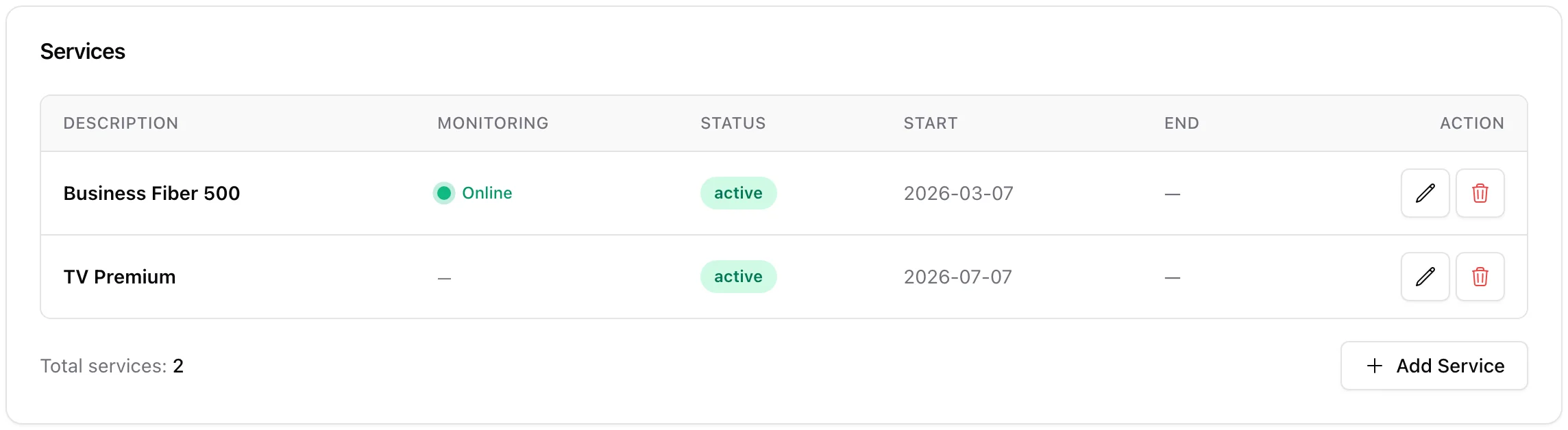
On the client's Services tab a TV service sits next to the internet one, with a dash in the Monitoring column because there is nothing to monitor.
4. Selling TV on top of an internet service
Most TV is sold to a customer who already has internet. Rather than a second service with its own invoice line and its own dates, add it as a catalog add-on on the internet service: open the service (Services > edit), find Recurring charges and click Add Recurring Charge.
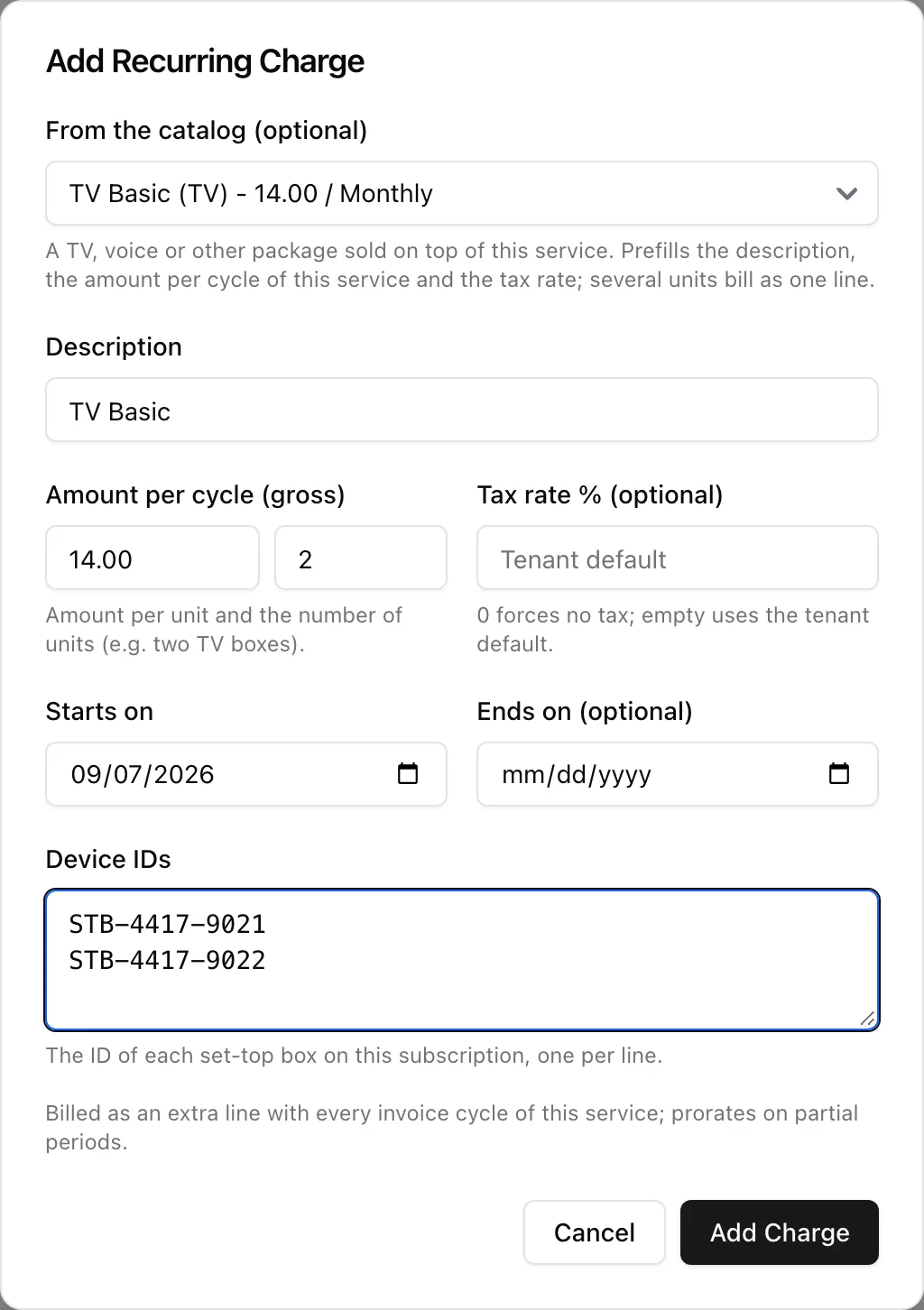
The first field, From the catalog (optional), lists your TV, voice and other packages. Internet packages are never offered - a second internet plan is a second service, not an add-on. Pick one and ISPBox prefills the rest:
- Description - the package name, editable.
- Amount per cycle - the package price converted to this service's cycle. A yearly TV pack at 120.00 added to a monthly internet service prefills at 10.00 per month; the same pack on a quarterly service prefills at 30.00. Edit it if you have agreed a different price.
- Quantity - the small box next to the amount. Two set-top boxes is quantity 2, and the amount stays the price per box.
- Tax rate - the package's own rate if it has one, otherwise your workspace default.
- Starts on and Ends on - the add-on rides the parent service's cycle and prorates on partial periods, exactly like a hand-typed recurring charge.
- The identity fields for a TV package - login and password, or a Device IDs box - following the package's identification mode.
Leave the catalog field on Custom charge and you get the old hand-typed recurring charge (router rental, static IP), unchanged.
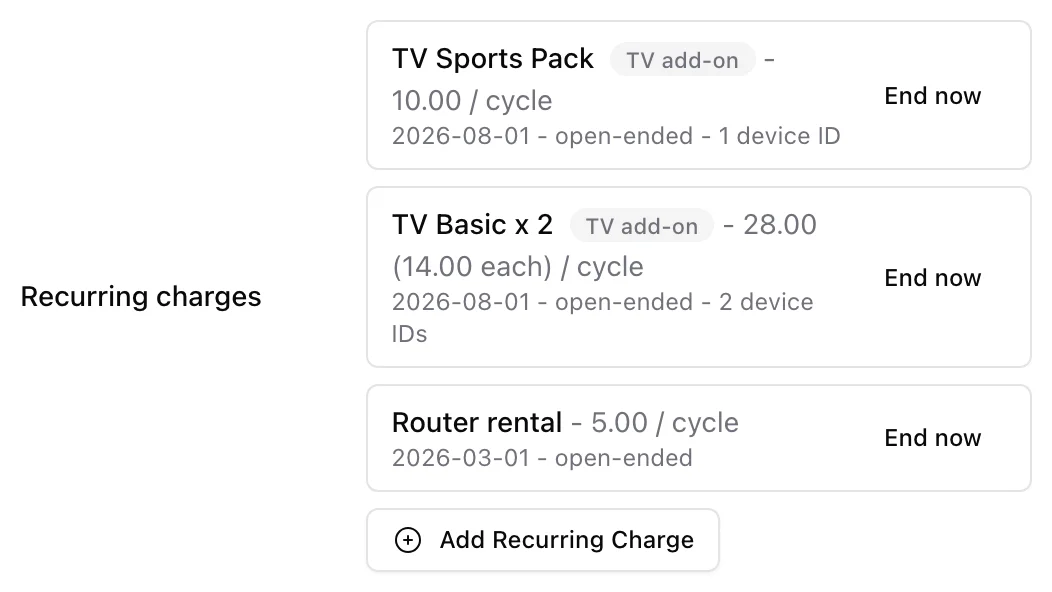
Back on the service, each add-on row shows the units, a TV add-on badge, the combined amount with the per-unit price in brackets, and a one-line identity summary ("2 device IDs", "Login: mnovak", "No device ID yet"). If a TV add-on is still missing its identity, the row says so in amber: "TV subscriber identity missing - the TV platform will not see this add-on as active." End now closes an add-on from today; ended rows stay visible, greyed out.
Two limits worth knowing:
- A package sold as an add-on cannot be deleted. ISPBox lists the customers whose services carry it and asks you to end those add-ons first, so nobody's invoice loses its price.
- Prepaid services take no add-ons. A prepaid service renews at the package price and nothing else, so recurring charges are not billed on it. The service edit form says so. Sell a TV pack to a prepaid customer as its own prepaid service instead.
5. What lands on the invoice
An add-on is one extra line on the same invoice as the service it hangs off - no second invoice, no second due date. Several units bill as a single line with the count in the description: TV Basic x 2 at 28.00. Partial periods prorate with the parent line, and the upcoming-invoice preview on the client's billing tab shows the add-on before the invoice is issued.
6. What the customer sees
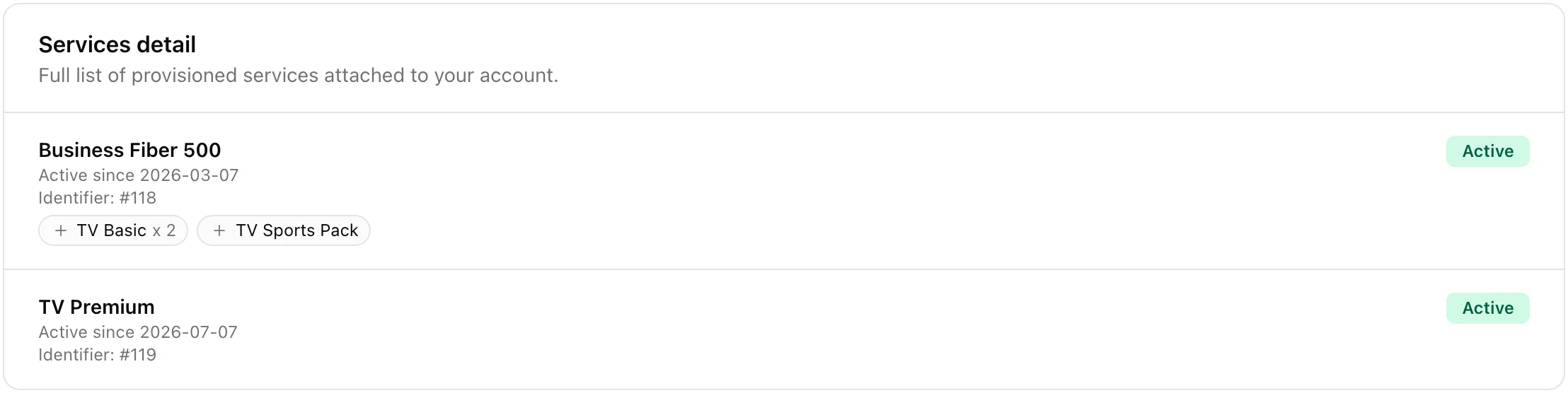
In the customer portal, active add-ons appear as small chips under the service they belong to - "TV Basic x 2", "TV Sports Pack". Ended add-ons and add-ons that have not started yet are not shown, and no identity (no login, no device ID) is ever exposed to the customer. A standalone TV service is listed as a service of its own.
7. Selling or renting the set-top box
The hardware and the subscription are separate decisions, and ISPBox has a different tool for each:
- You sell the box outright - charge it once. Add a one-time fee (or an ad-hoc pending charge) on the client's billing tab. It lands on the next invoice and never comes back.
- You rent the box - charge it every cycle. Add a plain recurring charge ("Set-top box rental") on the service, with no catalog package behind it. Ending the rental is one click when the customer returns the box.
- The TV pack itself - a catalog add-on when the customer also has internet from you, or a TV service of its own when they do not.
Keeping the pack and the box on separate lines means you can change the price of one without touching the other, and the customer can read their invoice.
8. Handing entitlements to the TV platform
ISPBox does not talk to your TV middleware itself - it publishes what the middleware needs and lets it sync. One endpoint, GET /api/v1/tv-subscriptions, lists every TV entitlement in the workspace in a single shape: standalone TV services and TV add-ons together, with the client, the package, the quantity, the identity and one status flag to gate on. See REST API & Webhooks for keys and scopes, and the live reference at ispbox.net/developers.