Probe Updates
Probes update themselves when you say so, only to releases signed by ISPBox, and step back to the previous version on their own if the new one does not come up.
A probe sits in your network for years, often on a MikroTik nobody wants to log in to. When a new version brings a fix, it should get there without anybody driving out or pasting container commands. Probes update themselves when you say so, only to releases signed by ISPBox, and step back to the previous version on their own if the new one does not come up.
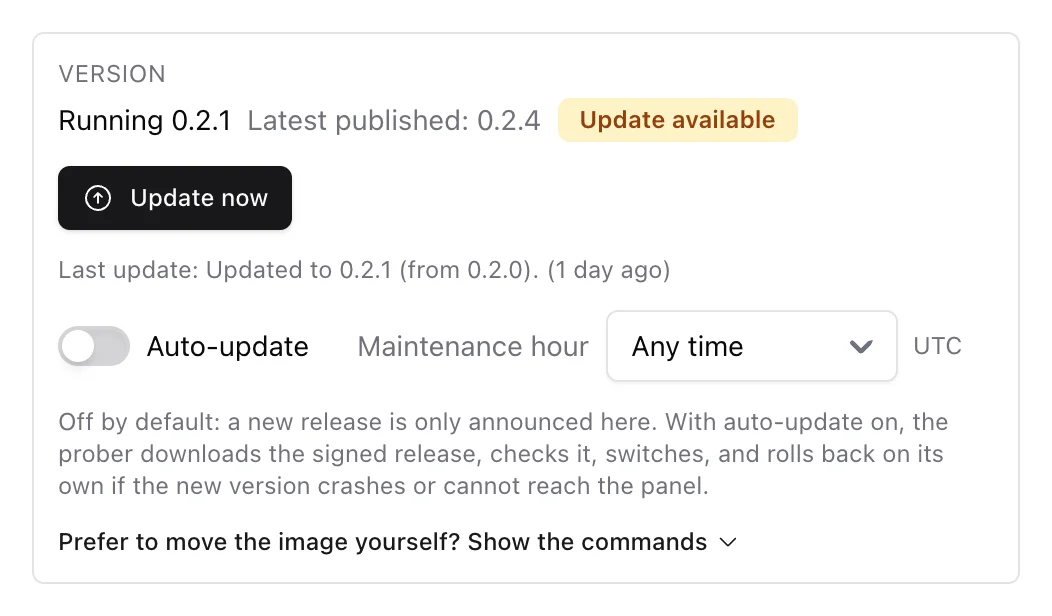
The Version row
Each probe card in Settings > Network monitoring > Probers has a Version row:
- the version it runs and the latest published release, with Update available when a newer one exists and Up to date when not,
- Update now when an update is available (and Cancel request while it is on its way). The probe picks the request up on its next configuration pull, within a minute; a request with no answer after 30 minutes is marked no answer yet,
- Auto-update, off by default: with it off, new releases are only announced; with it on, the probe moves to each new release by itself, at any time or only in the Maintenance hour you pick (in your workspace time zone),
- the last result, for example Updated to 0.2.1 (from 0.2.0) or Update to 0.2.2 failed and was rolled back: exited with code 1,
- for anyone who prefers to move the image by hand, Prefer to move the image yourself? Show the commands gives the exact Docker and RouterOS commands for the latest release, ready to copy.
What happens during an update
- The probe downloads the new version from the panel, checks its size and fingerprint against the release it was told about, and verifies ISPBox's signature.
- It restarts into the new version on trial. The launcher that starts it checks the signature again before running anything.
- The new version has three minutes to reach the panel and must keep running for one minute. If it crashes or cannot reach the panel, it is stopped, marked as bad, and the previous version runs again. The card says why.
- After a good trial the new version stays; the one before it is kept as the fallback, and anything older is deleted.
The probe keeps measuring and archiving throughout; a restart costs a few seconds, and nothing measured is lost.
Why it is safe
- Nothing unsigned ever runs. Releases are signed offline with keys that never touch the panel or any server. The part that checks signatures lives in the probe image and is never replaced by an update, so even a compromised download path cannot swap it out.
- No downgrades. A bad release is withdrawn and replaced by a newer one; a rollback happens only on the probe that could not run the new version.
- The site owner has the last word.
ISPBOX_SELF_UPDATE=offin the probe's environment makes it refuse every update, whatever the panel says, and the card then says that self-update is switched off on the box. On a MikroTik that is/container/envs/add list=ispbox key=ISPBOX_SELF_UPDATE value=offand a container restart.
Inside a MikroTik container
It works the same way. Count about 50 MB on the probe's disk for the downloaded versions, on top of the archive's own limit; the probe refuses a download when there is not enough free space and says so on the card. The downloaded version runs from the container's data mount, so it survives a container restart.
Good to know
- The setup checklist on the monitoring overview has a Probers up to date step.
- Updating needs the settings permission.
- A probe image from before 0.2.0 cannot update itself; its card says so and gives the commands to move it by hand once. After that it updates itself like any other.