Service Locations
Service areas are the backbone of how ISPBox organises customers, packages and reporting. Create locations, set a default, offer packages per area, and bulk-assign clients.
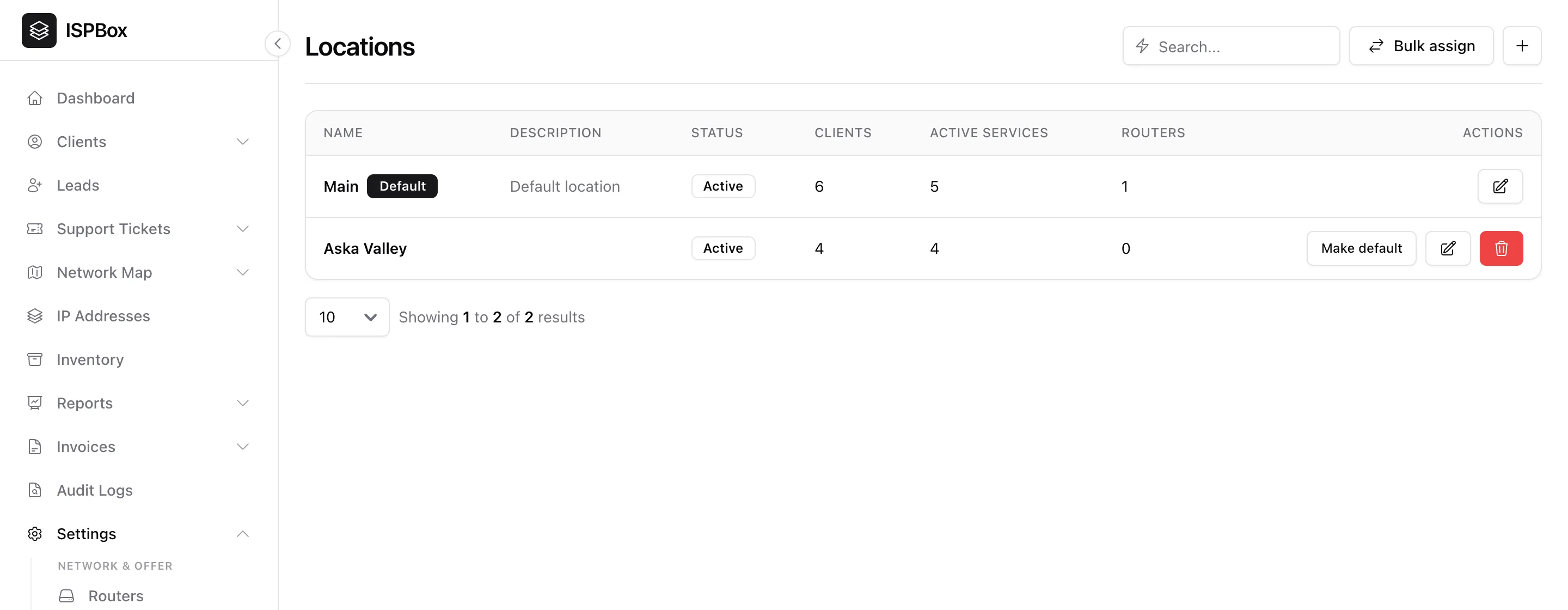
Locations are the service areas your ISP operates in - a town, a tower's coverage zone, a franchise region. They are the backbone of how ISPBox organises customers, packages and reporting, so it is worth setting them up early. Manage them under Settings > Locations (needs settings manage).
1. Why locations matter
A location ties several things together:
- Packages - each package can be offered at specific locations, so a customer only sees plans that are actually available where they live.
- Clients & services - every customer belongs to a location, which drives Revenue by Location reporting.
- Fees - a one-time fee can be global or scoped to one location.
2. The locations list
The table shows each location with its status and live counts of clients, active services and routers. One location is marked Default - new customers land there unless you choose otherwise. Add a location with the + button (name, description, active flag), and use Make default to change which one is primary.
3. Bulk assign
Moving many customers at once - say after a tower rename or a territory change - use Bulk assign to reassign a batch of clients to a different location in one action, instead of editing them one by one.