Unpaid customers: a payment page instead of a cut-off
Keep blocked and expired customers connected on a walled garden that shows a payment page and lets them reach only your portal and payment provider. PPPoE and DHCP, RouterOS commands included.
By default a customer who is blocked or whose plan has expired is cut off: the router rejects their login and they get no address at all. With Unpaid customers switched on for a router, they stay connected instead, but can reach only your customer portal and your payment provider. Any web page they open shows a page that says the service is paused, with a button to sign in and pay. As soon as they pay (or you unblock or renew them), normal service comes back on its own.
It also keeps the customer's equipment reachable. A PPPoE CPE that is cut off has no address you can reach; on the walled garden it has one.
It works on RADIUS routers: PPPoE on any router vendor, DHCP on MikroTik. API-mode routers keep the cut-off.
1. Switch it on for the router
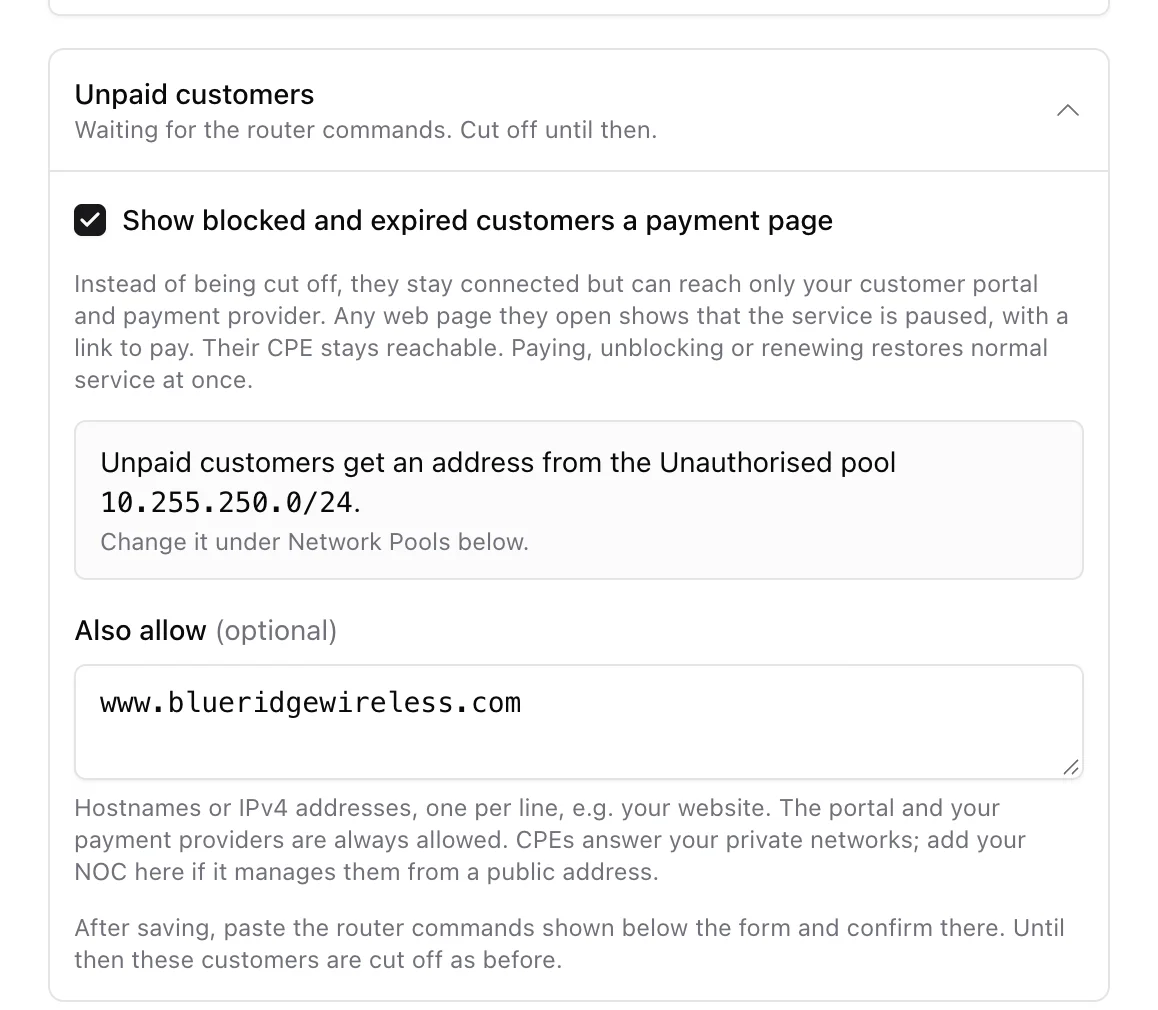
Open Settings > Routers, edit the router and open the Unpaid customers row. Tick Show blocked and expired customers a payment page.
- Unauthorised pool (PPPoE routers only): unpaid PPPoE customers get an address from the router's Unauthorised pool instead of their own, so the router can tell them apart. If the router has none yet, the row offers Add pool 10.255.250.0/24; to use another subnet, add a pool of type Unauthorised (unpaid customers) under Network Pools on the same page. A router has one, from /16 to /29, on a subnet no other pool of the router uses; the router takes its first address, and its DNS servers (if you fill them in) go to the unpaid customers.
- Also allow (optional): extra sites unpaid customers may open, one per line, for example your website. Exact hostnames or IPv4 addresses only; wildcards such as *.example.com do not work in a router address list. Your portal and the payment providers you have switched on are always allowed.
Press Update Router. Nothing changes for your customers yet: first the router needs the commands from the next step.
2. Paste the commands into the router
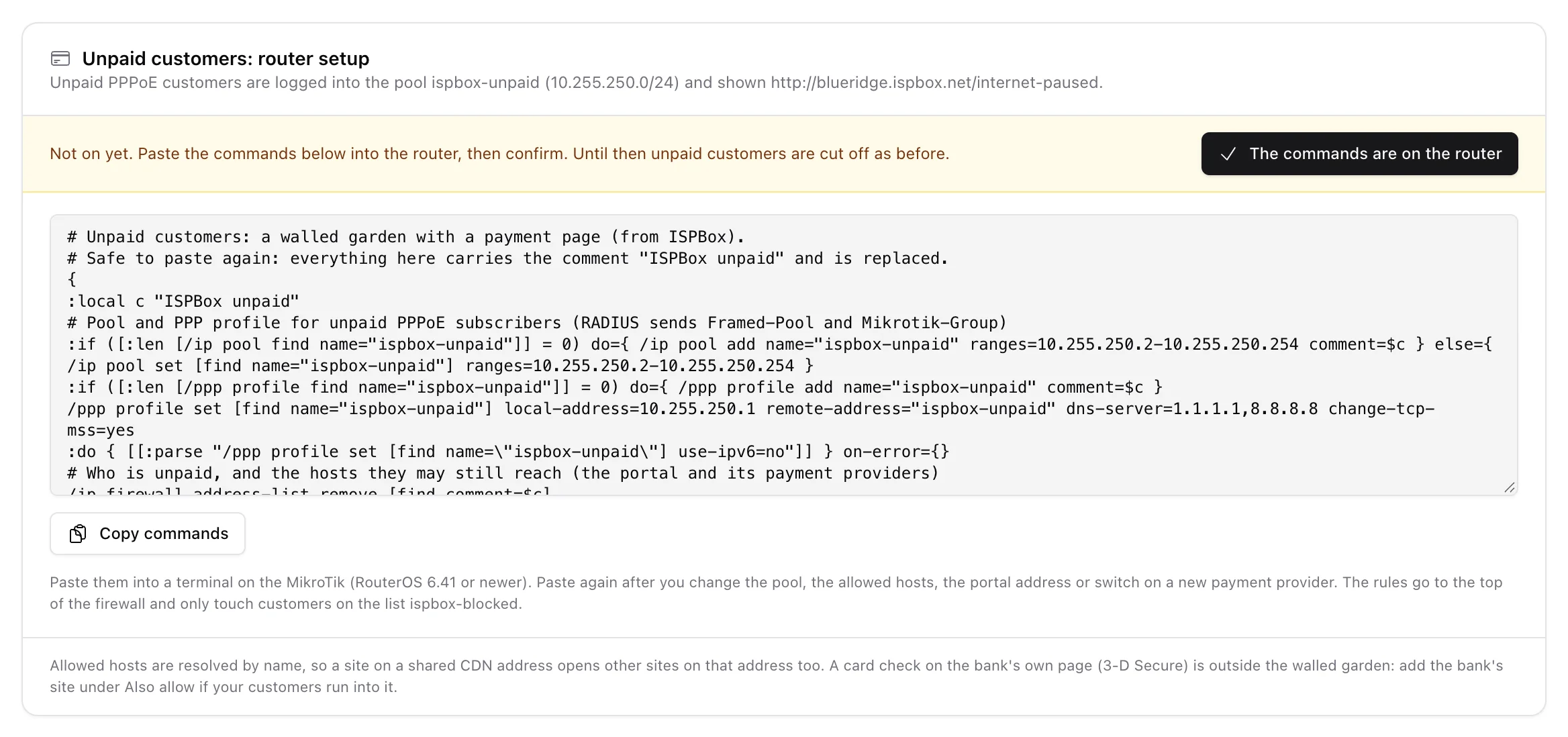
Below the form, the Unpaid customers: router setup card shows one block of RouterOS commands made for this router. Copy it and paste it into a terminal on the MikroTik (RouterOS 6.41 or newer, 6 and 7 both work). It creates:
- for PPPoE, the unpaid pool and a PPP profile for it, without IPv6,
- a list of the hosts unpaid customers may reach,
- a redirect that answers every plain web page with the payment page,
- firewall rules at the top of the firewall: the allowed hosts and DNS go through, the CPE still answers your private networks (management), everything else is refused.
The rules only touch customers on the address list ispbox-blocked, so everyone else is not affected. The block is safe to paste again: it replaces what it made before. Paste it again after you change the pool, the allowed hosts or your portal address, or after you switch on a new payment provider.
Once the commands are on the router, press The commands are on the router on the card. Only then does the panel move the router's blocked customers onto the walled garden; until then they are cut off as before. If you later change or delete the Unauthorised pool, or change the router vendor, the card asks for the commands and the confirmation again, and customers are cut off in between. Switching the option off sends everyone back to the cut-off.
Other router vendors get the facts their own configuration needs instead of RouterOS commands: the pool name ISPBox sends (Framed-Pool), its subnet, the list of hosts to allow and the page address. On accel-ppp the card shows the [ip-pool] lines to add. Do not hand out IPv6 to the unpaid pool, or unpaid customers can go round the rules.
3. What the customer sees
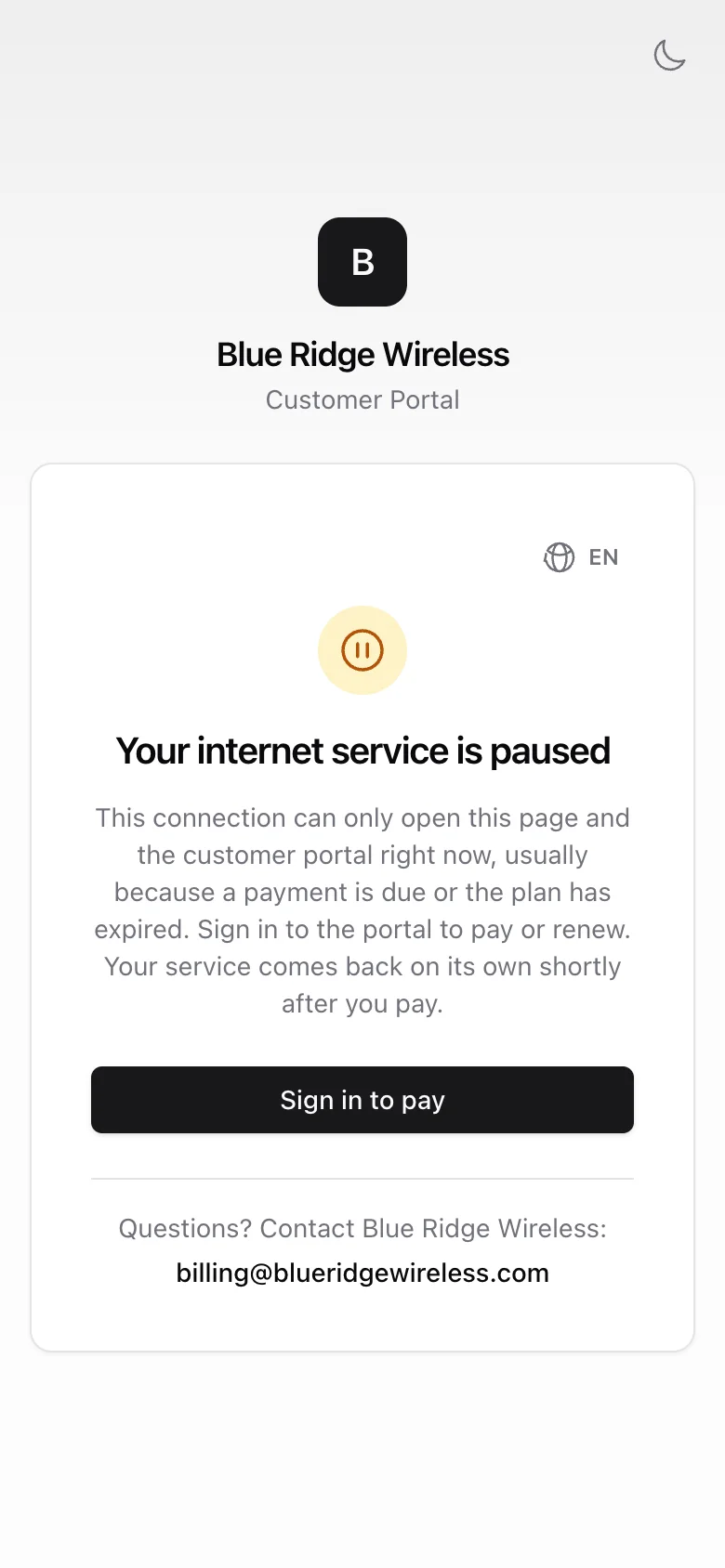
Every plain web page the customer opens goes to /internet-paused on your portal address. Phones and laptops usually notice this by themselves and pop up a "sign in to network" sheet with the page. It shows your company name and logo, says the service is paused, and has a Sign in to pay button that opens the customer portal, plus your phone number and email from Settings > Company. It is in the customer's language.
The page cannot tell who the customer is (it only sees your router's address), so it does not show amounts. The customer signs in to the portal to see and pay what they owe.
Who ends up on the walled garden
Everyone the panel would otherwise cut off on that router:
- clients blocked by hand,
- services blocked for non-payment by the dunning rules,
- prepaid services whose period has run out,
- seasonally paused services (vacation),
- on DHCP routers also suspended and cancelled services, which keep their address as before.
A PPPoE service that has ended or was never started (inactive or pending) stays cut off, and archived clients are not kept: their login is removed. Customers on a speed limit (non-payment or prepaid "reduce speed", data cap) are not affected; they keep their own address and the reduced speed.
How it works
- PPPoE: instead of rejecting the login, RADIUS accepts it into the unpaid pool (
Framed-Pool; on MikroTik also the PPP profile and the address list), with no address of the customer's own and no IPv6, at 1 Mbit/s. The session ends every hour and dials again. When you block someone who is online, the panel disconnects the session so it dials back into the pool; when they pay, it disconnects it again so it dials back onto their own address. Both need dynamic authorization (CoA) switched on for the router; without it the change waits for the next redial. - DHCP (MikroTik): the customer keeps their address and is moved to the blocked list on the live lease right away, at 1 Mbit/s. Paying takes them off the list in the same way.
Limits
- Allowed hosts are resolved by name into addresses. A site behind a shared CDN address (Cloudflare, for example) lets other sites on that address through too.
- Only plain web pages (http) are redirected. Secure pages (https) to other sites simply do not open; the phone's own check usually brings up the payment page anyway.
- If a customer's bank asks for a card check on its own site (3-D Secure), that site is outside the walled garden. Add it under Also allow if your customers run into it.
- A parked CPE answers connections from private and CGNAT addresses (10.x, 172.16-31.x, 192.168.x, 100.64.x). If you manage CPEs from a public address, add it under Also allow.
- To manage a customer's CPE independently of their payment state, give it a management address that does not depend on the PPPoE session (a static address or management VLAN) and store it on the service under Customer equipment.