CGNAT is one of those topics where two audiences arrive angry at each other. Subscribers search for it because port forwarding stopped working and a forum told them to blame their ISP. Operators live with it because IPv4 addresses cost real money and there are not enough of them. Both are right. This guide serves both - what CGNAT is, why it exists, the address ranges involved, and how ISPs size and run it without drowning in support tickets.
CGNAT in plain terms
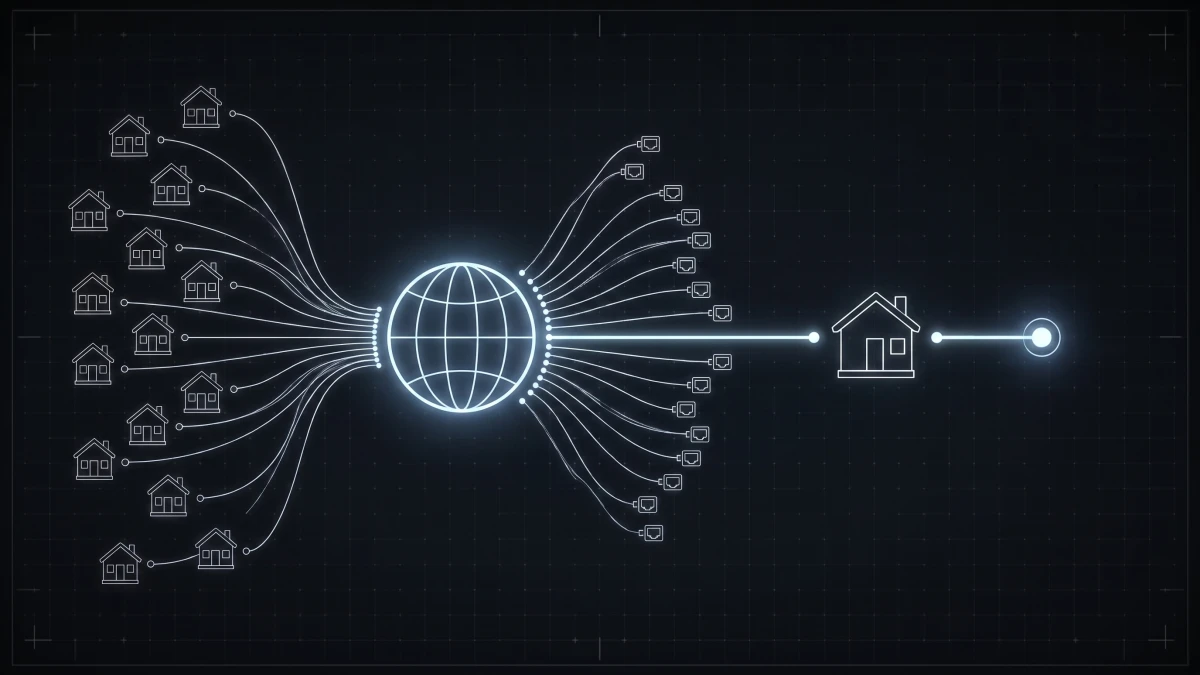
CGNAT (Carrier-Grade NAT) means your ISP shares one public IPv4 address among multiple customers. Your home router still does its own NAT - but instead of receiving a public address on its WAN port, it receives a private one from the carrier's pool, and a second layer of NAT inside the ISP's network translates it to a shared public address. Hence the other name: NAT444, three address realms between your laptop and the internet.
How do you know you are behind CGNAT? Compare your router's WAN address with what a "what is my IP" site reports. If the router shows an address between 100.64.0.0 and 100.127.255.255 (or a private range like 10.x.x.x) while the internet sees something else - that is CGNAT.
Why ISPs do this
Not stinginess - arithmetic. IPv4 ran out globally in the 2010s. New allocations are essentially unavailable; addresses trade on a secondary market at tens of dollars apiece, and a growing ISP needing a /22 (1,024 addresses) is looking at a serious capital cost just to hand each subscriber a number.
CGNAT lets an operator serve, say, 5,000 subscribers from a few hundred public addresses, deferring that cost. For a market where most traffic is outbound - browsing, streaming, video calls - the overwhelming majority of customers never notice. The honest long-term answer is IPv6 dual-stack alongside CGNAT, so modern traffic bypasses the NAT entirely; the CGNAT layer then only carries legacy IPv4.
The 100.64.0.0/10 range, and why you must use it
RFC 6598 reserved 100.64.0.0/10 - four million addresses from 100.64.0.0 to 100.127.255.255 - specifically for the carrier side of CGNAT. It exists because the alternatives break things:
- Using RFC 1918 space (10/8, 172.16/12, 192.168/16) risks colliding with subscribers' own LANs - a customer whose home network is 10.0.0.0/24 behind a carrier NAT also using 10.0.0.0/8 gets routing chaos.
- Using squatted public space (bogons, military ranges) works until the day it very much does not.
100.64.0.0/10 is guaranteed never to appear on a customer LAN or the public internet. Use it for the subscriber-facing side of the CGNAT layer; do not route it to the world.
Sizing: the math that decides your support load
The operational core of CGNAT is port allocation. Each public IPv4 address has roughly 64,000 usable ports. Give each subscriber a block - 1,000, 2,000, 4,000 ports - and the ratio falls out:
- 64,000 ports / 2,000 per subscriber ≈ 32 subscribers per public IP - a comfortable, low-complaint ratio
- 64,000 / 1,000 ≈ 64:1 - denser, still workable for residential traffic
- Beyond that, modern households (every phone, TV, and console holding dozens of connections) start exhausting their blocks, which surfaces as "the internet randomly drops" tickets
There is a second constraint people forget: logging. Law enforcement requests arrive as "who used address X port Y at time Z," so your CGNAT must log port-block assignments, and denser sharing means more churn to store. Deterministic port-block allocation keeps those logs sane.
We built a free CGNAT calculator that does this arithmetic for you - subscribers, ports per subscriber, public pool size - if you are planning a deployment or re-checking one that has grown.
The trade-offs, honestly
What breaks or degrades behind CGNAT: inbound connections (self-hosted servers, some cameras and NVRs, classic port forwarding), strict-NAT gaming scenarios, and the occasional shared-IP reputation problem (one abusive subscriber gets a public address rate-limited or blocked, neighbors feel it).
What an operator can do about it - and what separates well-run CGNAT from resented CGNAT:
- Sell the escape hatch. Offer a public static IPv4 as a paid add-on. Gamers, home-server folks, and remote workers with picky corporate VPNs happily pay $5-10/month, which also directly funds your address pool.
- Deploy IPv6 dual-stack. Most gaming networks, CDNs, and video platforms prefer IPv6 when available - traffic quietly sidesteps the NAT and your port pools breathe easier.
- Keep assignment coherent. Which subscriber is behind which pool, who bought a static, whose plan includes it - that is subscriber data, and it belongs where subscribers live.
Where this meets your ISP stack
CGNAT decisions are ultimately per-subscriber service attributes: this customer gets the CGNAT pool, that one pays for a static public IP, this business plan includes a /29. In ISPbox, that assignment rides the same rails as everything else - the RADIUS/PPPoE layer hands each session its address or pool at login (how RADIUS works), IPAM tracks which pools and statics exist and who holds them (see our IPAM tools comparison), and the static-IP add-on is just a line item on the plan that provisions itself. Sell the upgrade in the portal; the network applies it on the next session - or live, via CoA.
FAQ
What is CGNAT in simple terms? Your ISP shares one public IPv4 address among multiple customers, adding a second layer of NAT inside the carrier network. Outbound traffic works normally; unsolicited inbound connections (port forwarding, self-hosting) generally do not.
What is the CGNAT IP range? 100.64.0.0/10 (100.64.0.0 - 100.127.255.255), reserved by RFC 6598 exclusively for carrier-grade NAT. If your router's WAN address is in this range, you are behind CGNAT.
How many customers can share one public IP with CGNAT? It depends on ports per subscriber: at 2,000 ports each, about 32 subscribers per address; at 1,000 ports, about 64. Denser ratios save addresses but increase port-exhaustion complaints and logging churn.
How do I get out of CGNAT? Ask your ISP for a public (usually static) IPv4 address - commonly a small monthly add-on. If you are the ISP: offering exactly that add-on, provisioned automatically, turns a complaint into a revenue line.